System.out.print Flood Makes DrJava Hang

I just filed a bug report for a serious problem with DrJava that we need to look at. It’s possible to make DrJava hang, or at least slow it down so much that it appears unresponsive, by printing out very long lines without line breaks.

This is related to the problem that Jarred noticed a while back in the DrJava/HJ meeting. Back then, we considered limiting the number of lines stored in the Interactions and Console documents.

I think that’s still a worthwhile idea to pursue, but the problem is more subtle. The same amount of data spread out across several lines, with line breaks inserted, does not make DrJava hang.

This program is bad and causes DrJava to become unresponsive:

[cc_java]public class FloodDrJava {
public static void main(String[] args) {
for(int i=0; i<10000; ++i) { System.out.print("Hello "+i+" "); } } }[/cc_java] This program makes DrJava a bit slow, but it never makes it seem to hang: [cc lang="java"]public class FloodDrJava { public static void main(String[] args) { for(int i=0; i<10000; ++i) { System.out.println("Hello "+i+" "); } } }[/cc] Note that the only difference is [cci]println[/cci] instead of [cci]print[/cci] in line 4. We should actually be sending more characters because of the line breaks.

It may be Swing’s word wrapping or something like that. It really seems to have to do with the length of the lines, and appending at the very end of it. It’s unlikely that simply limiting the number of lines would make a difference here.

Share
Posted in DrJava | Leave a comment

Print This Post Print This Post  

Power_Let Was Wrong

I just did some experiments with Mint, because we ran into some problems with using HJ inside DrJava, and I wanted to make sure we didn’t have those problems. That’s when I noticed that our Power_Let example had been wrong. One of our undergrads had written it as x^0 = x, and no one had noticed…

Embarrassing… But at least the unstaged code was equally wrong, so the benchmark is valid ;)

Share
Posted in Mint, Ramblings | Leave a comment

Print This Post Print This Post  

Demo of DrJava/HJ

In today’s DrJava/Habanero meeting, Vincent, Jarred and I presented a demo of DrJava/HJ to Jack Dennis of MIT. Generally, we were quite pleased how we could just re-build Habanero Java and DrJava, and get a working version with the newest features from both packages.

We also noticed a few problems, of course. Perhaps most critically, when using the HJ compiler from within DrJava, the compiler uses the wrong directories when it generates class files for classes not in the default package.

I fixed part of that bug. The compiler adapter was ignoring the destination directory passed to the HJ compiler adapter. Now, if you create a project and set a build directory, the class files will end up in the right place. I have committed this fix into the DrJava trunk and also into the drjava-hj branch.

I didn’t fix the problem (a) if there is no build directory set, or (b) if we are not in project mode. This is something that I think should be fixed in the HJ compiler, because it doesn’t behave the same way javac behaves: If you invoke javac and don’t give it a destination directory, it will generate the class files in the same directory where the source files are. The HJ compiler generates the class files in the current directory.

Example:

[cci]javac src/HelloWorld.java[/cci] generates the class file src/HelloWorld.class.
[cci]hjc src/HelloWorld.hj[/cci] generates the class files HelloWorld.class, HelloWorld$0.class, and HelloWorld$Main.class. in the current directory, not in src.

I hope the HJ team will agree this is a change that should be made in the HJ compiler.

Furthermore, we noticed again that compiler error messages aren’t displayed in DrJava’s Compiler Output pane. We also noted that we cannot call methods directly from the Interactions pane: We have to use the [cci]hj[/cci] or [cci]run[/cci] commands, otherwise the class loader isn’t properly set up. We should at least come up with a better error message than throwing an exception:

[ccN]Welcome to DrJava. Working directory is /Users/mgricken/bin/hj.release/examples
> new FibFuture().fib(10)
java.lang.NullPointerException
at hj.lang.Runtime.here(Runtime.java:317)
at hj.lang.Object.(Object.java:44)
at FibFuture.(FibFuture.hj)[/ccN]

Interestingly, we can call Mint methods from the Interactions pane, we just cannot use the new syntax elements in Mint, brackets and escape.
[ccN]Welcome to DrJava. Working directory is /Users/mgricken/Documents/Research/Mint/java-mint/trunk/langtools/mintTest
> import edu.rice.cs.mint.runtime.*
> Code c = DrJavaInteractions.makeCodeInt(5)
> c
<| ((5)) |>
> Code cTo10 = DrJavaInteractions.spower(c, 10)
> cTo10
<| (((5)) * (((5)) * (((5)) * (((5)) * (((5)) * (((5)) * (((5)) * (((5)) * (((5)) * (((5)) * (1))))))))))) |>
> cTo10.run()
9765625[/ccN]

Share
Posted in DrJava, Mint | Leave a comment

Print This Post Print This Post  

New Mint Release: r15858

I made a new release of Mint and DrJava with Mint yesterday: September 29, 2010 (r15858). The latest release is, as always, available from the Mint implementation page:

We have added the [cci lang=”java”]edu.rice.cs.mint.runtime.CodeFree[/cci] interface and the [cci lang=”java”]edu.rice.cs.mint.runtime.CheckedExceptionInCode[/cci] exception class.

The [cci lang=”java”]CodeFree[/cci] interface provides a different, more transparent way of specifying separable classes that can be used for non-local assignments and CSP. When a class is declared to implement the [cci lang=”java”]CodeFree[/cci] interface, the class is guaranteed to be code-free, provided a number of static checks are passed:

  1. All field types and method return types are code-free, either using the old definition that required the types to be [cci lang=”java”]final[/cci], or by themselves implementing the [cci lang=”java”]CodeFree[/cci] interface.
  2. The same applies to all subtypes of types implementing the [cci lang=”java”]CodeFree[/cci] interface. It is an error to extend a class declared to be code-free using the [cci lang=”java”]CodeFree[/cci] interface and then to add a field containing or a method returning code.

This new rule makes it simpler to work with non-primitive types since the classes do not have to be [cci lang=”java”]final[/cci] anymore. In the past, lifting had to be done instead of using CSP; that is not necessary anymore. Consider the old code with the required [cci lang=”java”]lift[/cci] method and its application instead of straight-forward CSP:

[cc lang=”java”]public abstract class Value {
public separable int intValue() { throw new WrongTypeException(); }
public separable boolean booleanValue() { throw new WrongTypeException(); }
public separable abstract boolean valueEq(Value other);
public separable abstract Code lift();
}

public class IntValue extends Value {
private int _data;
// …
public separable Code lift() {
final int lfData = _data; // hack to help the Mint compiler
return <| (Value) new IntValue(lfData) |>;
}
}

public class BooleanValue extends Value {
private boolean _data;
// …
public separable Code lift() {
final boolean lfData = _data; // hack to help the Mint compiler
return <| (Value) new BooleanValue(lfData) |>;
}
}

// …

public class Val implements Exp {
private Code _value;
public Val(final Value value) {
_value = value.lift(); // lifting here
}
// …
}[/cc]
and the new code that doesn’t require the [cci lang=”java”]lift[/cci] method anymore:

[cc lang=”java”]public abstract class Value implements CodeFree, Serializable {
public separable int intValue() { throw new WrongTypeException(); }
public separable boolean booleanValue() { throw new WrongTypeException(); }
public separable abstract boolean valueEq(Value other);
}

public class IntValue extends Value {
private int _data;
// …
}

public class BooleanValue extends Value {
private boolean _data;
// …
}

// …

public class Val implements Exp {
private Code _value;
public Val(final Value value) {
_value = <| value |>; // straight-forward CSP
}
// …
}
[/cc]

Please note that a class used in CSP still needs to be serializable if the code object it is used in is to be saved using [cci lang=”java”]MintSerializer.save[/cci]. That means that whenever you implement [cci lang=”java”]CodeFree[/cci], you should consider also implementing the [cci lang=”java”]java.io.Serializable[/cci] interface.

The second change involves the way checked exceptions are thrown inside a code object. In the past, checked exceptions were not allowed, because the [cci lang=”java”]Code.run()[/cci] method did not have a [cci lang=”java”]throws Throwable[/cci] clause.

We still didn’t add such a clause, because it would essentially require a try-catch construct around every call to [cci lang=”java”]Code.run()[/cci]. Instead, checked exceptions are caught and rethrown wrapped in a [cci lang=”java”]edu.rice.cs.mint.runtime.CheckedExceptionInCode[/cci] unchecked exception. Here is an example:

[cc lang=”java”]public static separable void m() throws IOException {
new File(“/this/is/a/bad/path”).createNewFile(); // throws IOException
}

// …

SafeCode c = <| { m(); } |>;
try {
c.run();
}
catch(CheckedExceptionInCode ce) {
Throwable cause = ce.getCause();
// …
}[/cc]

We also improved error checking for calls to separable methods and fixed a bug that required [cci lang=”java”]SafeCode[/cci] in too many places.

The version of DrJava with Mint is based on the current trunk (and therefore is newer than the updated stable release of DrJava that was recently made available).

(Re-posted from The Java Mint Blog.)

Share
Posted in Mint | Leave a comment

Print This Post Print This Post  

Presentations: Agile and Efficient Domain-Specific Languages using Multi-stage Programming in Java Mint (Practice Talk 2)

Agile and Efficient Domain-Specific Languages using Multi-stage
Programming in Java Mint

(PowerPoint, PDF, view embedded)

Mathias Ricken, Edwin Westbrook and Walid Taha

Where: Rice University Computer Science Department, Habanero Research Group Meeting
When: September 24, 2010

Domain-specific languages (DSLs) are a powerful productivity tool
because they allow domain experts, who are not necessarily programming
experts, to quickly develop programs. DSL implementations have unique
constraints for programming languages because they must be efficient,
in order to ensure high productivity, but they must also be agile, in
order to meet the rapidly changing demands of their domains. In this
tutorial we show how multi-stage programming (MSP) can be used to
build staged interpreters, which combine the agility of interpreters
with the efficiency of compilers. The tutorial is conducted in Java
Mint, an multi-stage Java based on recent work incorporating MSP into
imperative object-oriented languages. In the first half of the
tutorial, we introduce MSP by demonstrating how to write a staged
interpreter for a number of basic language constructs, such as
recursive functions, conditionals, and let expressions. In the second
half, we extend our staged interpreter to take advantage of several
well-known compiler optimizations, including type inference, constant
folding, and static parallel loop scheduling. We highlight the
opportunities afforded by using MSP with object-oriented design to
quickly create efficient DSL implementations.

It is an early practice talk for a tutorial to be held at GPCE’10.

Share
Posted in Publications | Leave a comment

Print This Post Print This Post  

Presentations: Agile and Efficient Domain-Specific Languages using Multi-stage Programming in Java Mint (Practice Talk)

Agile and Efficient Domain-Specific Languages using Multi-stage
Programming in Java Mint

(PowerPoint, PDF, view embedded)

Video recording available on vimeo.

Mathias Ricken, Edwin Westbrook and Walid Taha

Where: Rice University Computer Science Department, COMP 600 Graduate Seminar
When: September 20, 2010

Domain-specific languages (DSLs) are a powerful productivity tool
because they allow domain experts, who are not necessarily programming
experts, to quickly develop programs. DSL implementations have unique
constraints for programming languages because they must be efficient,
in order to ensure high productivity, but they must also be agile, in
order to meet the rapidly changing demands of their domains. In this
tutorial we show how multi-stage programming (MSP) can be used to
build staged interpreters, which combine the agility of interpreters
with the efficiency of compilers. The tutorial is conducted in Java
Mint, an multi-stage Java based on recent work incorporating MSP into
imperative object-oriented languages. In the first half of the
tutorial, we introduce MSP by demonstrating how to write a staged
interpreter for a number of basic language constructs, such as
recursive functions, conditionals, and let expressions. In the second
half, we extend our staged interpreter to take advantage of several
well-known compiler optimizations, including type inference, constant
folding, and static parallel loop scheduling. We highlight the
opportunities afforded by using MSP with object-oriented design to
quickly create efficient DSL implementations.

It is an early practice talk for a tutorial to be held at GPCE’10.

Share
Posted in Publications | Leave a comment

Print This Post Print This Post  

Rear-Ended

A friend and I got rear-ended tonight. Not our fault, but our backs and necks hurt, and the car is probably totaled.

I think the moral of the story is: You could be killed any time, so if someone offers you ice cream, you should accept the offer.

Update

Damn subhumans driving without insurance should be shot like the dangerous stray animals that they are.

Share
Posted in Uncategorized | Leave a comment

Print This Post Print This Post  

Silent Hudson Failure

Our Hudson server failed, because it couldn’t connect to the web server. However, I didn’t find out about it just now, because it also failed to connect to the SMTP server to tell me about it.

It’s really not a major issue. There seems to have been an NFS problem in the department network; I ran into it on my work desktop on Friday and rebooted. I suspect it’s the same issue here, and rebooting the Hudson server will probably solve the problem.

I didn’t find out about it, though, because there’s some kind of SSL certificate problem that prevented Hudson from accessing the SMTP server using SSL. This is a bit more serious. I tried to figure out how to add the certificate to the JRE key store, but gave up when i received the nice informative output

keytool error: java.lang.NullPointerException

I just ended up disabling SSL for SMTP. I’m surprised that it still works, but it does.

Share
Posted in Ramblings | Leave a comment

Print This Post Print This Post  

Problem in DrJava Applet Viewer

I just read the following thumbs-down review for DrJava on the SourceForge website:

There is a severe defect. The HelloWorld Java applet (http://download.oracle.com/javase/tutorial/deployment/applet/getStarted.html) crashes in the Applet Viewer invoked by DrJava. Still it runs smootly both in IE8 and FireFox. It also runs OK in the Applet Viewer started separately, without DrJava.

There really is a problem. The HelloWorld applet throws an exception.

[cc]Welcome to DrJava. Working directory is D:\Documents\Dev\Java
> run HelloWorld
Exception in thread “AWT-EventQueue-0″ java.lang.Error: Cannot call invokeAndWait from the event dispatcher thread
at java.awt.EventQueue.invokeAndWait(Unknown Source)
at javax.swing.SwingUtilities.invokeAndWait(Unknown Source)
at HelloWorld.init(HelloWorld.java:10)[/cc]

The problem is that we already execute the [cc_java inline=”true”]Applet.init()[/cc_java] method in the event thread, and calling [cc_java inline=”true”]invokeAndWait[/cc_java] in the event thread would cause a deadlock.

[cc_java]import javax.swing.JApplet;
import javax.swing.SwingUtilities;
import javax.swing.JLabel;

public class HelloWorld extends JApplet {
//Called when this applet is loaded into the browser.
public void init() {
//Execute a job on the event-dispatching thread; creating this applet’s GUI.
try {
SwingUtilities.invokeAndWait(new Runnable() {
public void run() {
JLabel lbl = new JLabel(“Hello World”);
add(lbl);
}
});
} catch (Exception e) {
System.err.println(“createGUI didn’t complete successfully”);
}
}
}[/cc_java]

Arguably, this applet is implemented in a strange way. [cc_java inline=”true”]invokeAndWait[/cc_java] should run the code immediately if it is already running in the event thread. I’ll see what I can do to fix this.

I would have preferred it if the reviewer had just filed a bug report and given us the opportunity to fix this first.

Share
Posted in DrJava, Ramblings | Leave a comment

Print This Post Print This Post  

New Mint Release: r15772

We have just made a new release of Mint and DrJava with Mint: September 16, 2010 (r15772). The latest release is, as always, available from the Mint implementation page:

We have added the [cci lang=”java”]edu.rice.cs.mint.runtime.MintSerializer[/cci] class to it that can write code object, including CSP data, to a jar file (or whatever stream you like), and then restore it again. Here is a very simple example:

[cc lang=”java”]Code c = <|123|>;
File f = new File(dir, “IntegerCode1.jar”);
MintSerializer.save(c, “IntegerCode1”, f);

Integer s = MintSerializer.load(f);
System.out.println(s);[/cc]

The version of DrJava with Mint is based on the current trunk (and not on updated stable release of DrJava that was made available this week).

(Re-posted from The Java Mint Blog.)

Share
Posted in Mint | Leave a comment

Print This Post Print This Post  

90 Days

90 days and two re-send requests, and the Texas DPS still hasn’t managed to get me my drivers license.

I think I also have a dysnumeric mail man, though. So maybe the DPS mailed it, but someone else received it.

Update

The Public Information Office of the Texas DPS actually read my halfhearted complaint and got in touch with me. I had already been talking to someone in the Drivers License Office for weeks, so I’m grateful for this gesture. Maybe this get me my license a bit faster.

Update

I finally received my drivers license. Thanks for everyone at the Texas DPS who helped tracking it down.

Renewed Texas Drivers License, Received after 91 Days

Renewed Texas Drivers License, Received after 91 Days

Share
Posted in Pictures, Ramblings | Leave a comment

Print This Post Print This Post  

24 Hour Fitness “Personal Fitness Consultation”

I signed up for a membership at 24 Hour Fitness. The free neighborhood pools in Houston are closed now that the summer is over, and I wanted to continue being able to swim. Two of the gyms nearby have swimming pools, and when I found out they also had a sauna, I just had to try it out.

Today was my free “personal fitness consultation”. I expected to be shown around in the gym, maybe to have a few of the machines demonstrated to me, depending on my fitness goals (which really are just to have fun and stay active and healthy). Nope, it was a high pressure sales pitch to buy personal training.

According to my consultant, there are five components to being healthy:

  1. Nutrition, and I eat healthy
  2. Cardio, which I already do
  3. Strength, which I don’t really do, so he wanted to focus on that

So far, so good. The last two where the kicker, though:

  1. Instruction, which I could pay for… from him, right here and right now!
  2. Supplements, which I could also buy… right here and right now!

I’m sure I could learn a lot, but I just don’t believe that I can’t be healthy without his instructions and supplements. I dove in the swimming pool instead.

Share
Posted in Ramblings | Leave a comment

Print This Post Print This Post  

COMP 410 Customer Meeting

I had my first meeting as “customer” with this semester’s COMP 410 class today. It was a lot of fun for me. From the class website:

COMP 410 is a unique experience in learning fundamental principles of software engineering. As a pure “discovery-process” learning environment, students are placed into a realistic software development scenario and are given the freedom to explore and develop their own interpretations of the guiding ideas and skills behind successful software development.

I requested a system that represents a marriage of technology and art, a way to turn real time data into collaborative, interactive graphical displays.

Share
Posted in Teaching | 2 Comments

Print This Post Print This Post  

New DrJava Stable Release: drjava-stable-20100913-r5387

We have made an updated stable version available: drjava-stable-20100913-r5387. You can download it from the DrJava website or from SourceForge.

Available for download at http://drjava.org .

DrJava is a lightweight programming environment for Java designed to
foster test-driven software development. It includes an intelligent
program editor, an interactions pane for evaluating program text, a
source level debugger, and a unit testing tool.

This stable release represents an update to the previous stable
release, providing a bug fix for three issues that proved to be
inconvenient for users.

Note: Java 1.4 compatibility has been dropped. To use DrJava, you will
need Java 5 or newer.

Bug fixes since last stable release:

  • The “Smart Run” feature properly runs a main method in a class
    first, and it does not attempt to call a zero-parameter constructor
    of a class if it does not exist.
  • The Apple Java 6 Developer Preview 6 (javase6release1dp6.dmg) is
    excluded as Java 6 JDK, as it does not contain a Java 6-compatible
    compiler. This caused NullPointerExceptions in rare cases.
  • On Linux systems with Java 5 or older, Metal is the default
    look-and-feel again. The system look-and-feel turned out to be
    awful.

Note: These patches were applied to the previous stable release
in a branch. Even though this release has revision 5387, other
features, like Habanero Java integration, are not yet included.
They will be contained in an upcoming development release.

Share
Posted in DrJava | Leave a comment

Print This Post Print This Post  

Is iConcept Press a Vanity Press?

I received an email from iConcept Press this morning:

Based on your paper: Test-first Java concurrency for the classroom (2010), we would like to invite you to submit a chapter to our book project under the working title: Java in Academic and Research. The editor of this book is [redacted].

We are especially interested in the motivation of your problem and why you model your problem in such way. We would like you to expand the paper and contribute to our book. Please note that we are not asking to republish the mentioned paper.

All our books are published as hard copy with ISBN and as open access. Each corresponding author will receive one copy of the book free of charge. The publishing fee (for each paper) is USD$38/page for the first 16 pages and USD$18/page thereafter. Each chapter normally has 16 – 25 pages.

About $600 for a book chapter, that sounds like a vanity press to me. iConcept Press claims to do peer review, but I don’t exactly trust that claim:

Is it that I simply pay money and my article can be printed in your book?

No. We go through several review processes. If your article is not up to our standards or is not what we require, we will not publish your article, even if you pay us.

Who are the reviewers? Who are the other authors who contribute? The editor of the book was given, but he seems to be rather unknown. The books that have been published by iConcept Press don’t seem to be complete garbage, judging by a quick glance at bioinformatics material, for example, from an outsider’s perspective, but I’m in no position to really make that determination.

I think if it weren’t for the publishing fee, I might roll with it. But I’m not going to spend $600 to have something published that might end up being a diamond in a turd.

Share
Posted in Ramblings | 10 Comments

Print This Post Print This Post  

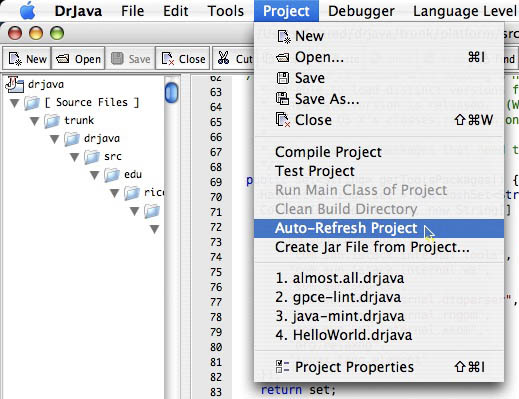
Auto-Refresh Project: A Forgotten DrJava Feature

I just used a DrJava feature that I pretty much forgot about: Auto-Refresh Project. It scans the project root for new source files and adds them to the project. It works really well.

DrJava: Auto-Refresh Project Feature

The feature was implemented under my supervision. How come I can’t find any reference to it in the DrJava documentation?

Share
Posted in DrJava | Leave a comment

Print This Post Print This Post  

Having a Good Time

I attended the wedding of two of my friends in San Antonio this past weekend. I had a good time.

At the wedding of two of my friends, September 3, 2010.

Really. This is what me having a good time looks like. And that’s not jealousy on my face.

Share
Posted in Pictures | Leave a comment

Print This Post Print This Post  

DrJava/HJ Born

I have been able to merge Vincent’s and Jarred’s changes into the DrJava trunk to create a version of DrJava/HJ that can compile and run Habanero Java (HJ) programs. Most importantly, there is a version where both HJ and DrJava are in one 20 MB file. Please try it out: drjava-hj.jar

DrJava/HJ Logo

I have identified a change that needs to be made to the HJ Runtime in order to integrate it with DrJava. It is small and does not affect the performance or execution of HJ when it is run independently from DrJava.

The class loader that HJ uses to find classes it is running has to be changed. DrJava has a dynamic class path, depending on the files that are open, the configuration of the project, and the global preferences. If HJ is to find the classes that DrJava has compiled, HJ needs to use the class loader DrJava provides. DrJava passes this class loader to its runtimes as “thread context class loader”, which “provides a way to pass an ‘intended classloader parent’ into a framework without explicitly needing to pass it.” [source]

The thread context class loader can be queried using [cci lang=”java”]Thread.currentThread().getContextClassLoader()[/cci] and needs to be passed wherever a user class is loaded using [cci lang=”java”]Class.forName[/cci]. I found four such calls to [cci lang=”java”]Class.forName[/cci] in the HJ runtime. The nice thing about the thread context class loaders is that, unless they are set, they default to the system class loader. As a result, unless DrJava (or some other application using the HJ runtime) set the thread context class loader to tell HJ “use this class loader to find my classes”, everything is just as before.

Share
Posted in DrJava, Research | 1 Comment

Print This Post Print This Post  

Mint on the Mac

I guess I’m a bit behind the technology curve. The MacBook that I’m using as one of my development machines is one of the original white Intel MacBooks with a Core Duo CPU (not Core 2 Duo). It’s a 32-bit machine, and Apple doesn’t offer Java 6 for 32-bit computers.

Mint, however, requires a version of Java 6, which is why we recommended using SoyLatte to run Mint. That comes with all kinds of inconveniences because SoyLatte uses X11 for its GUIs, which means DrJava needs to run under X11.

Yesterday I tested Mint and DrJava with Mint using Apple’s Java SE 6.0 Release 1 Developer Preview 6 (file name: javase6release1dp6.dmg), which I still had floating around and which is the last version of Apple’s Java 6 that still runs on 32-bit Macs. It works! SoyLatte is only required if you don’t have a version of Java 6 (either Apple’s official version on 64-bit Macs, or Apple’s Java SE 6.0 Release 1 Developer Preview 6 on 32-bit Macs) on your Mac.

I have updated the instructions on how to install Java Mint on the Mac and how to run DrJava with Mint accordingly.

(Re-posted from The Java Mint Blog.)

Share
Posted in Mint | Leave a comment

Print This Post Print This Post  

Reflection-Based S-Expression Parser

I’m really quite proud of this little reflection-based S-expression parser that I wrote for our GPCE Mint tutorial.

We wanted to have a parser so we don’t have to construct our ASTs using Java code. The problem was that we’ll probably have ten different mini-languages, and we didn’t want to write a parser for each language. Reflection was the answer, of course.

For this parser to work, you need to define the base class of the class hierarchy (e.g. [cci lang=”java”]Exp[/cci]) and the subclasses as static nested classes inside the same outer class (e.g. all inside [cci lang=”java”]UnstagedLint[/cci]).

You then simply specify the base class, and the parser will search for the subclasses. The names of the S-expressions are the simple names of the subclasses (e.g. Add and Int if there are [cci lang=”java”]Add[/cci] and [cci lang=”java”]Int[/cci] subclasses).

When encountering an S-expression, the parser will try all of the constructors of the corresponding class. As arguments for a constructor, the parser can process all primitive types, the boxed types, strings, recursive occurrences of the base class (e.g. [cci lang=”java”]Add[/cci] containing two [cci lang=”java”]Exp[/cci] instances), as well as other class hierarchies, which are parsed using subparsers.

These subparsers work the same way the main parser works. For example, if a [cci lang=”java”]Val[/cci] constructor needs a [cci lang=”java”]Value[/cci] argument, and there is a subparser registered for the [cci lang=”java”]Val[/cci] hierarchy, the main parser will delegate to that subparser. Here’s an example:

[cc lang=”java”]DataTypes.Exp e =
new LintParser(DataTypes.Exp.class)
.addSubParser(new LintParser(DataTypes.Value.class))
.parse(“(Add (Val (IntValue 1)) (Val (IntValue 2)))”);[/cc]

This creates a parser for expressions of class [cci lang=”java”]DataTypes.Exp[/cci], and it registers a subparser for expressions of class [cci lang=”java”]DataTypes.Value[/cci]. Then it parses the string [cci](Add (Val (IntValue 1)) (Val (IntValue 2)))[/cci]. The [cci](IntValue 1)[/cci] and [cci](IntValue 2)[/cci] substrings are parsed using the subparser.

It’s really quite elegant. Especially the ease of integrating the subparsers surprised me. Here’s the parser in full.

[cc lang=”java” lines=”20″]package parser;

import java.lang.reflect.*;
import java.util.*;

/**
* A reflection-based S-expression parser returning an expression of type E.
* Written by Mathias Ricken and Edwin Westbrook.
*/
public class LintParser {
/** Convenience method to parse string s into an expression of class c,
* using the specified subparsers as help, if the parser encounters non-primitive,
* non-string arguments to S-expressions not within the class hierarcy under class c.
* @param c class of the expression
* @param s string to parse
* @param subParsers subparsers for non-primitive, no-string values
* @return expression of class c */
public static T parse(Class c, String s, LintParser… subParsers) {
LintParser p = new LintParser(c);
for(LintParser sp: subParsers) {
p.addSubParser(sp);
}
return p.parse(s);
}

/** Exception being thrown if the string cannot be parsed. */
public static class ParseException extends RuntimeException { }

/** The class of the expression (e.g. lint1_arithmetic.UnstagedLint.Exp). */
private Class _expClass;

/** The class enclosing the expression classes (e.g. lint1_arithmetic.UnstagedLint). */
private Class _enclosingClass;

/** A map from S-expression names to classes (e.g. Int -> lint1_arithmetic.UnstagedLint.Int). */
private HashMap> _classes =
new HashMap>();

/** A map from classes for which subparsers have been registered to the subparsers. */
private HashMap,LintParser> _subParsers =
new HashMap,LintParser>();

/** Create a new parser for expressions of class expClass.
* @param expClass the class of the expressions to be parsed */
public LintParser(Class expClass) {
_expClass = expClass;
_enclosingClass = _expClass.getEnclosingClass();
// find all concrete, static subclasses of expClass contained in the same enclosing class
for(Class c: _enclosingClass.getDeclaredClasses()) {
if (((c.getModifiers() & Modifier.ABSTRACT)==0) &&
((c.getModifiers() & Modifier.STATIC)!=0)) {
try {
Class contained = c.asSubclass(_expClass);
_classes.put(contained.getSimpleName(), (Class)contained);
println(contained.getSimpleName());
}
catch(ClassCastException cce) { /* skip */ }
}
}
}

/** Add a subparser for expressions of type S. Return this parser (not the subparser!)
* for method chaining.
* @param p subparser for expressions of type S
* @return this parser (for expressions of type E) */
public LintParser addSubParser(LintParser p) {
_subParsers.put(p._expClass, p);
return this;
}

/** Parse the string.
* @param s the string to be parsed
* @return the expression of type E */
public E parse(String s) {
println(“parse ‘”+s+”‘”);
RestoreStringTokenizer st = new RestoreStringTokenizer(s.trim());
return parse(st);
}

/** Parse the tokens in the tokenizer.
* @param s the tokenizer with the tokens
* @return the expression of type E */
protected E parse(RestoreStringTokenizer s) {
// position to restore everything
final int sPos = s.getPosition();

// read (
parseWhitespace(s);
String word = s.nextToken();
println(“word: ‘”+word+”‘”);
if (!word.equals(“(“)) {
s.restorePosition(sPos);
throw new ParseException();
}

// read S-expression name
parseWhitespace(s);
word = s.nextToken();
println(“word: ‘”+word+”‘”);
if (!_classes.containsKey(word)) {
// don’t know what that is, restore
s.restorePosition(sPos);
throw new ParseException();
}

// known subclass of E
Class c = _classes.get(word);
println(“Class: “+c.getSimpleName());
parseWhitespace(s);

// position to restore after trying out a constructor
final int sTryCtorPos = s.getPosition();

Constructor ctor;
for(Constructor ctor2: c.getDeclaredConstructors()) {
println(“\ttrying ctor “+ctor2);

// this is necessary since c.getDeclaredConstructors() returns Constructor
// but we want Constructor
try { ctor = c.getConstructor(ctor2.getParameterTypes()); }
catch(NoSuchMethodException nsme) { throw new AssertionError(“Should never happen.”); }

// try to parse the arguments for this constructor
Object[] args = new Object[ctor.getParameterTypes().length];
int argIndex = 0;
try {
for(Class paramC: ctor.getParameterTypes()) {
// primitive types and their boxed types
if ((paramC==int.class) || (paramC==Integer.class)) {
args[argIndex] = parseLeaf(s,Integer.class);
}
else if ((paramC==boolean.class) || (paramC==Boolean.class)) {
args[argIndex] = parseLeaf(s,Boolean.class);
}
else if ((paramC==long.class) || (paramC==Long.class)) {
args[argIndex] = parseLeaf(s,Long.class);
}
else if ((paramC==double.class) || (paramC==Double.class)) {
args[argIndex] = parseLeaf(s,Double.class);
}
else if ((paramC==float.class) || (paramC==Float.class)) {
args[argIndex] = parseLeaf(s,Float.class);
}
else if ((paramC==byte.class) || (paramC==Byte.class)) {
args[argIndex] = parseLeaf(s,Byte.class);
}
else if ((paramC==short.class) || (paramC==Short.class)) {
args[argIndex] = parseLeaf(s,Short.class);
}
// char or Character
else if ((paramC==char.class) || (paramC==Character.class)) {
// parse as string
Object temp = parseLeaf(s,String.class);
// must be exactly one character
if (temp.toString().length()!=1) throw new ParseException();
args[argIndex] = new Character(temp.toString().charAt(0));
}
// strings
else if (paramC==String.class) {
args[argIndex] = parseLeaf(s,String.class);
}
// recursively parse expressions of type E
else if (_expClass.equals(paramC)) {
args[argIndex] = parse(s);
}
// try to use a subparser
else if (_subParsers.containsKey(paramC)) {
// try one of the subparsers
args[argIndex] = _subParsers.get(paramC).parse(s);
}
else {
// don’t know what that is
// restore happens below
throw new ParseException();
}
++argIndex;
}
}
catch(ParseException pe) {
// this constructor didn’t work out, we need to restore and try another constructor
s.restorePosition(sTryCtorPos);
// continue with next constructor
continue;
}
try {
// we read all values required for this constructor
// make sure that the next token is )
parseWhitespace(s);
word = s.nextToken();
println(“word: ‘”+word+”‘”);
if (!word.equals(“)”)) {
// it wasn’t ), we need to restore and try another constructor
s.restorePosition(sTryCtorPos);
// continue with next constructor
continue;
}
parseWhitespace(s);

// successfully used this constructor
println(“new “+ctor.getDeclaringClass().getSimpleName()+” “+
java.util.Arrays.toString(args));
E e = (E)ctor.newInstance(args);
return e;
}
catch(Exception e) {
// something went wrong using this constructor, we need to restore and try another
s.restorePosition(sTryCtorPos);
// continue with next constructor
continue;
}
}

s.restorePosition(sPos);
throw new ParseException();
}

/** Parse a leaf of class c, which must have a unary constructor taking a String, from
* the tokenizer s.
* @param s tokenizer from which to parse
* @param c the class, which has a unary constructor taking a String, for that we want to create a value
* @return parsed value of class c */
protected Object parseLeaf(RestoreStringTokenizer s, Class c) {
// position so we can undo this attempt to parse
final int sPos = s.getPosition();

String word = null;
try {
// get the unary constructor taking String
Constructor ctor = c.getDeclaredConstructor(String.class);

// skip whitespace, get the string, skip whitespace
parseWhitespace(s);
word = s.nextToken();
println(“word: ‘”+word+”‘”);
Object o = ctor.newInstance(word);
parseWhitespace(s);

return o;
}
catch(NoSuchMethodException nsme) {
// something went wrong, restore and abort
s.restorePosition(sPos);
throw new ParseException();
}
catch(InstantiationException ie) {
// something went wrong, restore and abort
s.restorePosition(sPos);
throw new ParseException();
}
catch(IllegalAccessException iae) {
// something went wrong, restore and abort
s.restorePosition(sPos);
throw new ParseException();
}
catch(InvocationTargetException ite) {
// something went wrong, restore and abort
s.restorePosition(sPos);
throw new ParseException();
}
}

/** Parse whitespace. Stop before the next non-whitespace token, or when there are no
* more tokens.
* @param s tokenizer from which to parse whitespace */
protected void parseWhitespace(RestoreStringTokenizer s) {
String word;
int sPrevPos;
while(s.hasMoreTokens()) {
sPrevPos = s.getPosition();
word = s.nextToken();
if (!word.trim().equals(“”)) {
s.restorePosition(sPrevPos);
break;
}
}
}

/** Debug method to print, comment System.out.println call out to disable debug printing */
public static void println(Object o) {
// System.out.println(o.toString());
}

/** This tokenizer stores all read tokens in a stack so they can easily be
* restored. This isn’t as memory as it could be, but it’s good enough for
* small examples. */
public static class RestoreStringTokenizer extends StringTokenizer {
/** Stack of read tokens. */
private Stack _read = new Stack();
/** Stack of restored tokens. */
private Stack _restored = new Stack();
/** Create a new string tokenizer that can restore positions. */
public RestoreStringTokenizer(String s) { super(s,” ()”,true); }
/** Return the current position. */
public int getPosition() { return _read.size(); }
/** Rewind to a previous position. This only goes backward, not forward. */
public void restorePosition(int pos) {
while(_read.size()>pos) {
_restored.push(_read.pop());
}
}
// overridden methods from StringTokenizer
public int countTokens() { return _restored.size() + super.countTokens(); }
public boolean hasMoreTokens() { return (_restored.size()>0) || super.hasMoreTokens(); }
public boolean hasMoreElements() { return hasMoreTokens(); }
public String nextToken() {
String token = (_restored.size()>0) ? _restored.pop() : super.nextToken();
_read.push(token);
return token;
}
public Object nextElement() { return nextToken(); }
public String nextToken(String delim) {
if (_restored.size()>0) return _restored.pop();
return super.nextToken(delim);
}
}

public static void main(String[] args) {
lint2_cond.UnstagedLint.Exp e = parse
(lint2_cond.UnstagedLint.Exp.class,”(Ifz (Int 1) (Int 10) (Mul(Int 3)(Add(Int 5)(Int 10))))”);
System.out.println(new lint2_cond.UnstagedLint.Program(e).peval(lint2_cond.UnstagedLint.env0));

lint.DataTypes.Value v = parse(lint.DataTypes.Value.class, “(IntValue 1)”);
System.out.println(v);

lint.DataTypes.Exp e2 =
new LintParser(lint.DataTypes.Exp.class)
.addSubParser(new LintParser(lint.DataTypes.Value.class))
.parse(“(Add (Val (IntValue 1)) (Val (IntValue 2)))”);
System.out.println(new lint.DataTypes.Program(e2).peval(lint.DataTypes.env0, lint.DataTypes.fenv0));

lint.DataTypes.Exp e3 =
LintParser.parse(lint.DataTypes.Exp.class, “(Add (Val (IntValue 1)) (Val (IntValue 2)))”,
new LintParser(lint.DataTypes.Value.class));
System.out.println(new lint.DataTypes.Program(e3).peval(lint.DataTypes.env0, lint.DataTypes.fenv0));

}
}[/cc]

Here is the definition of a simple language for arithmetic expressions that uses the parser:

[cc lang=”java” lines=”20″]package lint1_arithmetic;

public class UnstagedLint {

/*
type exp = Int of int
| Var of string
| Add of exp * exp
| Sub of exp * exp
| Mul of exp * exp
| Div of exp * exp
type def = Definition of string * int
type prog = Program of def list * exp
*/

public static interface Exp {
public int eval(Env e);
}

public static class Int implements Exp {
private int _value;
public Int(int value) {
_value = value;
}
public int eval(Env e) {
return _value;
}
}

public static class Var implements Exp {
private String _s;
public Var(String s) {
_s = s;
}
public int eval(Env e) {
return e.get(_s);
}
}

public static abstract class BinOp implements Exp {
protected Exp _left, _right;
public BinOp(Exp left, Exp right) {
_left = left;
_right = right;
}
}

public static class Add extends BinOp {
public Add(Exp left, Exp right) {
super(left, right);
}
public int eval(Env e) {
return _left.eval(e) + _right.eval(e);
}
}

public static class Sub extends BinOp {
public Sub(Exp left, Exp right) {
super(left, right);
}
public int eval(Env e) {
return _left.eval(e) – _right.eval(e);
}
}

public static class Mul extends BinOp {
public Mul(Exp left, Exp right) {
super(left, right);
}
public int eval(Env e) {
return _left.eval(e) * _right.eval(e);
}
}

public static class Div extends BinOp {
public Div(Exp left, Exp right) {
super(left, right);
}
public int eval(Env e) {
return _left.eval(e) / _right.eval(e);
}
}

/*
exception EnvironmentException
let env0 = fun x -> raise EnvironmentException
let fenv0 = env0
let ext env x v = fun y -> if x=y then v else env y
*/

public static class EnvironmentException extends RuntimeException { }

// environment; implemented as a function object from String to Exp
public static interface Env {
public int get(String y);
}
public static final Env env0 = new Env() {
public int get(String s) { throw new EnvironmentException(); }
};

public static Env ext(final Env env, final String x, final int v) {
return new Env() {
public int get(String y) {
if (x.equals(y)) return v; else return env.get(y);
}
};
}

public static class Definition {
private String _name;
private int _v;
public Definition(String name, int v) {
_name = name;
_v = v;
}
public String name() { return _name; }
public int value() { return _v; }
}

public static class Program {
public Definition[] _defs;
public Exp _body;
public Program(Exp body, Definition… defs) {
_defs = defs;
_body = body;
}

public int peval(Env env) {
return peval(env,0);
}

private int peval(final Env env, int defIndex) {
// match p with
if (_defs.length<=defIndex) { // Program ([],e) -> eval e env
return _body.eval(env);
}
else {
// |Program (Definition (n,v)::tl,e) -> peval (Program(tl,e)) (ext env n v)
final Definition d = _defs[defIndex];
return peval(ext(env, d.name(), d.value()),defIndex+1);
}
}
}

/*
let rec eval e env fenv =
match e with
Int i -> i
| Var s -> env s
| Add (e1,e2) -> (eval e1 env fenv)+(eval e2 env fenv)
| Sub (e1,e2) -> (eval e1 env fenv)-(eval e2 env fenv)
| Mul (e1,e2) -> (eval e1 env fenv)*(eval e2 env fenv)
| Div (e1,e2) -> (eval e1 env fenv)/(eval e2 env fenv)

let rec peval p env =
match p with
Program ([],e) -> eval e env
|Program (Definition (s1,i1)::tl,e) -> peval (Program(tl,e)) (ext env s1 i1)

*/

public static Program term10times20plus30 = new Program
(new Add(new Mul(new Var(“x”), new Var(“y”)), new Int(30)),
new Definition(“x”, 10),
new Definition(“y”, 20));

public static Program parsedTerm10times20plus30 = new Program
(parser.LintParser.parse(Exp.class, “(Add (Mul (Var x) (Var y)) (Int 30))”),
new Definition(“x”, 10),
new Definition(“y”, 20));

public static Program termWhatX = new Program
(new Var(“x”));

public static Program parsedTermWhatX = new Program
(parser.LintParser.parse(Exp.class, “(Var x)”));

public static void main(String[] args) {
int i = term10times20plus30.peval(env0);
System.out.println(“term10times20plus30 = “+i);

i = parsedTerm10times20plus30.peval(env0);
System.out.println(“parsedTerm10times20plus30 = “+i);

try {
i = termWhatX.peval(env0);
System.out.println(“termWhatX = “+i);
throw new AssertionError(“This should throw an EnvironmentException”);
}
catch(EnvironmentException ee) { System.out.println(“termWhatX threw “+ee); /* expected */ }

try {
i = parsedTermWhatX.peval(env0);
System.out.println(“parsedTermWhatX = “+i);
throw new AssertionError(“This should throw an EnvironmentException”);
}
catch(EnvironmentException ee) { System.out.println(“parsedTermWhatX threw “+ee); /* expected */ }
}
}[/cc]

Share
Posted in Mint | 1 Comment

Print This Post Print This Post