Bookmark Google Calendar Searches

I think I have finally figured out how how to bookmark Google Calendar searches. The problem was that the search parameters did not seem to be passed using URL “get” parameters. The Google Calendar URL was always just

https://www.google.com/calendar/render

and the search parameters never made it into a bookmark.

I just experimented a bit by passing q=blabla arguments, and doing that seems to work. I can specify to just search my calendar using src=username%40gmail.com. For example, this URL can be bookmarked to search my calendar for “opera OR symphony OR concert OR theater OR theatre”:

[cc]https://www.google.com/calendar/render?src=username%40gmail.com&q=opera%20OR%20concert%20OR%20symphony%20OR%20theater%20OR%20theatre[/cc]

Replace username%40gmail.com with your GMail address. Use %40 instead of the “at” sign (@) and %20 instead of a space.

Share
Posted in Uncategorized | Leave a comment

Print This Post Print This Post  

String Pool Interning Saves the Weakly Separable Day

I just took a swim in the string pool. Who would have thought that interning strings would be so useful for weak separability in Mint?

I knew before that we had some problems calling [cci lang=”java”]String.equals[/cci] in a separable method, like the [cci lang=”java”]Env.get(String y)[/cci] method that does an environment look-up, because [cci lang=”java”]String.equals[/cci] wasn’t declared separable itself. That’s why I used the [cci lang=”java”]==[/cci] operator in the initial Lint interpreter I wrote for the PLDI 2010 paper:

[cc lang=”java”]public static separable Env ext(final Env env,
final String x,
final Code v) {
return new Env() {
public separable Code get(String y) {
// error: if (x.equals(y))
if (x==y)
return v;
else
return env.get(y);
}
};
} [/cc]

This wasn’t a problem because we didn’t have a parser and were creating our ASTs using hand-written Java code. The variable names are string constants, which are always interned:

[cc lang=”java”]public static Program term10times20plus30 = new Program
(new Add(new Mul(new Var(“x”), new Var(“y”)), new Int(30)),
new Definition(“x”, <|10|>),
new Definition(“y”, <|20|>));[/cc]

Tonight, I wrote a reflection-based S-expression parser, and now the variable names are substrings of a longer string:

[cc lang=”java”]public static Program parsedTerm10times20plus30 = new Program
(parser.LintParser.parse(Exp.class, “(Add (Mul (Var x) (Var y)) (Int 30))”),
new Definition(“x”, <|10|>),
new Definition(“y”, <|20|>));[/cc]

Substrings aren’t interned automatically, and the comparison using [cci lang=”java”]==[/cci] fails. Fortunately, I can simply intern the strings when I create the [cci lang=”java”]Var[/cci] AST nodes and the [cci lang=”java”]Definition[/cci] variable bindings:

[cc lang=”java”]public static class Var implements Exp {
private String _s;
public Var(String s) {
_s = s.intern(); // must intern here, so we can use == in the ext method below
}
public separable Code eval(Env e) {
return e.get(_s);
}
}
public static class Definition {
private String _name;
private Code _v;
public Definition(String name, Code v) {
_name = name.intern(); // must intern here, so we can use == in the ext method above
_v = v;
}
public separable String name() { return _name; }
public separable Code value() { return _v; }
}[/cc]

This was a whole lot simpler and cleaner than making some kind of exception for [cci lang=”java”]String.equals[/cci].

Share
Posted in Mint | Leave a comment

Print This Post Print This Post  

New Mint Release: r15716

As mentioned before, Eddy and I discovered a problem with type variables in code generated by the Mint compiler. We have now fixed this problem in the new release of Mint and DrJava with Mint: August 30, 2010 (r15716). The latest release is, as always, available from the Mint implementation page:

The problem occurred when the programmer used a type variable inside a bracket. An example of this would be a generic method like this:

[cc lang=”java”]public separable Code fun(Code c1, Code c2) {
return <| ( `(lfTest.eval(e,f).booleanCodeValue()) ? `c2 : `c1 ) |>;
}[/cc]

This caused Mint to generate 2nd stage code that contained the type variable [cci lang=”java”]X[/cci] unbound. Unfortunately, the types are erased, and there is no way to find out what type [cci lang=”java”]X[/cci] actually refers to at runtime, e.g. by writing something like [cci lang=”java”]X.class[/cci] (this generates the Java compiler error “cannot select from a type variable”).

To get around this problem, we now require a final instance of type [cci lang=”java”]Class[/cci] to be in scope for every type variable [cci lang=”java”]X[/cci]. For example, in the generic method above, there is a type variable [cci lang=”java”]X[/cci] that is being used in the bracket. Therefore, we now have to have a final instance of [cci lang=”java”]Class[/cci] somewhere in scope, for example as a method parameter.

[cc lang=”java”]public separable Code fun(Code c1, Code c2,
final Class xc) {
return <| ( `(lfTest.eval(e,f).booleanCodeValue()) ? `c2 : `c1 ) |>;
}[/cc]

That’s all that is necessary. The variable [cci lang=”java”]xc[/cci] is not actually used in the code, it just needs to be in scope.

(Re-posted from The Java Mint Blog.)

Share
Posted in Mint | Leave a comment

Print This Post Print This Post  

Passing a Class<T> for Every Type Variable T

When working on our GPCE Mint tutorial, Eddy and I realized that there is a problem when programmers use type variables inside brackets. A method like

[cc lang=”java”]public separable Code fun(Code c1, Code c2) {
return <| ( `(lfTest.eval(e,f).booleanCodeValue()) ? `c2 : `c1 ) |>;
}[/cc]

causes Mint to generate code containing the free type variable [cci lang=”java”]X[/cci]. There is no way to get any type information from a type variable at runtime, e.g. by doing [cci lang=”java”]X.class[/cci], so instead we decided to require the user to have a final instance of [cci lang=”java”]Class[/cci] in scope somewhere.

This was a pragmatic solution that seems to work pretty well. The method above can be rewritten as

[cc lang=”java”]public separable Code fun(Code c1, Code c2,
final Class xc) {
return <| ( `(lfTest.eval(e,f).booleanCodeValue()) ? `c2 : `c1 ) |>;
}[/cc]

To implement this, we had to find all variables of type [cci lang=”java”]Class[/cci] that were in scope at the time a bracket was generated. This was surprisingly confusing to do with the javac environment and scope classes. In the end, I decided to adapt the [cci lang=”java”]Resolver.findVar[/cci] and [cci lang=”java”]Resolver.findField[/cci] methods.

[cc lang=”java”] /** This method returns a list of all VarSymbols of type Class in scope where X is a type variable. */
List getClassVarsInScope() {
// System.out.println(“env = “+env);
List ret = List.nil();
Scope current = env.info.scope;
// System.out.println(“Scope: “+current);
while(current != null) { // also go into the outer (enclosing) scopes
// for(Symbol s: current.elems) {
for (Scope.Entry e = current.elems; e != null; e = e.sibling) {
ret = processPotentialClassVarInScope(e.sym, ret);
}
current = current.next;
}
// System.out.println(“Asking for vars in “+env.enclClass.sym);
ret = _getClassVarsInScope(env, ret);
return ret.reverse();
}

List processPotentialClassVarInScope(Symbol s, List ret) {
// System.out.println(“in scope: “+s+” : “+s.getClass().getSimpleName());
if (s instanceof VarSymbol) {
VarSymbol vs = (VarSymbol)s;
if ((vs.type.tsym == syms.classType.tsym) &&
((vs.flags() & FINAL) != 0) &&
(vs.type.getTypeArguments().nonEmpty()) &&
(vs.type.getTypeArguments().head instanceof TypeVar)) {
// vs is of type Class where X is a type variable
ret = ret.prepend(vs);
}
}
return ret;
}

List _getClassVarsInScope(Env env, List ret) {
Env env1 = env;
boolean staticOnly = false;
while (env1.outer != null) {
if (rs.isStatic(env1)) staticOnly = true;
Scope.Entry e = env1.info.scope.elems;
while (e != null) {
Symbol sym = e.sym;
if (!(staticOnly &&
sym.kind == VAR &&
sym.owner.kind == TYP &&
(sym.flags() & STATIC) == 0)) {
ret = processPotentialClassVarInScope(sym, ret);
}
ret = _getClassFieldsInScope(env1, env1.enclClass.sym.type, env1.enclClass.sym, ret);

e = e.sibling;
}
ret = _getClassFieldsInScope(env1, env1.enclClass.sym.type, env1.enclClass.sym, ret);

if ((env1.enclClass.sym.flags() & STATIC) != 0) staticOnly = true;
env1 = env1.outer;
}

ret = _getClassFieldsInScope(env, syms.predefClass.type, syms.predefClass, ret);

return ret;
}

List _getClassFieldsInScope(Env env,
Type site,
TypeSymbol c,
List ret) {
while (c.type.tag == TYPEVAR)
c = c.type.getUpperBound().tsym;
Scope.Entry e = c.members().elems;
while (e != null) {
if (e.sym.kind == VAR && (e.sym.flags_field & SYNTHETIC) == 0) {
if (rs.isAccessible(env, site, e.sym)) {
ret = processPotentialClassVarInScope(e.sym, ret);
}
}
e = e.sibling;
}
Type st = types.supertype(c.type);
if (st != null && (st.tag == CLASS || st.tag == TYPEVAR)) {
ret = _getClassFieldsInScope(env, site, st.tsym, ret);
}
for (Type it: types.interfaces(c.type)) {
ret = _getClassFieldsInScope(env, site, it.tsym, ret);
}
return ret;
}[/cc]

A new Mint release can be expected shortly.

Share
Posted in Mint | Leave a comment

Print This Post Print This Post  

New Mint Release: r15707

When working on our GPCE tutorial, Eddy and I discovered a small bug in the Mint compiler which I have now fixed in the new release of Mint and DrJava with Mint: August 24, 2010 (r15707). The latest release is, as always, available from the Mint implementation page:

The only change I made was to fix the let expression pretty printer when the expression contained more than one declaration.

The problem never came up before because we only had one declaration per let expression, and it was always possible to rewrite

[cc lang=”java”]let int x = 1, y = 2; x+y[/cc]

as

[cc lang=”java”]let int x = 1; let int y = 2; x+y[/cc]

We are pushing the Mint compiler more, and we have discovered another problem with generic methods. Currently, Mint generates a class extending [cci lang=”java”]Code[/cci] with [cci]X[/cci] occuring unbound when this method is called:

[cc lang=”java”]public separable abstract Code fun(Code c1, Code c2, Object… param);[/cc]

We are looking at making another bugfix soon.

(Re-posted from The Java Mint Blog.)

Share
Posted in Mint | Leave a comment

Print This Post Print This Post  

Two Pieces of Fail

I encountered two pieces of fail today already.

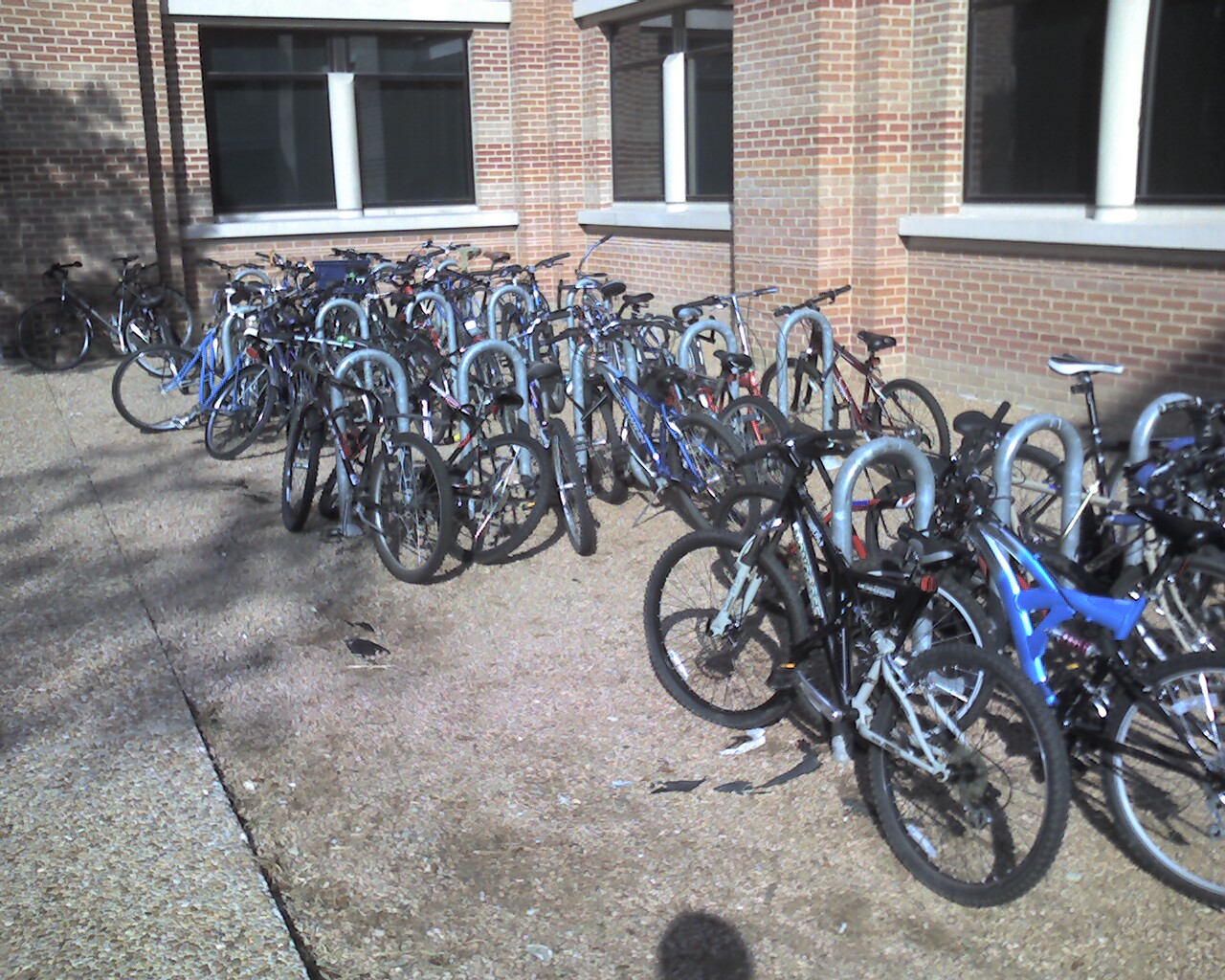
Fail number 1: Absolutely no place to park my bike. This has been pretty much the case ever since the undergrads have been back. Rice built two new colleges right next to the building I work in, but didn’t consider what an increased resident population would do to bike rack space: The undergrads, of course, store their bikes semi-permanently on the bike racks that we need to commute.

This is what the bike racks looked like shortly after 9 AM this morning:

Overfull Duncan Hall Bike Rack, 9:15 AM

Overfull Duncan Hall Bike Rack, 9:15 AM

I have been lobbying for more bike racks for over a year now, to no avail. I guess I’m going to be taking my bike up into my building from now on.

Fail number 2: I still don’t have my Texas drivers license, even though it has been 67 days since I renewed it. It’s even been over three weeks since I first contacted the DPS and was told the license would be remade and resent. Today I found out why it’s taking so long:

You will be mailed out a temporary permit today while you receive your license in the mail. Apparently the license was not remade when the visitor status was updated. I sincerely apologize for the inconvenience this has caused you.

In essence, they cut up my old drivers license, updated their internal database, and never mailed me a new license. Good job, Texas DPS. I’m glad I have an international drivers license as a backup.

Share
Posted in Pictures, Ramblings | Leave a comment

Print This Post Print This Post  

New Mint Release: r15700

On Friday, I created a new release of Mint and DrJava with Mint: August 20, 2010 (r15700). The latest release is, as always, available from the Mint implementation page:

The only changes that we made were a small change to the build process on Mac OS, and the addition of the Range and Lift utility classes.

The Lift class allows the user to manually lift primitive values and strings when the compiler did not do that already, for example when working with arrays.

The Range class provides methods that allow many for loops to be written as foreach loops with a final loop variable that can be used across bracket boundaries immediately. Consider this example of a staged sparse matrix multiplication:

public static separable
Code smmult(final double[][] a,
Code b,
Code output,
int l, int m, int n) {
Code stats = <| { } |>;
for(final int i: range(0, l)) {
for(final int j: range(0, m)) {
Code c = <| 0.0 |>;
for(final int k: range(0, n)) {
if(a[i][k] == 0.0)
continue;
else if(a[i][k] == 1.0)
c = <| `c + (`b)[k][j] |>;
else
c = <| `c + (`(lift(a[i][k])) * (`b)[k][j]) |>;
}
stats = <| { `stats; (`output)[i][j] = `c; } |>;
}
}
return stats;
}

is a lot cleaner than

public static separable
Code smmult(final double[][] a,
Code b,
Code output,
int l, int m, int n) {
Code stats = <| { } |>;
for(int i = 0; i < l; i++) { for(int j = 0; j < m; j++) { final int ii = i; final int jj = j; Code c = <| 0.0 |>;
for(int k = 0; k < n; k++) { final int kk = k; if(a[i][k] == 0.0) continue; else if(a[i][k] == 1.0) c = <| `c + (`b)[kk][jj] |>;
else
c = <| `c + (`(lift(a[ii][kk])) * (`b)[kk][jj]) |>;
}
stats = <| { `stats; (`output)[ii][jj] = `c; } |>;
}
}
return stats;
}

The ii, jj, and kk variables aren’t necessary anymore.

(Re-posted from The Java Mint Blog.)

Share
Posted in Mint | Leave a comment

Print This Post Print This Post  

Compiled “Run” Commands in DrJava

I had mentioned a while ago that the way we put together the commands that get interpreted when the user presses the “Run” button or types in java or applet or run in the Interactions Pane is very messy.

I had told myself that I should try to rewrite this as Java code that doesn’t get interpreted in our Interactions Pane, but that actually gets statically compiled. I did that, and the code was a whole lot more maintainable. Compare this code to the previous code:

/** This method performs the "smart run". Unfortunately, we don't get the right static error messages.
* @param s full command line, i.e. "run MyClass 1 2 3"
* @param c class to be run, i.e. MyClass.class
*/
@SuppressWarnings("unchecked")
public static void runCommand(String s, Class c) throws Throwable {
if (s.endsWith(";")) s = _deleteSemiColon(s);
List tokens = ArgumentTokenizer.tokenize(s, true);
final String classNameWithQuotes = tokens.get(1); // this is "MyClass"
final String className =
classNameWithQuotes.substring(1, classNameWithQuotes.length() - 1); // removes quotes, becomes MyClass
String[] args = new String[tokens.size() - 2];
for (int i = 2; i < tokens.size(); i++) { String t = tokens.get(i); args[i - 2] = t.substring(1, t.length() - 1); } boolean isProgram = false; boolean isApplet = false; Class oldC = c; while(c != null) { if ("acm.program.Program".equals(c.getName()) || "acm.graphics.GTurtle".equals(c.getName())) { isProgram = true; break; } c = c.getSuperclass(); } c = oldC; if (!isProgram) { try { // if this doesn't throw, c is a subclass of Applet c.asSubclass(java.applet.Applet.class); isApplet = true; } catch(ClassCastException cce) { } } java.lang.reflect.Method m = null; if (isApplet) { try { m = c.getMethod("main", java.lang.String[].class); if (!m.getReturnType().equals(void.class)) { m = null; } } catch (java.lang.NoSuchMethodException e) { m = null; } if (m==null) { java.applet.Applet instance = null; if (args.length==0) { try { // try default (nullary) constructor first Constructor ctor = c.getConstructor(); instance = java.applet.Applet.class.cast(ctor.newInstance()); } catch(NoSuchMethodException nsme) { instance = null; } catch(InstantiationException ie) { instance = null; } catch(IllegalAccessException iae) { instance = null; } catch(java.lang.reflect.InvocationTargetException ite) { if (ite.getCause()!=null) { throw ite.getCause(); } else { System.err.println("Error: Please turn off 'Smart Run' or use 'java' command instead of 'run'."); } } if (instance==null) { try { // try String[] constructor next Constructor ctor = c.getConstructor(String[].class); instance = java.applet.Applet.class.cast(ctor.newInstance(new Object[] { new String[0] })); } catch(NoSuchMethodException nsme) { instance = null; } catch(InstantiationException ie) { instance = null; } catch(IllegalAccessException iae) { instance = null; } catch(java.lang.reflect.InvocationTargetException ite) { if (ite.getCause()!=null) { throw ite.getCause(); } else { System.err.println("Error: Please turn off 'Smart Run' or use 'java' command instead of 'run'."); return; } } } if (instance==null) { System.err.println("Error: This applet does not have a default constructor or a constructor "+ "accepting String[]."); return; } } else { try { // try String[] constructor Constructor ctor = c.getConstructor(String[].class); instance = java.applet.Applet.class.cast(ctor.newInstance(new Object[] { args })); } catch(NoSuchMethodException nsme) { instance = null; } catch(InstantiationException ie) { instance = null; } catch(IllegalAccessException iae) { instance = null; } catch(java.lang.reflect.InvocationTargetException ite) { if (ite.getCause()!=null) { throw ite.getCause(); } else { System.err.println("Error: Please turn off 'Smart Run' or use 'java' command instead of 'run'."); return; } } if (instance==null) { System.err.println("Error: This applet does not have a constructor accepting String[]."); return; } } edu.rice.cs.plt.swing.SwingUtil.showApplet(instance, 400, 300); } } else { try { m = c.getMethod("main", java.lang.String[].class); if (!m.getReturnType().equals(void.class)) { System.err.println("Error: This class does not have a static void main method accepting String[]."); m = null; } } catch (java.lang.NoSuchMethodException e) { System.err.println("Error: This class does not have a static void main method accepting String[]."); m = null; } } if (m != null) { if (isProgram) { String[] newArgs = new String[args.length+1]; newArgs[0] = "code="+c.getName(); System.arraycopy(args, 0, newArgs, 1, args.length); args = newArgs; } try { m.setAccessible(true); m.invoke(null, new Object[] { args }); } catch(SecurityException se) { System.err.println("Error: Please turn off 'Smart Run' or use 'java' command instead of 'run'."); } catch(IllegalAccessException iae) { System.err.println("Error: Please turn off 'Smart Run' or use 'java' command instead of 'run'."); } catch(java.lang.reflect.InvocationTargetException ite) { if (ite.getCause()!=null) { throw ite.getCause(); } else { System.err.println("Error: Please turn off 'Smart Run' or use 'java' command instead of 'run'."); } } } }

It's actual Java code that is statically compiled, not a string that is concatenated at runtime and that might be erroneous.

Unfortunately, we don't get the right static error messages. I can print something like "Static Error: Undefined class 'Foo'" as output, but it doesn't have the right font and doesn't invoke the right listeners, so the "Auto-Import" dialog doesn't show up, for example.

For now, I'm using the old string concatenation routine again.

Share
Posted in DrJava | Leave a comment

Print This Post Print This Post  

Java Versions on the Mac

Stephen had some questions about Java on the Mac. I tried to answer them.

From the DrJava site, I see notes that a JDK is already installed on OS X machines—that explains why I can’t find downloads for it.

There are some Java downloads from Apple, but they’re hard to find and
meant for developers (Apple ID required).

I have a couple of questions about it though:

Here are some answers from Apple: Mac OS X Java Frequently Asked Questions (FAQ) for developers.

a) Is it a 32-bit or a 64-bit JDK?

As far as I know, Macs have both a 32-bit and a 64-bit JDK installed. If I understand this page correctly, by default, the 32-bit JVM is running.

I don’t have a 64-bit Mac, though, so I don’t have any experience with 64-bit Mac JVMs.

b) Does the Mac run some sort of auto-updating process on it – how do you know what version it is running and how do you get a newer version if needed?

This is what the FAQ says:

Java updates usually stand alone, allowing you to choose when an update is appropriate. However, it is always recommended to check the description and release notes for all software updates to see which technologies are affected. Major upgrades such as Mac OS X Leopard typically update Java as well.

It’s been such a long time since I’ve had a Java update on my 10.4 32-bit MacBook, but I think new versions of Java appear in the “Software Update” list (see Apple menu).

The reason I ask is that for running Eclipse, one needs to know if you’re running a 32-bit or 64-bit version because not only are different plug-ins needed, but the install procedure can be different as well. Also, we need to know what version of Java people are running on their Macs.

On the command line: [cci]java -version[/cci]

The sun.arch.data.model property may also help, it should be [cci lang=”java”]”32″[/cci],
[cci lang=”java”]”64″[/cci] or [cci lang=”java”]”unknown”[/cci]. You can get the value by calling [cci lang=”java”]System.getProperty(“sun.arch.data.model”)[/cci], for example in the DrJava Interactions Pane (see Oracle FAQ entry).

Here is some more Apple-specific information about Java versions.

Hope this helps.

Update

Corky said what I had written about “by default, the 32-bit JVM is running” had confused him. He wondered: “Is a 32 bit version of Java 6 now available on Leopard?”

No, there’s still no 32-bit Java 6 from Apple for Tiger (10.4).

It seems like the -d64 switch is a mode, like -server or -client, and that on the Mac both the 32-bit and the 64-bit JVMs are rolled into one. On Windows, Linux and Solaris, there are 32-bit and 64-bit JVMs that need to be installed separately.

Share
Posted in Uncategorized | Leave a comment

Print This Post Print This Post  

GPCE’10 Tutorial Lecture: Agile and Efficient Domain-Specific Languages using Multi-stage Programming in Java Mint

Eddy, Walid, and I proposed a tutorial lecture for GPCE’10, and we’re delighted to report that it has been accepted for presentation on Sunday, October 10, 2010.

Agile and Efficient Domain-Specific Languages using Multi-stage Programming in Java Mint

Domain-specific languages (DSLs) are a powerful productivity tool
because they allow domain experts, who are not necessarily programming
experts, to quickly develop programs. DSL implementations have unique
constraints for programming languages because they must be efficient,
in order to ensure high productivity, but they must also be agile, in
order to meet the rapidly changing demands of their domains. In this
tutorial we show how multi-stage programming (MSP) can be used to
build staged interpreters, which combine the agility of interpreters
with the efficiency of compilers. The tutorial is conducted in Java
Mint, an multi-stage Java based on recent work incorporating MSP into
imperative object-oriented languages. In the first half of
the tutorial, we introduce MSP by demonstrating how to write a staged
interpreter for a number of basic language constructs, such as
recursive functions, conditionals, and let expressions. In the second
half, we extend our staged interpreter to take advantage of several
well-known compiler optimizations, including type inference, constant
folding, and static parallel loop scheduling. We highlight the opportunities
afforded by using MSP with object-oriented design to quickly create
efficient DSL implementations.

Brief Outline of Tutorial

This tutorial uses Java Mint to introduce MSP in imperative,
object-oriented languages. We will progress as follows:

  1. Introduction to MSP, the three language constructs “bracket”,
    “escape” and “run”, and their use in Java Mint.
  2. Brief overview of MSP applications other than interpreters.
  3. Development of a staged interpreter for a small DSL. We
    incrementally add:

    1. Arithmetic expressions
    2. Conditionals
    3. Recursive functions
    4. Let expressions
  4. Application of compiler optimizations in the interpreter
    for our DSL. We discuss:

    1. Extending the interpreter with multiple data types
    2. Type inference
    3. Constant folding
    4. Static parallel loop scheduling

Biographies

Mathias Ricken is a doctoral candidate in the Programming Languages
Team at Rice University and one of the principal developers of the
DrJava integrated development environment. His research interests
include concurrent programming, extending the Java language, and
computer science education. He is the developer of the Concutest
concurrent unit testing framework and has created various experimental
extensions of Java to address, for instance, programming with
meta-data. Currently, Mathias is contributing to Java Mint, a
multi-stage extension of Java that allows safe and expressive
statically typed program generation and specialization in an
imperative language setting.

Edwin Westbrook is a post-doctoral researcher at Rice University. His
primary interests are in developing techniques for implementing and
verifying properties of domain-specific languages (DSLs). He has
worked on a number of projects in this area, including: Cinic, a type
theory for building machine-checked proofs of properties of DSLs using
a new approach to higher-order abstract syntax; Java Mint, a
multi-stage version of Java used for efficient implementations of
DSLs; and Acumen, a DSL for designing cyber-physical systems.

Walid Taha is an professor at Halmstad University. His current interest is in modeling and simulation of cyberphysical systems. He was the principal investigator on a number of research awards and contracts from the National Science Foundation (NSF), Semi-conductor Research Consortium (SRC), and Texas Advanced Technology Program (ATP). He received an NSF CAREER award to develop Java Mint. He is the principle designer Java Mint, Acumen, MetaOCaml, and the Verilog Preprocessor. He founded the ACM Conference on Generative Programming and Component Engineering (GPCE), the IFIP Working Group on Program Generation (WG 2.11), and the Middle Earth Programming Languages Seminar (MEPLS). In 2009, he chaired the IFIP Working Conference on Domain Specific Languages (DSLs).

(Re-posted from The Java Mint Blog.)

Share
Posted in Mint | 3 Comments

Print This Post Print This Post  

New Version of DrJava with Mint: drjava-r5366-mint-r15665

The DrJava team released a new stable version of DrJava today, drjava-stable-20100816-r5366.

I therefore created a new release of DrJava with Mint: August 16, 2010 (drjava-r5366-mint-r15665.jar). The latest release is available from the Mint implementation page:

Nothing has changed on the Mint language side.

(Re-posted from The Java Mint Blog.)

Share
Posted in DrJava, Mint | Leave a comment

Print This Post Print This Post  

New DrJava Stable Release: drjava-stable-20100816-r5366

We have just released a new stable release of DrJava: drjava-stable-20100816-r5366. You can download it from SourceForge or from the DrJava homepage.

Available for download at http://drjava.org .

DrJava is a lightweight programming environment for Java designed to
foster test-driven software development. It includes an intelligent
program editor, an interactions pane for evaluating program text, a
source level debugger, and a unit testing tool.

In addition to bug fixes, this stable release includes a number of new
features introduced after the last beta release:

These features include improved keyboard shortcuts, improved undo/redo
functionality outside the Definitions Pane, as well as better menus
for detached windows on the Mac.

Note: Java 1.4 compatibility has been dropped. To use DrJava, you will
need Java 5 or newer.

New features since the last beta release:

  • Keyboard shortcuts for Project menu items.
  • Menus for detached windows on Mac OS.
  • Undo/Redo for Input Box and detached Interactions Pane.
  • Keyboard shortcuts available in detached windows.
  • Displaying compiz warning only for Java older than 1.6.0_20.
  • Changing the default look-and-feel for non-Windows, non-Mac
    machines (=Linux) to the system default. This will probably
    be GTK instead of Metal, which is much prettier.

Bug fixes since last beta release:

  • Properly disabled ‘Run Project’s Main Class’ if main class not set.
  • Bugfix for a problem relating to menu item availability, which
    caused the project menu to be disabled when it should be enabled.
  • IllegalAccessException with Smart Run on non-Public class.
  • Fixed NullPointerException when removing Find All matches.
  • Fixed a bug that caused a NullPointerException when a Find All
    encountered a missing file.
  • Fixed bug StringIndexOutOfBoundsException on non-Western systems
    that use characters longer than a byte.
  • Fixed bug that caused Undo/Redo menu items to not be enabled
    properly.
  • Fixed bug that caused pressing Ctrl-Z (Undo) to make the System.in
    box disappear.
  • Fixed bug that caused { or } to be inserted on Linux when using
    “Go to Opening/Closing Brace” shortcuts.
  • Fixed a bug that enabled Undo for the Interactions Pane on Macs
    even when there was nothing to undo.
  • Fixed problem that prevented configuration of key bindings for
    actions with the same names, e.g. “New” (File) and “New” (Project).
  • Fixed bug that caused changes to Key Bindings to not be canceled
    properly.

New features since the last stable release:

  • The Eclipse Java Compiler is now integrated into DrJava. DrJava
    therefore does not require the JDK anymore to compile
    programs. Note that the JDK is still required to use the debugger
    or to create Javadoc.
  • DrJava supports the OpenJDK and JavaMint (multi-stage programming
    in Java; see http://www.javamint.org/ ) compilers.
  • JUnit 4.7 support.
  • ConcJUnit support (for concurrent unit tests; see
    http://www.concutest.org/ ).
  • Access control for private and package private members now enabled
    by default.
  • DynamicJava (Interpreter) error messages are much better,
    especially those involving method and constructor invocation.
  • Added support in DynamicJava for explicit type arguments in local
    function invocations (x = foo(23)).
  • The Breakpoint, Bookmarks, and Find Results tabbed panes now have
    Previous/Next buttons and associated keyboard shortcuts for simpler
    browsing.
  • The Interactions Pane working directory can now be specified even
    when not using projects.
  • If DrJava cannot start, for example because of bad memory settings
    in the Preferences, DrJava will suggest that you let it reset the
    Preferences.
  • The preferred compiler can now be set, and this setting will be
    restored when DrJava starts the next time.
  • Zoom for Print Preview.
  • New Class wizard.
  • Save Copy ability for Definitions documents, Interactions Pane and
    Console Pane contents.
  • The Java Language Level facility has been simplified. There now is
    only one language level called “Functional Java”, using the file
    extension .dj. It is comparable to the Intermediate level and
    can still compile .dj0 and .dj1 files. .dj2 files are compiled
    using the Full Java compiler. DrJava will suggest that you rename
    .dj0 and .dj1 files to .dj files, and .dj2 files to .java files.
  • DrJava can generate a custom .jar file of itself that includes
    additional files. There is a Tools/Advanced/Generate Custom
    drjava.jar menu item that takes the current DrJava executable file
    and a number of user-specified files to generate a new jar file.

    • The libraries included in the new jar file will then
      automatically be included in the classpath and be usable without
      adding them to a classpath somewhere.
    • There is no functionality to remove the libraries again from the
      modified jar file.
    • Generating a custom DrJava jar file disables the check for
      updated versions. Otherwise a user may download an updated
      version that doesnt have required libraries anymore.
  • When DrJava encounters missing files during a “Find All” search,
    it will ask the user whether to continue or abort the search.
  • Improved “New Java Class” dialog with some auto-completion.
  • Better feedback when Java API data is loaded, which may involve
    some delay if it is retrieved from the internet.
  • There is a new option in Preferences/Interactions Pane
    called “Smart Run (‘java’) Command”. If enabled (default),
    the “Run” button and the “java” command in the Interactions
    Pane detects if the class (a) is an ACM Java Task Force
    program (subclass of acm.program.Program) or (b) an applet.
    If (a), then it runs the program’s main method, but inserts
    “code=MyClass” as argument 0. If (b), it starts the
    applet viewer. Otherwise, the “java” command behaves just
    as before.
  • Right margin line.
  • Improved Save As file naming.
  • Tools->Advanced->New DrJava Instance feature.
  • Appending .jar to file name when generating custom DrJava.

Bug fixes since the last stable release:

  • Fixed some indentation bugs.
  • Fixed some GUI initialization problems that prevented DrJava from
    starting on some systems.
  • Fixed a bug that prevented DrJava from opening on MacOS 10.5 or
    10.6.
  • Fixed compiler error when closing curly brace missing.
  • Fixed NullPointerException in Jar Project dialog.
  • Fixed a bug that prevented users from editing External Processes.
  • Fixed a bug in un-commenting source code.
  • Fixed a bug in displaying the Auto-Import dialog in the
    Interactions Pane.
  • Improved suggestion to increase interactions JVM heap.
  • Improved responsiveness when selecting a compiler.
  • Fixed a bug that prevented users from generating Javadoc of
    Language Level files.
  • DynamicJava (Interpreter) bug fix allows the declaration of
    interfaces.
  • Miscellaneous small DynamicJava bug fixes make it much more robust
    and correct, including better handling of member lookup, inner
    classes, enums, interfaces, raw types, static imports, switch
    statements, casts, and final variables.
  • Bugfix for comparing 0.0 == -0.0 and NaNs.
  • Bugfix in DynamicJava: Supports annotation declarations
  • Bugfix in DynamicJava: Fixes parser bug for enums
  • Bugfix in DynamicJava: Fixes implicit accessibility of interface
    members
  • Bugfix in DynamicJava: Fixes checking of assignments from character
    literals
  • Bugfix in DynamicJava: Improves checking of casts
  • Bugfix in DynamicJava: getClass() is a special method with type
    Class for all classes
  • Bugfix in DynamicJava: Improves error messages for inner class
    references
  • Bugfix in DynamicJava: Preserves location in wildcards
  • Bugfix in DynamicJava: Catches errors that occur during static
    initialization of a class
  • Bugfix in DynamicJava: Short-circuiting during type checking
  • Bugfix in DynamicJava: += for strings
  • Bugfix in DynamicJava: Array initializer is assigned to a non-array
    type
  • Misc improvements to DynamicJava SoureChecker
  • Bugfix that prevented users from watching local variables in the
    Debugger.
  • Smaller Java Language Level fixes.
  • StringIndexOutOfBoundsException During Next Word
  • Exception when double click on External process tab
  • This commit fixes some glitches in the new functional
    LL, effectively subsuming both the Elementary (.dj0)
    and Intermediate (.dj1) language levels.
  • Bugfix for throw null
  • Fixing a memory leak in DefinitionsPane.
Share
Posted in DrJava | Leave a comment

Print This Post Print This Post  

Improved DrC#?

Recently, I was asked if there will ever be a new DrC# which is similar to DrJava.

Unfortunately, I don’t expect an improved DrC# in the near future. We don’t have the funding and personnel to work on such a project. We already have trouble maintaining the DrJava Plug-in for Eclipse.

It may be possible to integrate a C# command line compiler into DrJava, though, if there is interest. There are problems with this approach, though: The syntax highlighting wouldn’t be right, and the Interactions Pane wouldn’t be functional.

Share
Posted in DrJava | Leave a comment

Print This Post Print This Post  

I’m Going to Eindhoven

The Java Mint tutorial lecture called “Agile and Efficient Domain-Specific Languages using Multi-stage Programming in Java Mint“, which Eddy and I proposed, has been accepted at GPCE 2010.

I’m looking forward to being in Eindhoven in October. Before that, on September 20, Eddy and I will have an opportunity to practice the lecture in our COMP 600 Graduate Research Seminar.

Share
Posted in Mint | Leave a comment

Print This Post Print This Post  

drjava.org Temporarily Unavailable

Our DrJava website is currently not available under the usual address (http://drjava.org). We are working on fixing this problem as quickly
as possible.

If you need access to the DrJava website in the meantime, please use one of these two URLs instead:

http://drjava.sourceforge.net/
http://www.cs.rice.edu/~javaplt/drjava/

We apologize for the inconvenience. Thanks for using DrJava!

Update

At some point during the morning of August 15, the domain started working again. We are happy to report that our website is available again under the usual address: http://drjava.org .

Share
Posted in DrJava | Leave a comment

Print This Post Print This Post  

Rice University Virtual Tour

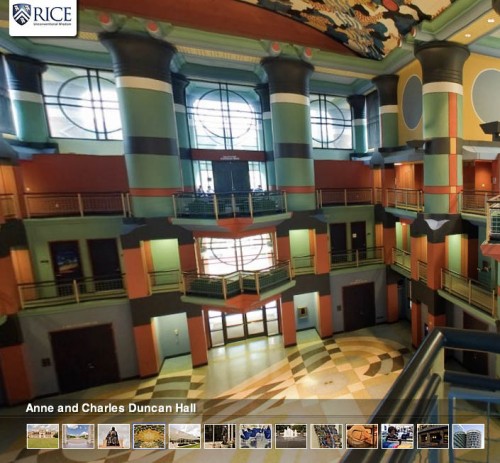
These are really cool panorama pictures of my university:

Experience Rice University’s 300-acre campus and its urban surroundings by taking our virtual tour http://bit.ly/a7Yt0I

If you click on the fourth image from the left in the navigation bar at the bottom, you can see my office building, Duncan Hall.

Duncan Hall at Rice University

Duncan Hall at Rice University

Share
Posted in Uncategorized | Leave a comment

Print This Post Print This Post  

Same Classpath in Front-End and Rest of Habanero Java Compiler

Vincent from the Habanero research group actually asked me to make the change of setting the Polyglot classpath to be the same as the Soot classpath. That involved spending about a day figuring out how to even build Habanero Java, and then finding the best way to access the Soot classpath.

Initially I thought I could call [cci lang=”java”]Options.v().soot_classpath()[/cci], but that literally contains the value of the -cp argument passed in, which may be empty. In the end, I was able to access the exact Soot classpath without any code replication in one line in HjToJimple.java:

[cc lang=”java”]options.classpath = soot.Scene.v().getSootClassPath();[/cc]

That was all that had to be done.

Now I hope the Habanero group agrees that it is the right thing to do to make sure that the front-end (Polyglot) and the rest of the compiler (Soot) use the same classpath and that they commit this change.

Now there are still issues with not being able to compile the same file more than once (“Duplicate values
/home/mgricken/bin/hj-1.1.0-mgricken/examples and /home/mgricken/bin/hj-1.1.0-mgricken/examples for option -sp”), and I also can’t yet run classes (“Error: Can’t find main class”) but I haven’t worked on that yet.

Share
Posted in DrJava | Leave a comment

Print This Post Print This Post  

I <3 Unix

[cci]find . -name \*html -or -name \*inc | xargs grep -l “\.owlnet\.” | xargs -n 1 -i bash -c ‘p4 edit {}; sed -i “s/\.owlnet\./.clear./g” {}'[/cci]

Share
Posted in Uncategorized | Leave a comment

Print This Post Print This Post  

COMP 202 Links for Previous Semesters

Dung Nguyen noticed that the links for previous semesters that I have on my Fall 2008 COMP 202 page all lead back to my own page.

I looked at the HTML source, and I do redirect to Owlnet, where the COMP 202 page used to be. For Fall 2007, for example, I link to http://www.owlnet.rice.edu/~comp202/04-fall. Something must have happened to the website on Owlnet. I tried to log in, but the SSH password that I have for comp202 does not work anymore. Neither did my comp212 password.

When I logged in with mgricken, though, I was able to see that the comp202 page has been redirected to CLEAR at http://www.clear.rice.edu/comp202 regardless of what actual page was being requested from Owlnet. For example, http://www.owlnet.rice.edu/~comp202 was being redirected to http://www.clear.rice.edu/comp202, which is what I wanted, but http://www.owlnet.rice.edu/~comp202/04-fall was being redirected to the same place.

Once I had figured out how to log into CLEAR, I could see that the CLEAR page at http://www.clear.rice.edu/comp202 redirects to my page… And that’s why all roads lead to me :-)

As a simple fix, I just changed my links to point to the right pages on CLEAR, e.g. to http://www.clear.rice.edu/comp202/04-fall.

I think we should also edit the redirection, which IT must have put in place without talking to us, and make it work as it should. If we don’t, then links that we may have elsewhere and that point to Owlnet don’t working either.

The web is a rather transient place. There really is no point to put up an “under construction” sign, because any website always is under construction.

Update

Changing the .htaccess file to

[cc]RedirectMatch ^/~comp202/(.*)$ http://www.clear.rice.edu/comp202/$1[/cc]

should do the trick.

Update

IT set up the redirection according to my suggestion now. Requests for Owlnet pages are now redirected to the corresponding CLEAR page. Try it:

http://www.owlnet.rice.edu/~comp202/06-fall now redirects properly to http://www.clear.rice.edu/comp202/06-fall/.

Share
Posted in COMP202 | Leave a comment

Print This Post Print This Post  

That’s Just Past Perfect

README files written by some non-native speakers of English are killing me right now. What is it with all the past perfect tense?!

All of these files had been put into the folder foo/bar, and the build files had been configured to point to these files.

Had been? Not anymore? Argh.

Share
Posted in Ramblings | Leave a comment

Print This Post Print This Post