DrJava Reaches One Million Download Milestone

The JavaPLT group is pleased to announce that DrJava recently passed
the milestone of one million downloads since its inception as a
SourceForge open source project in 2002. The DrJava developers want to
thank all the users of DrJava for making the project so successful.

DrJava is a lightweight integrated development environment (IDE) for
writing Java programs. It is designed primarily for students,
providing an intuitive interface and the ability to interactively
evaluate Java code in an “Interactions Pane”. It also includes
powerful features for more advanced users including the DrJava
developers. DrJava is freely distributed under the BSD License, and it
is still under active development by the JavaPLT group at Rice
University.

The development of DrJava began in 2001, lead by Professor Robert
“Corky” Cartwright of the Computer Science department, with the first
release being made available in Spring 2002. From the beginning, the
DrJava source code emphasized the use of Java generics, novel at the
time. Early in the evolution of DrJava, support for Java generics was
added to the Interactions Pane. After the addition of a project
facility in 2004 and improved support for large projects beginning in
2006, DrJava experienced a sharp increase in popularity.

DrJava is a cross-platform application available for Windows, Mac OS
and Linux. DrJava supports several different Java compilers, including
Oracle/Sun’s JDK, OpenJDK, the Eclipse Java Compiler, as well as
research compilers such as NextGen and Java Mint. In 2005, DrJava
introduced support for a hierarchy of Java language levels, a
pedagogic framework that helps beginners learn Java by partitioning
the language into levels of increasing syntactic complexity.

Since the inception of the DrJava project, over 60 students have
contributed to DrJava in Professor Cartwright’s class on Production
Programming or as part of independent study projects. DrJava is now
being used at institutions across the globe, including the University
of Pennsylvania, Cornell University, Georgia Tech, University of
California-San Diego, University of Washington, Université de Nice
Sophia-Antipolis, National Unversity Singapore and Rice University.
DrJava has also been used as teaching tool in books by Pearson
Education and Wiley Higher Education.

DrJava is available for download for free at http://drjava.org/

Share
Posted in DrJava | Leave a comment

Print This Post Print This Post  

Enerjy Fault Proneness Analysis of DrJava

I just read that a company called Enerjy did a “fault proneness”
analysis of many Java open-source projects
, and DrJava was among them. We rank in the lower half, but just above Eclipse.

I don’t exactly know how the rules are weighted, but they are pretty
arbitrary. One thing I noticed, for example, is this rule: “You can
configure JAVA0020 for allowable names. The default is for the name to
begin with a letter followed by letters, digits or underscores.”

We consistently prefix fields with an underscore, so we consistently
violate their convention. I don’t put a lot of trust into metrics like
these, particularly when they are ill-configured.

I still thought this was interesting.

Share
Posted in DrJava, Ramblings | Leave a comment

Print This Post Print This Post  

Simpler ACM Java Task Force Programs in DrJava

Daniel L. Schuster, Professor of Computer Science & Mathematics at Western State College of Colorado and author of The Free Java Book, had asked me at SIGCSE 2010 if we could simplify runing ACM Java Task Force programs in DrJava. Other IDEs can run ACM Java Task Force programs that just look like this

//HelloWorldConsole.java
import acm.program.*;

public class HelloWorldConsole extends ConsoleProgram {
public void run( ) {
println("Hello World");
}
}

In the past, DrJava needed a main method:

//HelloWorldConsole.java
import acm.program.*;

public class HelloWorldConsole extends ConsoleProgram {
public void run( ) {
println("Hello World");
}
public static void main(String[ ] args) {
new HelloWorldConsole( ).start(args);
}
}

This was, in my humble opinion, due to the rather twisted way the ACM Java library determines the main class using command line arguments, Java properties, OS-specific ways to determine the command line involving process IDs, etc.

I think I have nonetheless found a working solution. I’m using a bit of reflection behind the scenes of the “Run” button and the “java” command in the Interactions Pane.

There is a new option in Preferences/Interactions Pane called “Smart Run (‘java’) Command”. If enabled (default), the “Run” button and the “java” command in the Interactions Pane detects if the class (a) is an ACM Java Task Force
program (subclass of acm.program.Program) or (b) an applet (subclass of java.applet.Applet). If the former is the case, then DrJava runs the program’s main method, but inserts "code=MyClass" as argument 0. If the latter is the case, DrJava starts the
applet viewer. If neither is the case, the command behaves just as before.

With a program from the book, like the one above, all the students need to do now is compile and press the “Run” button.

I have created a new weekly build that is available from our DrJava Weekly Jar website (direct link: drjava-weekly-20100508-r5249).

If Dan determines that this solution works for him, this feature will definitely be in the next stable release, which we expect for the end of May.

There are two other new features in DrJava that Dan and his students may find interesting:

  1. DrJava doesn’t require the JDK anymore to compile programs. This
    could simplify the instructions in “Setting Up Your Computer”. To
    compile, DrJava now uses an integrated Eclipse compiler and needs just
    a JRE 6. To use the debugger or generate Javadoc, the JDK is still
    necessary, though.
  2. You can generate a custom drjava.jar file that already includes the
    ACM Java library classes from the acm.jar file. That way, those
    classes are already included on the classpath, and you don’t need to
    add it to the Extra Classpath under “Resource Locations”.

I’m convinced these two features, plus the smart “Run” command I just implemented, make DrJava an even better, simpler teaching tool.

Share
Posted in DrJava | 6 Comments

Print This Post Print This Post  

New Mint Release: r15405

I just created a new release of Mint and DrJava with Mint: May 8, 2010 (r15405). The release is available from the Mint implementation page:

The DrJava team released a second beta version of DrJava yesterday, drjava-beta-20100507-r5246.

Nothing has changed on the Mint language side, but there have been minor changes in the Mint build process, and several examples have been added.

There have been plenty of new features and bugfixes for DrJava, and they have been integrated into DrJava with Mint. Most importantly, DrJava with Mint will now automatically select the Mint compiler on start-up.

(Re-posted from The Java Mint Blog.)

Share
Posted in DrJava, Mint | Leave a comment

Print This Post Print This Post  

One Million Downloads of DrJava!

We have reached one million downloads of DrJava!

The DrJava download figure, provided by SourceForge, is authoritative as of Friday, May 7, 2010, at 8 PM CDT.

Many thanks to all our users!

Share
Posted in DrJava | Leave a comment

Print This Post Print This Post  

New DrJava Beta Release: drjava-beta-20100507-r5246

We have just released our second beta version in preparation for the next stable release: drjava-beta-20100507-r5246. You can download it from SourceForge or from the DrJava homepage.

Available for download at http://drjava.org .

DrJava is a lightweight programming environment for Java designed to
foster test-driven software development. It includes an intelligent
program editor, an interactions pane for evaluating program text, a
source level debugger, and a unit testing tool.

In addition to bug fixes in anticipation of the next stable release,
this beta release includes a number of new features introduced after
the last beta release:

These features include a simplified Java language level facility,
the ability to generate a custom DrJava .jar file that contains
additional libraries, and the ability to abort a “Find All” search
that encounters missing files.

Note: Java 1.4 compatibility has been dropped. To use DrJava, you will
need Java 5 or newer.

New features since the last beta release:

– The Java Language Level facility has been simplified. There now is
only one language level called “Functional Java”, using the file
extension .dj. It is comparable to the Intermediate level and
can still compile .dj0 and .dj1 files. .dj2 files are compiled
using the Full Java compiler. DrJava will suggest that you rename
.dj0 and .dj1 files to .dj files, and .dj2 files to .java files.

– DrJava can generate a custom .jar file of itself that includes
additional files. There is a Tools/Advanced/Generate Custom
drjava.jar menu item that takes the current DrJava executable file
and a number of user-specified files to generate a new jar file.

* The libraries included in the new jar file will then
automatically be included in the classpath and be usable without
adding them to a classpath somewhere.

* There is no functionality to remove the libraries again from the
modified jar file.

* Generating a custom DrJava jar file disables the check for
updated versions. Otherwise a user may download an updated
version that doesnt have required libraries anymore.

– When DrJava encounters missing files during a “Find All” search,
it will ask the user whether to continue or abort the search.

– Improved “New Java Class” dialog with some auto-completion.

– Better feedback when Java API data is loaded, which may involve
some delay if it is retrieved from the internet.

New features since the last stable release:

– The Eclipse Java Compiler is now integrated into DrJava. DrJava
therefore does not require the JDK anymore to compile
programs. Note that the JDK is still required to use the debugger
or to create Javadoc.

– DrJava supports the OpenJDK and JavaMint (multi-stage programming
in Java; see http://www.javamint.org/ ) compilers.

– JUnit 4.7 support.

– ConcJUnit support (for concurrent unit tests; see
http://www.concutest.org/ ).

– Access control for private and package private members now enabled
by default.

– DynamicJava (Interpreter) error messages are much better,
especially those involving method and constructor invocation.

– Added support in DynamicJava for explicit type arguments in local
function invocations (x = foo(23)).

– The Breakpoint, Bookmarks, and Find Results tabbed panes now have
Previous/Next buttons and associated keyboard shortcuts for simpler
browsing.

– The Interactions Pane working directory can now be specified even
when not using projects.

– If DrJava cannot start, for example because of bad memory settings
in the Preferences, DrJava will suggest that you let it reset the
Preferences.

– The preferred compiler can now be set, and this setting will be
restored when DrJava starts the next time.

– Zoom for Print Preview.

– New Class wizard.

– Save Copy ability for Definitions documents, Interactions Pane and
Console Pane contents.

Bug fixes since the last stable release:

– Fixed some indentation bugs.

– Fixed some GUI initialization problems that prevented DrJava from
starting on some systems.

– Fixed a bug that prevented DrJava from opening on MacOS 10.5 or
10.6.

– Fixed compiler error when closing curly brace missing.

– Fixed NullPointerException in Jar Project dialog.

– Fixed a bug that prevented users from editing External Processes.

– Fixed a bug in un-commenting source code.

– Fixed a bug in displaying the Auto-Import dialog in the
Interactions Pane.

– Improved suggestion to increase interactions JVM heap.

– Improved responsiveness when selecting a compiler.

– Fixed a bug that prevented users from generating Javadoc of
Language Level files.

– DynamicJava (Interpreter) bug fix allows the declaration of
interfaces.

– Miscellaneous small DynamicJava bug fixes make it much more robust
and correct, including better handling of member lookup, inner
classes, enums, interfaces, raw types, static imports, switch
statements, casts, and final variables.

– Bugfix for comparing 0.0 == -0.0 and NaNs.

– Bugfix in DynamicJava: Supports annotation declarations

– Bugfix in DynamicJava: Fixes parser bug for enums

– Bugfix in DynamicJava: Fixes implicit accessibility of interface
members

– Bugfix in DynamicJava: Fixes checking of assignments from character
literals

– Bugfix in DynamicJava: Improves checking of casts

– Bugfix in DynamicJava: getClass() is a special method with type
Class for all classes

– Bugfix in DynamicJava: Improves error messages for inner class
references

– Bugfix in DynamicJava: Preserves location in wildcards

– Bugfix in DynamicJava: Catches errors that occur during static
initialization of a class

– Bugfix in DynamicJava: Short-circuiting during type checking

– Bugfix in DynamicJava: += for strings

– Bugfix in DynamicJava: Array initializer is assigned to a non-array
type

– Misc improvements to DynamicJava SoureChecker

– Bugfix that prevented users from watching local variables in the
Debugger.

– Smaller Java Language Level fixes.

Share
Posted in DrJava | 2 Comments

Print This Post Print This Post  

Eclipse 3.6M7 Released

The Eclipse 3.6M7 milestone has been released now, and I integrated the new milestone of the Eclipse Java Compiler into DrJava. It seems like every problem I had found has been fixed. I remove our custom version of the Eclipse Java Compiler.

Share
Posted in DrJava | Leave a comment

Print This Post Print This Post  

Body Worlds – Koerperwelten Bremen

My mother and I visited the Koerperwelten Bremen exhibition today. It is one of the Body Worlds traveling exhibitions that display real human bodies that have undergone plastination. Here are some images from the exhibition in Bremen.

There has been some controversy about these exhibitions. Some claim that the display of the bodies devalues the donors or human life in general. In general I cannot understand those sentiments, although I found some of the plastinates a little questionable. For example, the poker players were not as educational as some other displays, although I can see that this arrangement may have been useful as a common “every day scene” accessible to visitors.

There was another body, I think it was called “mythical being” or something along those lines, where all muscles had been separated so that they could be seen individually. This was particularly visible in the arms, where all muscles for the fingers were now visible. That was highly educational, but I found the fact that the body was “riding” on its spinal column, as if it were a witch’s broom, somewhat distracting.

I left with a profound sense of wonder about the human body. Life is beautiful.

PS: The incredibly beautiful girl staffing the tickets booth, who looked a bit like a young Heather Graham, even accepted my US student ID. A rare occasion.

Share
Posted in Uncategorized | Leave a comment

Print This Post Print This Post  

Visa Interview

Today, I went to Berlin to renew my student visa. For the last few weeks, I had collected letters, filled out forms, taken passport pictures and paid fees. Compared to five years ago, everything was a bit easier.

The main form was the DS-160, and it was filled out online. All I had to bring was a print-out of a barcode. The problem with the DS-160 web page, though, was that it asked for information like all the dates of when I had entered and left the US during the last five years… and the website timed out after 30 minutes of inactivity.

Everyone in my department was very kind and helpful, in particular my advisor Corky, my committee member Walid Taha, and the department chair Joe Warren, of course. Today at the embassy, everyone was friendly too.

I was a bit worried, because five years ago, I encountered quite the “Giftzwerg” there: She asked me “Do you have forms X, Y and Z?” and I said “Yes.” She returned my papers and said “No, you don’t.” which really confused me. What she meant to say was “Do you have ONLY forms X, Y and Z, and nothing else?” She clearly enjoyed being cryptic.

But today, I encountered no one like that. A young woman checked our documents outside, in the slight Berlin rain, and she noticed two problems: I still had my I-94 form in the pass, and she said that was “a big no-no”, but I told her it was a multiple entry I-94 form. She asked me to discuss this with her colleagues inside. Then she was looking for the receipt that I had paid the SEVIS fee. But I told her I had been a student for so long, I didn’t have to pay the SEVIS fee, I was grandfathered in. I had a print-out from the ICE website too, had I needed it.

Next were a metal detector and an X-ray machine and a couple of Marines checking passports, and then I was in. There were only three visa applicants before me. I handed my passport and a few pieces of paper to a woman behind bullet-proof glass (I think it was the same woman who worked there five years ago; last time, she commented that she had the same birthday as me) and sat down to wait for my interview.

Maybe half an hour later, I was called to another window, and a male consular officer (the only one I’ve ever dealt with) got me ten-printed. Then he asked me what I was doing in the US (“I’m a PhD candidate in computer science and work as a research assistant at Rice University.”). Next, he asked me a bit about my research and how much work I had left to do. He said he got a PhD too, and that it took him longer than it will take me.

Then he already told me my visa had been approved and that the embassy will process my passport and mail it back. Great! Thanks, everyone, for your help.

Update

Today, on Wednesday, just a day and a half after my interview, I received my passport with a new visa stamp.

Share
Posted in Graduate School | Leave a comment

Print This Post Print This Post  

Python is Pretty Cool, And So Is DrJava

I’ve got to admit: Python is pretty cool when it comes to quickly writing powerful scripts. I wanted to extract the number of all-time downloads from DrJava’s SourceForge statistics page, but it wasn’t on the same line as the “Total” word, so a simple sed one-liner wasn’t enough.

Of course I could have written it in Java, but that would have involved compiling it and having class files in addition to the Java file. I probably could have written it as a bash script, but to be honest, bash is pretty clunky. Python did the job easily and well.

import shutil
import os
import time
import datetime
import math
import urllib
import re
from array import array

filehandle = urllib.urlopen('http://sourceforge.net/project/stats/detail.php?group_id=44253&ugn=drjava&type=prdownload&mode=alltime&file_id=0')

found = False
for lines in filehandle.readlines():
if found:
text = lines.strip()
p = re.compile(r'<.*?>')
text = p.sub('', text)
# p = re.compile(r',')
# text = p.sub('', text)
print text
break

if lines.find('Total') != -1:
found = True

filehandle.close()

There are probably better, more elegant ways of doing this, but Python is one of those languages that I use but never learned, just like Perl or PHP. Maybe it’s a “P” thing. No, it isn’t, I actually learned Pascal at my Gymnasium (German secondary school) and at university in Germany.

Anyway, using this script I have now integrated a download counter on the DrJava website that gets updated every midnight. We’re seriously getting close to a million, faster than I expected. This is probably because of the new DrJava beta version we released.

With less than 5,000 downloads to go, we might hit the million early in May already!

Share
Posted in DrJava, Uncategorized | Leave a comment

Print This Post Print This Post  

Eclipse Compiler Bug Fixed in 3.6M7

According to an update to the Eclipse bug report 308256 I filed when I was working on integrating the Eclipse Java compiler into DrJava, the bug will have been fixed in 3.6M7.

That milestone doesn’t seem to be available yet, but soon we won’t need to maintain a modified copy of the Eclipse compiler in our own SVN repository.

Share
Posted in DrJava | 1 Comment

Print This Post Print This Post  

Simplified Language Levels

The second DrJava project I’m working on is a simplified Language Level facility. As stated before, this is mainly Corky’s work, but I’m helping to integrate it into DrJava.

In revisions 52255227, the Java Language Levels were changed. Once these changes are integrated into the trunk, there will only be one Language Level called dj (or “Functional Java”), which was created by combining and modifying dj0 and dj1. The dj2 Language Level has been eliminated and the Language Level converter merely copies the unmodified text from a dj2 file to a java file.

The new Language Level facility can still compile dj0 and dj1 files as dj files. Compiling dj2 files is currently broken.

Here is what we need to do to properly support the new Java Language Level facility:

  1. Change all file dialogs to open *.java, *.dj0, *.dj1, *.d2 and the new *.dj files.
  2. When a *.dj0 or *.dj1 file is opened, the user should be asked if he or she wants to rename the file to *.dj.
  3. When a *.dj2 file is opened, the user should be asked if he or she wants to rename the file to *.java.
  4. The diagram and explanation of the Language Levels in the documentation needs to be updated.
  5. The Language Levels menu needs to be changed to just “Full Java” and “Simplified Java” or something like that.
  6. Since *.dj2 files do not have the line number table anymore, they open the *.java file now. This needs to be fixed:
    1. In JUnit and the debugger, we are missing the line number conversion table. I suggest when a dj2 file is processed and the generated java file doesn’t have a conversion table at the top, we create an identity relation
      (i.e. it maps a line number to itself). Then we can still treat dj2 files as Language Level files.
    2. Compiler errors in dj2 files aren’t caught by the Language Level converter anymore, so javac compiles the generated java file. Errors in dj2 files are therefore reported in the java file, which is opened. We need additional code here that replaces the java file in the error message with the corresponding dj2 file from which it was generated.

We will wait until the semester at Rice is over, though until we make a new release. We don’t want our students in COMP 211 run into problems because DrJava suddenly behaves differently than before. I have also disabled building weekly jars for the same reason.

Share
Posted in DrJava | Leave a comment

Print This Post Print This Post  

Generate a Custom DrJava jar File

This week, I have worked on a couple of DrJava projects:

  1. Generate Custom drjava.jar
  2. New Language Level Support

The second project, a simplified language level facility, is mainly Corky’s work, I’m just helping to integrate it into the main part of DrJava.

The first project, the ability to bundle other libraries and classes with DrJava, was a request by Barbara Ericson for use with the Media Computation classes at Georgia Tech.
As of revision 5232, this feature has been implemented and merged into the trunk.

  • There is a Tools/Advanced/Generate Custom drjava.jar menu item that takes the current DrJava executable file and a number of user-specified files to generate a new jar file.
  • The user can select any number of jar and zip files or directories to be added. When a directory is added, all files in that directory and its subdirectories will be added recursively.
  • When the “Generate” button is pressed, DrJava then performs a check to see if the added libraries could interfere with DrJava itself and perhaps with each other. This is done using MD5 hashes.
  • DrJava will write out a new drjava.jar file to the file specified by the user.
  • The libraries included in the new jar file will then automatically be included in the classpath and be usable without adding them to a classpath somewhere.
  • This works in the jar file, the Windows exe file, and the Mac application.
  • However, DrJava will ONLY be able to write a jar file, not create a Windows exe file or a Mac application.
  • There is no functionality to remove the libraries again from the modified jar file.
  • Generating a custom DrJava jar file disables the check for updated versions. Otherwise a user may download an updated version that doesn’t have required libraries anymore.
  • The added files and directories appear in the version line of DrJava to provide minimal help, e.g. "DrJava Version : drjava-20100423-r5230 with foo.jar, bar.jar".

I’ll still have to do more specific tests with the Media Computation classes. As Mark Guzdial explained to me: “Right now, we include jmusic, javazoom, and various class files into our classes — see http://mediacomputation.org for either the Java CS1 or Data Structures classes.”

This is probably also of interest to anyone who uses the ACM classes.

Share
Posted in DrJava | 2 Comments

Print This Post Print This Post  

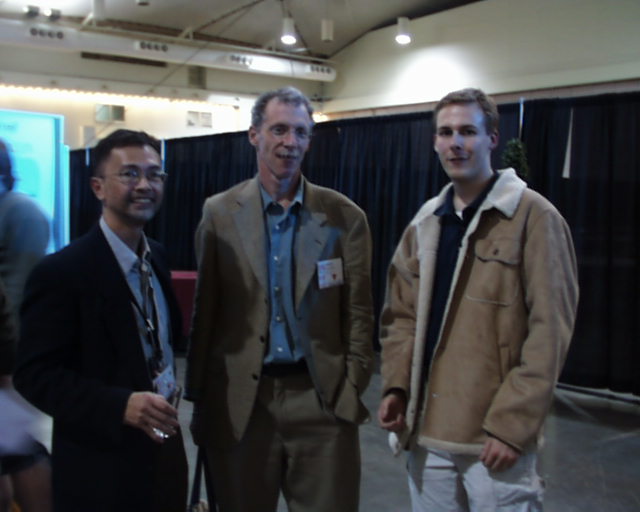
OOPSLA 2004 Picture

I just found a picture of myself on Carl Alphonce‘s website for the 3rd "Killer Examples" Workshop, held at OOPSLA 2004 in Vancouver, Canada. Wow, did I look young.

OOPSLA 2004 Poster Session

Dung Nguyen, Owen Astrachan and I at the OOPSLA 2004 Poster Session

Share
Posted in Pictures | Leave a comment

Print This Post Print This Post  

988,013 DrJava Downloads

According to the DrJava statistics on SourceForge, we’ve had 988,013 downloads of DrJava so far.

If this summer is similar to last summer, we’ll hit a million downloads towards the end of July!

Share
Posted in DrJava | 1 Comment

Print This Post Print This Post  

New DrJava with Mint Version

The DrJava team released a new beta version of DrJava today, drjava-beta-20100415-r5220.

I have integrated the February 17, 2010 of Mint with the new DrJava beta release and am happy to provide to you a new version of DrJava with Mint: drjava-r5220-mint-r15362.jar.

Nothing has changed on the Mint side, but there have been plenty of bugfixes for DrJava, as well as a few new features. In particular, the persistent compiler preference will make it easier to use DrJava with Mint: Just select the Mint compiler as default!

(Re-posted from The Java Mint Blog.)

Share
Posted in DrJava, Mint | Leave a comment

Print This Post Print This Post  

New DrJava Beta Release: drjava-beta-20100415-r5220

We have made a new beta version available: drjava-beta-20100415-r5220. You can download it from SourceForge or from the DrJava homepage.

Available for download at http://drjava.org .

DrJava is a lightweight programming environment for Java designed to foster test-driven software development. It includes an intelligent program editor, an interactions pane for evaluating program text, a source level debugger, and a unit testing tool.

In addition to bug fixes in anticipation of the next stable release, this beta release includes a number of new features introduced after the last stable release:

These features include JUnit 4 support, ConcJUnit support, and the ability to use the built-in Eclipse compiler, the OpenJDK and JavaMint compilers.

Note: Java 1.4 compatibility has been dropped. To use DrJava, you will need Java 5 or newer.

New features since the last stable release:

  • The Eclipse Java Compiler is now integrated into DrJava. DrJava therefore does not require the JDK anymore to compile programs. Note that the JDK is still required to use the debugger or to create Javadoc.
  • DrJava supports the OpenJDK and JavaMint (multi-stage programming in Java; see http://www.javamint.org/ ) compilers.
  • JUnit 4.7 support.
  • ConcJUnit support (for concurrent unit tests; see http://www.concutest.org/ ).
  • Access control for private and package private members now enabled by default.
  • DynamicJava (Interpreter) error messages are much better, especially those involving method and constructor invocation.
  • Added support in DynamicJava for explicit type arguments in local function invocations (“x = foo(23)”).
  • The Breakpoint, Bookmarks, and Find Results tabbed panes now have Previous/Next buttons and associated keyboard shortcuts for simpler browsing.
  • The Interactions Pane working directory can now be specified even when not using projects.
  • If DrJava cannot start, for example because of bad memory settings in the Preferences, DrJava will suggest that you let it reset the Preferences.
  • The preferred compiler can now be set, and this setting will be restored when DrJava starts the next time.
  • Zoom for Print Preview.
  • New Class wizard.
  • Save Copy ability for Definitions documents, Interactions Pane and Console Pane contents.

Bug fixes since the last stable release:

  • Fixed some indentation bugs.
  • Fixed some GUI initialization problems that prevented DrJava from starting on some systems.
  • Fixed a bug that prevented DrJava from opening on MacOS 10.5 or 10.6.
  • Fixed compiler error when closing curly brace missing.
  • Fixed NullPointerException in Jar Project dialog.
  • Fixed a bug that prevented users from editing External Processes.
  • Fixed a bug in un-commenting source code.
  • Fixed a bug in displaying the Auto-Import dialog in the Interactions Pane.
  • Improved suggestion to increase interactions JVM heap.
  • Improved responsiveness when selecting a compiler.
  • Fixed a bug that prevented users from generating Javadoc of Language Level files.
  • DynamicJava (Interpreter) bug fix allows the declaration of interfaces.
  • Miscellaneous small DynamicJava bug fixes make it much more robust and correct, including better handling of member lookup, inner classes, enums, interfaces, raw types, static imports, switch statements, casts, and final variables.
  • Bugfix for comparing 0.0 == -0.0 and NaNs.
  • Bugfix in DynamicJava: Supports annotation declarations
  • Bugfix in DynamicJava: Fixes parser bug for enums
  • Bugfix in DynamicJava: Fixes implicit accessibility of interface members
  • Bugfix in DynamicJava: Fixes checking of assignments from character literals
  • Bugfix in DynamicJava: Improves checking of casts
  • Bugfix in DynamicJava: getClass() is a special method with type Class for all classes
  • Bugfix in DynamicJava: Improves error messages for inner class references
  • Bugfix in DynamicJava: Preserves location in wildcards
  • Bugfix in DynamicJava: Catches errors that occur during static initialization of a class
  • Bugfix in DynamicJava: Short-circuiting during type checking
  • Bugfix in DynamicJava: += for strings
  • Bugfix in DynamicJava: Array initializer is assigned to a non-array type
  • Misc improvements to DynamicJava SoureChecker
  • Bugfix that prevented users from watching local variables in the Debugger.
  • Smaller Java Language Level fixes.
Share
Posted in DrJava | 1 Comment

Print This Post Print This Post  

Asserting Garbage Collection in Unit Tests

I just read a blog post by Tor Norbye called How to Write a Memory Leak Unit Test. In it, he describes how code from the NetBeans team can be used to find memory leaks. It seems like it’s a more advanced, user-friendly way of doing what I described before. In particular, the chain of references preventing garbage collection is actually printed out during the test.

I definitely have to take a closer look at this. Thanks, Tor!

Share
Posted in DrJava | 1 Comment

Print This Post Print This Post  

To Do for a DrJava Beta Release

With two weeks left in the semester, we should think about what work
needs to be done on DrJava to make a beta release, followed by a
stable. Should we make these releases even if we don’t fix some of the
serious bugs we currently have?

We have received several comments that our release schedule isn’t
convenient, since we typically make stable releases at the end of the
summer, but larger universities need to install the software at the
beginning of the summer already. It would therefore be advantageous if
we could make a new release soon.

We’ve had one reoccurrence of the “Cannot undo” problem, but it’s
difficult to track down. Most serious problems are in the interpreter.
There are some problems with language levels, but since we do not have
many customers that use language levels in the Fall, fixing those
isn’t as urgent.

Here’s a list of important bugs:

DrJava:

  1. 2983435: CannotUndoException in revision 5202

Interactions:

  1. 2974931: Boolean Short-Circuiting Doesn’t Work (now fixed)
  2. 2962806: Problem with polymorphism in interactions
  3. 2953189: String Concatenation Error (now fixed)
  4. 2895618: Used statement “int num = {1, 2, 3};”, it was a syntax error (now fixed)
  5. 2866108: Interaction Pane Breaks explicit toString() inheritance use (now fixed)

This one makes me wonder if there are other class loader issues in the
interpreter:

  1. 992535: Inner enum declaration fails

These two are not show stoppers, but should be easy to fix:

  1. 2015467: Crash when creating a class in an illegal package
  2. 2985180: Can’t Invoke main Method of Class Declared in Interactions

Not so important:

  1. 2694759: enums can’t appear in EnumSets

Language Levels:

These are also not show stoppers for this release, since we don’t have
many customers that use Language Levels in the Fall. We should attempt
to fix these before the next Spring COMP 211 class, though.

  1. 2782406: Incorrect Error: Cannot access the non-static method
  2. 2675036: import statement is misunderstood
  3. 2675006: final in dj1 generates double final modifier
  4. 2674992: Should automatically generate public modifier

Update

Dan fixed a bunch of bugs.

Share
Posted in DrJava | Leave a comment

Print This Post Print This Post  

Eclipse Java Compiler for DrJava

I finished integrating the Eclipse Java compiler into DrJava. This
made the DrJava executable about 1.1 MB bigger, but it has the benefit
that DrJava users don’t necessarily have to have the JDK installed
anymore: As long as they run DrJava with Java 6, they will always at
least have the Eclipse Java compiler available (but not the debugger).
I think this is an important improvement since getting the “No
compiler available” error was one of the most frequently reported
problems.

The Eclipse compiler I’m using is a modified version 3.6M6. I could
not use the latest release 3.5.2 because of a bug that prevented any
errors from being reported to a DiagnosticListener. After I had
diagnosed that problem, I found out that the bug had been fixed for
milestone 3.6M3. I discovered that this release has another bug,
though, which prevents a DiagnosticListener from receiving information
about the source file that contains a compiler error.

I filed a bug report with Eclipse and fixed the
bug in a modified copy of the Eclipse Java compiler 3.6M3 currently
kept in our repository. It works in *our* case, but the Eclipse
developers won’t be able to use the exact same solution without losing
some generality. I’ll see what they do, and when they fix the problem,
I’ll replace our modified version with their solution.

Please take a look at our latest weekly release. If you are
running Java 6 or later, you should be able to select the Eclipse
compiler. It still prefers the other compilers, but on systems with
the Java 6 JRE but without JDK, users of this version now at least
have a compiler available.

I still have to include the Eclipse license text in the program, the source and on the website, but I’ll get to that.

Let me know what you think! Thanks.

Share
Posted in DrJava | 3 Comments

Print This Post Print This Post