The Dumbest DrJava Bug Report Yet

Looking at DrJava bug reports often makes me upset: Either because there is a bug in DrJava, or because there might be a bug in DrJava, but I can’t know for sure because the user neglected to provide crucial information about the system DrJava was running on and the source code that was edited.

Then there is a completely different category: Bug reports filed by users who are so unbelievably ignorant that they report a bug in a "Hello World"-level program of theirs as a bug in DrJava. That really makes me lose my cool.

In order to vent a little, I herewith present you the dumbest DrJava bug report yet: [ 1914390 ] Unhandled exception: java.lang.NullPointerException.

Check out this masterpiece of software engineering:

import java.io.*;
import java.util.Scanner;

public class ScanFajlli {
public static void main(String arg[]) throws IOException {
Scanner s = null;
// String f = null;

try {
s.useDelimiter("\t");
s = new Scanner(new BufferedReader(new
FileReader("test.txt")));

while (s.hasNext()) {
System.out.println(s.next());
}
} finally {
if (s != null) {
s.close();
}
}
}
}

It’s difficult to put the null value and the method call any closer together. Truly stunning.

Share
Posted in Code Pranger, DrJava, Ramblings | 2 Comments

Print This Post Print This Post  

The Builder Pattern in DrJava

I’m currently in the process of dealing with a confusing error message that one of our users got when he tried to save his files in DrJava. The problem is actually pretty simple: The files were read-only, and he got a “Permission denied” message that, and I agree, was too broad to nail down the exact nature of the problem.

What I’m planning to do now is display a better error message, and ask the user if he wants to overwrite the files even though they are read-only. Generally, this transfers to failed attempts to save. Here, I want to present the user with a list of files that could not be saved and ask the user if he wants to retry saving them. For read-only files, there is a clear solution available: make the files writable (even though Sun, in their inexplicable enterprise to keep Java development challenging and interesting has provided the File.setReadOnly() method, but no method to make a file writable). For writes that failed for other reasons, there is no clear panacea, but a “Retry” option seems useful.

There already was a dialog that does much of what I need, ScrollableListDialog. It has been used to display a list of files that could not be found and have therefore been removed from the project. Now I’m going to extend that dialog so it supports more than just one button (“OK”), lets the programmer know which button was pressed, and let the user select files in the list. So it’s getting a bit more complicated.

When I looked at the constructor, I decided that it was already way too complicated. It was badly designed and as a result error-prone and time-consuming to deal with. Here is the main constructor of the class:

public ScrollableListDialog(Frame owner,
String dialogTitle,
String leaderText,
Collection listItems,
int messageType,
int width,
int height,
Icon icon,
boolean fitToScreen) { /* ... */ }

There were additional constructors that supplied default values so that not all values had to be set manually. Still, extending this structure even further meant adding even more constructors. I decided this was the wrong path. Instead, I chose the Builder design pattern.

The constructor for ScrollableListDialog is private, so instances cannot be created directly. Instead, there is a static class ScrollableListDialog.Builder that starts out with the default values in its fields. Builder has setters to change these values, and a factory method ScrollableListDialog build() that creates the ScrollableListDialog so configured. All of the setters return this, so setting different values can be chained together. Consider this explicit constructor call (using one of the other constructors that I haven’t shown):

ScrollableListDialog dialog = new ScrollableListDialog(MainFrame.this,
"Files Not Found",
"The following files could not be found and have been removed from the project.",
filePaths,
JOptionPane.ERROR_MESSAGE);

This isn’t even the full-blown constructor shown above, but it already isn’t clear which of the strings is the title and which the text for the dialog body. If we add width and height, it isn’t clear which comes first. Type systems do not help here. Using the Builder pattern, the above becomes a bit more verbose, but much clearer:

ScrollableListDialog dialog = new ScrollableListDialog.Builder()
.setOwner(MainFrame.this)
.setTitle("Files Not Found")
.setText("The following files could not be found and have been removed from the project.")
.setItems(filePaths)
.setMessageType(JOptionPane.ERROR_MESSAGE)
.build();

Not only is this type-safe, but it also pairs up the value being set with its name. Using the Builder pattern, Java can achieve something similar to named variables, where the name of the variable has to be stated when passing an argument. The order in which the values are set is arbitrary, and only those values need to be bothered with that are actually important in the specific situation.

I should mention two little issues: First, some people may ask why everything in the Builder class can’t be static. Then I would not have to new the builder class and create another object. In single-threaded code, that would be fine, but if the Builder class is accessed from two different threads simultaneously, their settings would interfere with each other. Second, the builder pattern makes it slightly harder to subclass ScrollableListDialog: In addition to subclassing that class, the Builder class has to be subclassed as well so that it actually builds an instance of the new subclass.

Now that the Builder is in place, I can easily extend ScrollableListDialog without having to worry that other users do not know what to pass in for the canSelect flag, for example.

Share
Posted in Code Pranger, DrJava | Leave a comment

Print This Post Print This Post  

The Last Two Weeks in Review

After finishing the change of the XML project file format in a series of all-nighters leading up to Thursday, April 3, with almost no sleep between Saturday and that Thursday, I unfortunately got sick again. It’s a shame: I get sick, I get better, I miss programming so much that I throw myself into endless hours of work, then I get sick again, probably from overdoing it and not eating properly. Before we made a new development release, drjava-20080411-1951-r4436, I managed to make one commit with several small bugfixes for the new XML project file format on Windows machines, but that was it. I was so sick, I couldn’t make it from my bed to the fridge. I’m afraid I’m not healthy yet, I’m still just as sick, but I’ve lost so much weight that it’s become easier to transport my body…

Now I added a small thing that I wish had gone into the release on Friday: An automatic update checker for DrJava. By default, it runs every seven days on start-up of DrJava and checks if there is a newer stable or beta release. If there is, then a dialog is displayed with a “Download” button that takes the user to SourceForge.

The settings can also be changed so that it

  1. checks for stable releases only,
  2. checks for stable and beta releases,
  3. checks for all releases, including development releases, or
  4. doesn’t check automatically.

The number of days between automatic checks can also be changed (all in the “Miscellaneous” pane of the “Preferences”). The dialog can be manually invoked by using the “Check for New Version of DrJava” menu item in the “Help” menu.

It works by checking the LATEST_VERSION*.TXT files on drjava.org:

http://www.drjava.org/LATEST\_VERSION.TXT
http://www.drjava.org/LATEST\_BETA\_VERSION.TXT
http://www.drjava.org/LATEST\_DEV\_VERSION.TXT

For that, of course, DrJava requires internet access, but DrJava fails gracefully if it cannot access the internet. I chose “check for stable and beta releases” as default. It would have been nice if all the users of the development release were automatically notified of the next beta release.

I’m pretty sure we have to make a new release soon, though, because the Mac application doesn’t work for me and at least one other person.

Update

Corky and Dan figured out what the problem with the Mac application is: The DrJava file inside the application doesn’t have the execute permission set, because zip/unzip do not store permissions. We’ll revert to using gzip/gunzip, and then it should work again.

Share
Posted in DrJava | Leave a comment

Print This Post Print This Post  

The Awful Project File Subsystem of DrJava Will Be Gone!

Hurray, we’re finally getting rid of the awfully over-engineered, needlessly complex, brittle and confusing project file subsystem of DrJava. We’ll keep the files in the current state and retain the ability to read old project files, but we’ll never ever touch them again, and we will always save in the new format.

The subsystem is too big to completely show here on the Code Pranger, but I found instructions on what must be done to add a property to the project file:

/** This parser uses the s-expression parser defined
* in the util pacakge. The SExp tree given by the parser is
* interpreted into a ProjectFileIR that is given to the user.
* This class must also deal with different versions of the project file.
*
* If at some point new information is to be stored in the project
* file, the following places in the code that need to changed:
* -- If the new information pertains to a document, the
* DocFile class should be augmented to store the new info.
* -- The interface for the DocumentInfoGetter should be
* expanded to allow for the new data to be retrieved.
* -- Add a new clause to the else-if ladder in the FilePropertyVisitor.
* -- Add the new information to the DocFile from the
* DocumentInfoGetter in the ProjectFileBuilder's
* addSourceDocument method.
* -- If the change is at the top level, you must modify the
* evaluateExpression method in this parser and add the
* corresponding methods to the ProjectFileIR, ProjectFileIRImpl,
* and ProjectFileBuilder.
*/

So let’s see: If you are only adding some more data that describes a document, you just have to change three classes, and one method. That’s not true at all. You have to change the OpenDefinitionsDocument class, the inner classes ConcreteOpenDefDoc in both AbstractGlobalModel and DefaultGlobalModel, and perhaps one or more of the interfaces it implements as well, for instance INavigatorItem.

And if the data you are storing is of some new form, in a format for which we have no visitors (sub-parsers), then you have to write your own visitors. For example, for a list of breakpoints, I had to write this very short snippet, just to parse (@Please don’t criticize the coding style. I wrote this code, but I mimicked the style the project file subsystem was written in.@):

/** Parses out a list of breakpoint nodes. */
private class BreakpointListVisitor implements SEListVisitor< List> {
public List forEmpty(Empty e) {
return new ArrayList(); }
public List forCons(Cons c) {
List list = c.getRest().accept(this);
DebugBreakpointData tmp = ProjectFileParser.ONLY
.parseBreakpoint(c.getFirst(), _srcFileBase);
list.add(0, tmp); // add to the end
return list;
}
};

/** Parses out the labeled node (a non-empty list) into
* a breakpoint. The node must have the "breakpoint" label on it.
* @param s the non-empty list expression
* @return the breakpoint described by this s-expression
*/
DebugBreakpointData parseBreakpoint(SExp s, String pathRoot) {
String name = s.accept(NameVisitor.ONLY);
if (name.compareToIgnoreCase("breakpoint") != 0)
throw new PrivateProjectException("Expected a breakpoint tag, "+
"found: " + name);
if (! (s instanceof Cons))
throw new PrivateProjectException("Expected a labeled node, "+
"found a label: " + name);
SEList c = ((Cons)s).getRest(); // get parameter list

BreakpointPropertyVisitor v = new BreakpointPropertyVisitor(pathRoot);
return c.accept(v);
}

/** Traverses the list of expressions found after "breakpoint"
* tag and returns the Breakpoint described by those properties. */
private static class BreakpointPropertyVisitor implements
SEListVisitor {
private String fname = null;
private Integer offset = null;
private Integer lineNumber = null;
private boolean isEnabled = false;
private String pathRoot;
public BreakpointPropertyVisitor(String pr) { pathRoot = pr; }
public DebugBreakpointData forCons(Cons c) {
String name = c.getFirst().accept(NameVisitor.ONLY);
if (name.compareToIgnoreCase("name") == 0) {
fname = ProjectFileParser.ONLY.parseFileName(c.getFirst()); }
else if (name.compareToIgnoreCase("offset") == 0) {
offset = ProjectFileParser.ONLY.parseInt(c.getFirst()); }
else if (name.compareToIgnoreCase("line") == 0) {
lineNumber = ProjectFileParser.ONLY.parseInt(c.getFirst()); }
else if (name.compareToIgnoreCase("enabled") == 0) {
isEnabled = true; }
return c.getRest().accept(this);
}

public DebugBreakpointData forEmpty(Empty c) {
if ((fname == null) || (offset == null) || (lineNumber == null)) {
throw new PrivateProjectException("Breakpoint information "+
"incomplete, need name, offset and line tags");
}
if (pathRoot == null || new File(fname).isAbsolute()) {
final File f = new File(fname);
return new DebugBreakpointData() {
public File getFile() { return f; }
public int getOffset() { return offset; }
public int getLineNumber() { return lineNumber; }
public boolean isEnabled() { return isEnabled; }
};
}
else {
final File f = new File(pathRoot, fname);
return new DebugBreakpointData() {
public File getFile() { return f; }
public int getOffset() { return offset; }
public int getLineNumber() { return lineNumber; }
public boolean isEnabled() { return isEnabled; }
};
}
}
}

And when the data that you want to add does not pertain to one particular document, but is rather a property of the entire project, then you need to change ProjectFileIR, ProjectFileIRImpl and ProjectFileBuilder. At least that’s what the description says. But you’ll also have to change the AbstractGlobalModel, its subclass DefaultGlobalModel, perhaps one or more of its superclasses or implemented interfaces, and definitely also the inner class ProjectFileGroupingState in AbstractGlobalModel. And since we want to be able to treat both project mode and flat-file mode the same, you then modify the interface ProjectFileGroupingState is implementing, and that forces you to change the inner class FlatFileGroupingState in AbstractGlobalModel as well. Oh, and of course you may have the parsing problem again and have to write that lil’ bit of code up there again.

Once you’ve done all that, you finally get to the easy part of adding GUI components to the “Project Properties” dialog. I hate GUI work, but after the ordeal described above, it felt like a vacation.

I’m the only developer that has added (@One developer changed the format slightly by changing the name of a property.@) anything to the project file format during the last three years and eight months. I’m the only one who had to go through this pain since July 2004. In fact, I have suffered more than the person who initially created this complex construct, because after it was in place, only three small pieces of data were added, and then the project file format remained unchanged for a year and eight months, until I came along.

I have since added persistent breakpoints and watches from the debugger to the project file, persistent bookmarks and information about where the project’s jar file should be created, and using which options. I can’t exactly tell who came up with this code that has tortured me for hours because the SourceForge repository history doesn’t reach far enough back, and I wouldn’t mention the name here anyway, but it must have been written by someone who completely misunderstood fundamental principles of object-oriented design. The code is generally rather well written, assuming that nothing changes: It is correct and robust. However, the developer paid no attention at all to extensibility and flexibility, and made it a nightmare to extend the system.

This is a clear example of over-engineering, of thinking of doing it “the right way”, of creating a large object-oriented design that incorporates nearly all design patterns the developer partially understands. This is an example of code that made the original developer feel good about himself, because he came up with something he considered “pretty”, even though something much simpler and much less pretty would have sufficed, and in the long term prevented a lot of silent anger and premature aging.

Of course my XMLConfig class has about 600 lines of code and 500 lines of unit tests, and it relies on Java’s classes for dealing with XML files, but there’s no reason to reinvent the wheel. In fact, writing an S-expression parser for the project files is another mark of a bad developer who overestimates himself: Instead of looking around and using code that already exists and that has been tested, the macho programmer decides he can do better and without any reason writes the code himself all over again. And because this programmer isn’t as good as he thinks he is, and because he is human, he makes mistakes. The repository history shows several commits that had to fix bugs in the project file code.

XMLConfig is actually very simple code. It just takes a string, which describes a path, follows that path into the AST defined by the XML file, and then returns the value found at the end of the path. And once I got past writing and testing XMLConfig, which did not take long, I have been using it in almost every project that needs to save data. Instead of requiring code like the 80-line extract above, my code using XMLConfig can load a list of file names in a single line.

Soon, two of our current DrJava developers taking the COMP 312 “Production Programming” course will add a complex data structure to the project file, and I don’t want them to go through what I had to go through. I don’t want them to write something like the 80 lines above. And I want to get to a point where adding information to the project file is really easy, because right now the current project file subsystem acts as a huge deterrent against any kind of change.

Share
Posted in Code Pranger, DrJava | Leave a comment

Print This Post Print This Post  

Creating a Branch for Your Project

Today I was asked how to create a branch for someone’s project. Branches are good for projects that take a little longer and involve a bit of trial and error, because you can commit your changes to the branch without disturbing the trunk. Committing often, with only small changes makes everyone’s life easier, because you can revert to a certain point, and of course the repository also serves as a backup of your code.

On the other hand, branches are separate from the trunk, so changes other developers make to the trunk do not automatically appear in the branch. If you use a branch, you have to do some work to keep up with the changes.

To create the branch, cd into the directory you’re working in (the topmost directory that has a .svn directory inside), e.g. if you’re working in /home/mgricken/drjava/drjava.autorefresh, and /home/mgricken/drjava/drjava.autorefresh is the topmost directory with a .svn subdirectory, then cd into /home/mgricken/drjava/drjava.autorefresh.

Copy the files into a branch by using svn copy:

Note: I’m using a backslash (\) at the end of a line and then indent the next line to format the command lines so that they display well on this blog. The backslash indicates that the entire command line should be typed as one line, without the backslashes at the end of the line.

svn copy . https://drjava.svn.sourceforge.net/svnroot/drjava/branches/<branch name>   \
    -m "Created <branch name> branch"

As branch name, I suggest something like autorefresh or drjava-autorefresh. For example:

svn copy . https://drjava.svn.sourceforge.net/svnroot/drjava/branches/drjava-autorefresh   \
    -m "Created drjava-autorefresh branch"

Whether you should name the branch drjava-autorefresh or just autorefresh depends on whether you have checked out the entire trunk with all the projects in it, like docs, platform, dynamicjava, etc. (entire trunk) or just the DrJava project (just DrJava). If you have checked out the entire trunk, then name the branch just autorefresh. If you have checked out only the DrJava project, name it drjava-autorefresh.

Subversion will automatically commit this change. When its done, you can go to http://drjava.svn.sourceforge.net/viewvc/drjava/branches/ and you should see a directory with the branch name you chose.

Now you need to do a fresh check out from that branch. You cannot continue to work with the files you have, because they use the trunk. So create a new directory, e.g. drjava.autorefresh.branch and check out from the branch:

cd ..
mkdir drjava.autorefresh.branch
cd drjava.autorefresh.branch
svn co https://drjava.svn.sourceforge.net/svnroot/drjava/branches/drjava-autorefresh

Subversion will now check out the files from the branch. Now you’re free to commit as often as you like, because you are just working with the branch, not with the trunk. Your changes won’t be visible to other
developers working with the trunk. Just remember to always check out from your branch. To see whether you’re working with a branch or the trunk, you can run svn info. If you’re working with the trunk, among other things, it will output

URL: https://drjava.svn.sourceforge.net/svnroot/drjava/trunk...

If you’re working with a branch, it will output

URL: https://drjava.svn.sourceforge.net/svnroot/drjava/branches/drjava-autorefresh...

More information about creating a branch can be found in the Subversion manual.


Every once in a while, you will probably want to merge changes to the trunk into your branch, just so that when you’re finished with the project, your DrJava won’t look completely different from the others’ DrJava. To find out how your branch differs from the trunk, use svn diff:

svn diff https://drjava.svn.sourceforge.net/svnroot/drjava/branches/drjava-autorefresh   \
    https://drjava.svn.sourceforge.net/svnroot/drjava/trunk/drjava

If you want to compare your branch to a certain revision, you can add an @<revision number> after the trunk URL:

svn diff https://drjava.svn.sourceforge.net/svnroot/drjava/branches/drjava-autorefresh   \
    https://drjava.svn.sourceforge.net/svnroot/drjava/trunk/drjava@4412

To actually merge the changes to the trunk into your branch, use svn merge:

svn merge https://drjava.svn.sourceforge.net/svnroot/drjava/trunk/drjava .

That merges the differences between your branch and the most recent revision of the trunk into your working copy on your hard drive. If you want to a certain revision of the trunk, you can add @<revision number> after the trunk URL again. Since the changes are only merged into your working copy, not into the repository, you still have to do a commit.

When you run svn merge, it will output the files that were changed:

U src/edu/rice/cs/drjava/DrJava.java
U src/edu/rice/cs/drjava/DrJavaRoot.java

In some cases, Subversion isn’t able to merge the changes automatically. In that case, it will show that there was a conflict:

C src/edu/rice/cs/drjava/ui/MainFrame.java

In case of a conflict, Subversion will create three files in addition to the original file that has a conflict. In the above example, you will get:

src/edu/rice/cs/drjava/ui/MainFrame.java
src/edu/rice/cs/drjava/ui/MainFrame.java.mine
src/edu/rice/cs/drjava/ui/MainFrame.java.r<oldrev> (e.g. MainFrame.java.r4415)
src/edu/rice/cs/drjava/ui/MainFrame.java.r<newrev> (e.g. MainFrame.java.r4417)

The actual file in conflict, MainFrame.java, will contain all
versions, separated by lines filled with <<<< and >>>> and ====. You can be pretty sure that it won’t compile. MainFrame.java.mine is the file you had in your working copy before you ran svn merge. MainFrame.java.r<oldrev> corresponds to the file in your branch before you changed it in your working copy. MainFrame.java.r<newrev> is the file from the trunk.

You’ll have to manually compare the three files and edit the file in conflict to produce a file that makes sense. This might involve talking to other developers to figure out what their changes do and how they work. After you have edited the file, MainFrame.java in this example, so that it compiles and is consistent with both your work and other developers’ work (don’t just copy MainFrame.java.mine over to MainFrame.java; that would dismiss the changes by other developers and probably make them angry ;-), you need to run svn resolved:

svn resolved src/edu/rice/cs/drjava/ui/MainFrame.java

Again, since merging happens in your local working copy, if you have any conflicts and you resolved them, you still have to make a commit (which will go into your branch) to move the changes into the repository.


When you have finished your project and you want to merge your branch into the trunk, you pretty much do the same as described above. This time, you check out the trunk, and then specify the URL of your branch for the merge:

svn co https://drjava.svn.sourceforge.net/svnroot/drjava/trunk/drjava
cd drjava
svn merge https://drjava.svn.sourceforge.net/svnroot/drjava/branches/drjava-autorefresh .
svn commit

More information about diff’ing and merging can be found in the Subversion manual.


This was a pretty long post, and some svn commands are a little complicated. I pretty much always forget how to do things and have to look them up again. Sometimes I accidentally create a branch or merge and then have to delete or revert. But don’t worry, you cannot permanently screw things up, and we’re here to help.

In general, we as the DrJava team probably do not use branches as often as we should. We all know how good it feels to make a commit: It gives you a sense of security, the ability to roll back to that point, and the repository serves as a backup of your code. Branches allow these kinds of “micro-commits” that we should be making. Instead of embarking on a long journey with many changes and no stops in between, we can commit to our branch many times, every time we have reached a nice place to stop, not the top of the mountain, the end of our project, but a plateau, if you will.

Share
Posted in DrJava | Leave a comment

Print This Post Print This Post  

New Ideas for Properties

I have already implemented a few of the properties mentioned below but then had to take a detour because of attributes for the properties. However, here are a few new properties that I came up with:

  • ${tmpfile;content="..."} (done) — this creates a temporary file and puts the value of the content attribute into the file.
  • ${tmpfile;name="..."; content="..."} (done)
  • ${tmpfile;dir="..."; name="..."; content="..."} (done)
  • ${tmpfile;keep="true"; dir="..."; name="..."; content="..."} (done)
  • ${input}— asks the user for an input string
  • ${input; message="..."; title="..."}

Again, can anyone come up with other properties that might be useful? Please post a comment.

Thank you!

Share
Posted in DrJava | Leave a comment

Print This Post Print This Post  

Performance Improvement and Feature Request Done

After finishing the separation of the maximum heap size argument from the JVM arguments, I implemented the code to detect out of memory situations in the master and slave JVM. If one of the JVMs runs out of memory, a dialog is displayed that suggests that the user increases the respective maximum heap size. This finishes up feature request [ 1908470 ] Separate Memory Preferences, Better Out of Memory Errors.

I then optimized the creation of the “Auto-Complete” list. It is no longer necessary to create wrappers around JavaAPIListEntry instances because both that class and GotoFileListEntry now share a common superclass. Toggling the “Java API” switch is a lot faster and uses less memory now. Even with “Scan Class Files After Every Compile”, which allows auto-completion of inner classes, the function is fast, at least on local drives.

I also changed three keyboard shortcuts. I added “Shift-Mask-O” for “Open Folder”, and I changed “Revert to Saved” from “Mask-R” to “Shift-Mask-R” because I accidentally hit “Mask-R” and lost a whole lot of changes. I also changed the “Are you sure?” dialog for “Revert” to have “No” as default selection. “Mask-R” is now “Rename”.

I also moved all the “Save Window Position” and “Reset Window Position” into their own pane, “Window Positions” under “Display”. The “Display” pane in the “Preferences” was getting a bit cluttered.

Share
Posted in DrJava | Leave a comment

Print This Post Print This Post  

Fortnight-and-Changely Log 02/24 to 03/10

On February 25, I got attributes working; they modify the output of variables. For instance, you can tell a variable that returns a file to make that file relative to some directory.

I spent the remaining days fixing small things that had gone wrong, like the escaping behavior for the quote-balancing tokenizer. I changed the escape character from backslash (\) to dollar ($), and then reversed the behavior of quotes and keywords that start with the escape character: Some text is considered a quote or a keyword unless it is prefixed with the escape character (e.g. ${foo}). Before, the first character was considered an escape character, so to get the quote ${foo}, you had to write $${foo}, and that’s just dumb. This problem is similar to the grep vs. egrep situation.

I also changed the way makeRelativeTo works on Windows: If the file is on a different drive than the directory it should be made relative to, then the absolute path of the file on its drive is returned. That’s not a relative path, but it’s as relative as it can get. The “Execute External Process” variables now work correctly on Windows, too.

Over Spring break, unfortunately I got sick, so I didn’t get as much done as I had wanted. On Tuesday, March 4, I think I finally got the behavior for properties and attributes right.

I then embarked on a small side project: I separated the “maximum heap size” settings for the Main and the Interactions VM from the JVM\_ARGS settings and created settings for the sizes of their own. This also involves “sanitizing” the JVM\_ARGS lines and removing or copying the size into the correct property. I just committed this.

Now we can catch exceptions like com.sun.jdi.VMOutOfMemoryException and java.lang.OutOfMemoryError and directly ask the user to increase the memory size.

Share
Posted in DrJava | Leave a comment

Print This Post Print This Post  

A Whole New Beethoven Experience

On Saturday, March 8, I had to get up early and only after a couple hours of sleep, but the anticipation of the event about to happen made any tiredness fade away. It was like Christmas. Today was all about Beethoven, my favorite composer. Today, the Houston Symphony offered a program of Beethoven material spanning from 10 AM to 11:30 PM. It was truly like Christmas.

I had heard about the “Beethoven Experience” a few months ago, in the program of another concert I had attended, the one featuring the also amazing Dame Glennie, and I was so happy to find out that the Houston Symphony offered a student rate for just $25. Twenty-five dollars for a day of music and information about my favorite composer… This caused months of tingling suspense.

There was also a Wavelength offer for the 7:30 PM “Beethoven’s Egmont” concert and a following after-party for $20, and I think again the organizers of Wavelenth, a program for music enthusiasts aged 18 to 29, was incredible. I had taken advantage of their offers many times before, but this time $25 for the whole day was the better deal.

I still feel indebted to Carey Kirkpatrick, who seems to be the organizer of Wavelength and whom I have finally met in person, because she let my friend and me have a Wavelength gift bag each, and she let us attend the Wavelength after-party even though this time we weren’t Wavelength participants at all. I like having taken advantage of her, because when I asked her if she had been able to enjoy the day’s program, she said she spent the day making the gift bags. Carey, the gifts were truly appreciated, and I’m sure with a doctorate degree in music, you knew everything I learned about Beethoven already anyway.

The day started at 10 AM with “Beethoven’s Missing Notes”, a program targeted at children and starring a lederhosen-wearing, strong German-accent wielding Beethoven actor. It was aimed at children, but it was just as educational for adults. It condensed the biographical information given on the first page of the program brochure and interspersed in the following pages for those adults with a short attention span. To make the story short, Beethoven had lost the first page of the sheets for his 5th symphony, and through asking him questions and having him tell us about his live, the audience was supposed to help him recreate the beginning. The final clue was that he wrote about what he heard. I’ve been told the 5th symphony is about fate knocking on one’s door; in this case, it was the landlord knocking on Beethoven’s door, duh-duh-duh-dah, reminding him that the rent was due. I was thoroughly entertained, perhaps more so than the kids.

The pieces played, mostly in part, were:

  • Beethoven, Overture to Coriolan, Opus 62
  • Beethoven, Bagatelle in A minor, WoO 59 (Für Elise)
  • Haydn, Symphony No. 60 in C major (II Distratto), VI Finale: Prestissimi
  • Haydn, Symphony No. 94 in G major (Surprise), III Menuet and Trio: Allegro molto
  • Beethoven, Symphony No. 1 in C major, Opus 21, IV Adagio: Allegro molto e vivace
  • Beethoven, Symphony No. 6 in F major, Opus 68 (Pastoral), III Merry assembly of country folk: Allegro
  • Beethoven, Symphony No. 5 in C major, Opus 67, I Allegro con brio
  • Beethoven, Symphony No. 5 in D minor, Opus 125 (Choral), II Molto vivace

The second part of the program, starting at 11:15 AM, featured the incredibly gifted pianist Carl R. Cunningham, who also contributed much to the program brochure. He played and commented on Beethoven’s Sonata for Piano No. 24 in F-sharp major, Opus 78. He also played one of only four polonaises composed by Beethoven, the Polonaise in C major, Opus 89, and finally the 14th Sonata for Piano in C-sharp minor, Opus 27, No. 2, to everyone better known as the “Moonlight Sonata”. His playing was simply amazing.

After a lunch break, the discussion “Beethoven’s Triumph Over Deafness”, lead by host Hans Graf, and the performance of several pieces composed by Beethoven followed. Dr, Richard Stasney, otolaryngologist and director of The Texas Voice Center, provided commentary on the progression of Beethoven’s hearing loss and his other illnesses. The pieces performed were, in order:

  • Violin Sonata No. 5 in F major, Opus 24 (Spring), I Allegro
  • Violin Sonata No. 9 in A major, Opus 47 (Kreutzer), U Adagio sostuneto-Presto-Adagio
  • Violin Sonata No. 10 in G major, Opus 96, I Allegro moderato
  • Quartet for Strings No. 15 in A minor, Opus 132 (Heiliger Dankgesang), III Canzona di ringraziamiento, molto adagio

The interesting thing here is that, of course, none of the pieces were played in full. So, rather than playing them linearly, full piece by full piece, they were played laterally, sideways. This exposed the effect Beethoven’s maturing and his deafness had on his music.

While the first piece, Opus 24, was still quite conservative and represented a learning Beethoven, the second piece, Opus 47, contains completely different, more muscular, more exhausting piano music; it was much less conservative, but much more Beethoven. Still, he had begun to struggle with hearing loss.

By the time Beethoven composed the piece Opus 96, his hearing loss was near complete. He had stopped performing the piano parts himself, and since there was no one that could replace him with his physical style at the piano found in Opus 47, Beethoven’s compositions had become quieter. At the same time, his deafness perhaps forced him to perform a deeper, inner analysis, because Opus 96 sounds quieter, yet very finely woven.

Opus 132, Beethoven’s holy chant of thanking, was composed during a period of complete deafness and horrible suffering due to other diseases. The heaviness of the molto adagio almost made my eyes water, yet towards the end of the piece, there was the distinct determination present that Beethoven would keep composing until the end of his life.

A part of Beethoven’s “Heiligenstadt Testament”, a last will written on October 6, 1802, to his brothers, Carl Casper and Nicolaus Johann, puts this force of will into writing, and it touched me personally very much:

Such circumstances brought me to the brink of despair, and had well nigh made me put an end to my life: nothing but my art was holding my hand. Ah! it seemed to me impossible to quit the world before I had produced all that I felt myself called to accomplish.

It was very important that Hans Graf decided to place this lateral, analytical session early in the afternoon, because it allowed the audience to put every piece played later into the context established by the four pieces played in this part, and to Beethoven’s style, his deafness, and his suffering.

I enjoyed this part of the day very much. I have been a Beethoven fan for pretty much my entire life as I remember it, but the pieces I liked, and thus had listend to the most, were Beethoven’s Symphony No. 9 and his Missa Solemnis, Opus 125 and Opus 123, respectively. I also liked the Romance for Violin No. 2 in F major, Opus 50, very much, but the Beethoven I knew was the one in the Ninth and Missa Solemnis. I knew about his by then complete deafness, I knew that when the Ninth premiered, he was conducting, but only as a secondary conductor, and he was off by a few bars at the end, but I didn’t know much about the course of Beethoven’s illnesses before and after that. This section very much broadened my horizon and my appreciation of Beethoven’s music. I was truly a student in this section, and in the following one, so I think the student tickets were very much justified.

After another break, Hans Graf returned with the entire symphony orchestra, for “Inside the Fifth”. In this session, Music Director Graf was conducting the first movement of Beethoven’s Symphony No. 5, I Allegro con brio, probably one of the most famous pieces of music ever written. But it was more like a rehearsal than a concert, and this was reinforced by most of the orchestra wearing every day clothes. I think this was a great decision. Because of this, and because of the chamber music character of the previous session, I had the feeling of spending an afternoon with the musicians and the conductor, rather than attending a series of concerts.

I didn’t have pen and paper with me, and I wanted to enjoy the performance anyway, and recording devices are, as far as I know, forbidden in the Houston Symphony, so unfortunately I have forgotten most of what Mr. Graf was able to teach us about the composition, literally, of the Fifth. He let the orchestra play certain only parts, sometimes asked one part of the orchestra to remain quiet, play louder, or improvise in another key, perhaps a key that wasn’t available on the instruments in Beethoven’s time. This allowed the audience to feel the genius behind the Fifth, why it was written the way it was, and why it still probably would have been better than it would have been had it been written 100 years later by someone else.

Mr. Graf explained why the trumpets stayed on G, even though with modern instruments, they would have played a different note, but why staying on G was overall better. He numerously showed where the “stem cell” of the Fifth, the “duh-duh-duh-dah”, shows up, and how Beethoven treated the entire orchestra as one instrument: In one bar, it is played by the violins, in another by the cellos, and in another one on the drums, but it is always present. Mr. Graf explained how another related idea was coined; how often in the orchestra was divided juxtaposition; and how this was in the end resolved by the most concise ending possible. I feel I understand the Fifth a little bit more; I feel terrible for already having forgotten so much; and I know for sure that some of the recordings of Symphony No. 5 I have are garbage. Or perhaps there just is no replacement for hearing something live, and this session, more rehearsal than concert, was more alive than live.

The next two sessions were, unfortunately, for me the low points of the day. At 4 PM, a fantastic string quartet played Beethoven’s Quartet for Strings No. 7 in F major, Opus 59, No 1. (Rasumovsky No. 1), which also happens to be one of the longest string quartets ever. The musicians were very good, the interplay between the instruments was amazing, how sometimes they would all play the same theme, sometimes echo each other, other times form groups of rivaling instruments. The quartet played movements III Adagio molto e mesto and and movement IV Allegro without pause in between, as with the other movements. Maybe because of that, or perhaps because of the general length, what appeared to me as movement III, was the “movement without end”. There were three, four opportunities to bring the movement to a graceful halt, but no, the musicians kept on going. Of course, it wasn’t their fault at all, they were admirably skillful, but this quartet just seemed longer than it had to be written by Beethoven, and it also appeared to be a gap filler as there was no additional commentary on the relevance of the piece in Beethoven’s life. According to the Opus number and by the style, I can only assume that it came between the more athletic, masculine Beethoven of the Kreutzer Sonata and the time when his hearing loss was taking a strong impact. A little more context here would have helped.

The session at 5 PM had the skillful pianist Cunningham return and play Six Variations on an Original Theme for Piano in D major, Opus 76 (often called the Turkish March), and the Sonata for Piano No. 15 in D major, Opus 28 (Pastoral), which is often overlooked because it is overshadowed by the preceding Spring and Moonlight sonatas and the following piano sonatas (Opus 31), the piano variations “Prometheus” or “Eroica” (Opus 35) and Symphony No. 2 (Opus No. 6). The six variations of Opus 76 were normal, running notes in the 1st; accented leaps in the 2nd; double-notes in the 3rd; rocking chords in the 4th; arpeggios in the 5th; and a 6th variation, played very fast, summarizing the elements heard in the previous variations. While listening to those variations was entertaining and a simple exercise for the listener, it lacked the context in Beethoven’s life, and the same is true for Opus 28. From what I have gathered in the “Beethoven’s Triumph over Deafness”, I can only conclude that Opus 76 was during the already quieter time of Beethoven, when deafness had struck, and he had to work out melodies and harmonies in his head rather than hammering them out on the piano himself; while Opus 28 was still a learning Beethoven.

At 7 PM, there was a lecture that summarized and interpreted the “Egmont” play by Johann Wolfgang von Goethe (another one of my favorites) and the incidental music composed by Beethoven (Opus 84). Egmont is a Flamish warrior and refuses to run from or submit to the Spanish rulers, and is thus sentenced to death; attempts to free him fail, and his mistress takes her life. The play ends tragically with the death of Egmont, issuing a last call to independence and resistance. The comparison was made that in the end, the hero of Goethe’s play “Egmont” and Beethoven’s incidental music was Beethoven himself.

The concert of Beethoven’s “Egmont” was the main event of the day, and a separate concert in itself. It was interesting to see some of the musicians in the third change of wardrobe. The concert hall filled up considerably. This was also the event sponsored by Wavelength, at $8 for the concert, or $20 for the concert and an after-party. Again, I think we got the better deal, and the folks at Wavelength were very generous to give us Wavelength gift bags and access to the after-party; I hope that this generous gesture will pay off by this article and my word of mouth.

I have to comment that the choir’s accentuation of the German lyrics was quite bad. Having been a member of a choir myself, I remember that maintaining the breaks between words is almost the most important thing. A native-speaker, I could not understand what the choir was singing without glancing at the English translation on the screens at the side, which brings me to my second comment: Sometimes the written translation was way off. Perhaps it only seems to a native speaker like that, because a change in sentence order already reveals a difference, even though the meaning of the sentence was preserved; but even keeping that in mind, I thought the translation could have maintained the meaning of the sentence and been more faithful to the original.

I just wish Wavelength had considered advertising the whole day at $25 or perhaps a little more for non-students: I think the turnout for the whole day would have been much greater, and many of the Wavelength members are still students, and the whole day was very much a learning experience. The friend accompanying me afterwards mentioned how tired she was, and I immediately likened it to a day full of lectures. Unless you allowed yourself to nap, to ignore what was being said, and to not look for the connections between the pieces played, this day was very much an intellectual exercise, especially for those not particularly musically trained, like me.

The last event of the day was a screening of the movie “Immortal Beloved”, about two letters written by Beethoven but never sent, to the unknown love of Beethoven’s life. Since I had already seen this movie and the event overlapped with the Wavelength after-party, we decided to instead head one and a half blocks east to Hunan. The snacks were suave, the drinks that could be obtained with the drink coupons were extravagant, and both my friend and I were able to make some interesting connections there. I wish we could have stayed longer, but the whole Beethoven Experience was a long day, for my friend, who had to go to work for a few hours beforehand, and for me on two hours of sleep.

I can only thank the Houston Symphony who created this event, for Mr. Graf’s education, Dr. Stasney’s education, the soloist performances of Mr. Cunningham, Ms. Joh, Ms. Dulgarska, Kurt Johnson, Mr. Holshouser accompanying on the piano; the quartet of Ms. Fuller, Mr. Halen, Mr, Brooks, and Mr. Brinton; the quarted of AMs. Silivos, Ms. Owen, Ms. Porfiris, and Mr. Dvorak; the soloists for “Egmont”, and of course the entire Houston Symphony and the Houston Symphony Chorus. A special thanks goes to Carey Kirkpatrick and the organizers of Wavelength.

Thank you all so much. Beethoven has always been my favorite composer, and now even more so I know why.

Much of this information comes from the program notes by Carl R. Cunningham, Hans Graf’s oral remarks, and from “The Beethoven Compendium – A Guide to Beethoven’s Life and Music”, edited by Barry Cooper.

Share
Posted in Ramblings | Leave a comment

Print This Post Print This Post  

Feed Bankruptcy

Just as other people have publicly declared “email bankruptcy”, I think I’m declaring RSS/Atom feed bankruptcy. I’ve worked very hard the last two weeks; often, I’ve been at the office from 10 AM to midnight or even 2 AM. My time at home was often limited to sleeping, showering, dressing and undressing, and brushing teeth.

I have tried, but I simply cannot keep up with all the feeds I have subscribed to. So after I have caught up with some other things, maintenance in my apartment, for example, I will probably have to sort through the feeds I subscribe to and delete some of them.

I wish there was some kind of two-layer system: Feeds I definitely want to see, and feeds that I might look at if I have time. Does anyone have such a system figured out? I guess I could put the important feeds into Google Reader and the less important feeds into Firefox’s Sage extension.

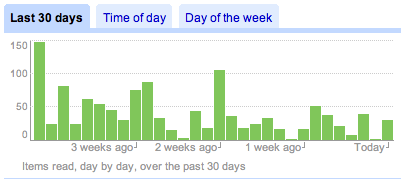
Anyway, pictures speak a thousand words:

Here are the items read, which really only means clicked on, per day during the last month. The declining trend is very apparent. There are days when I try to catch up, like today or two days ago, but I pretty much fail.

Items read over the last 30 days.

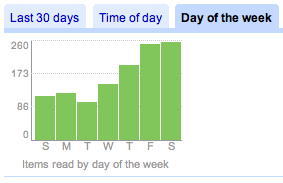
I think the graph of items read by day of week show that I read pretty guilt-free: Mostly on the weekends and not on or before the days we usually have group meetings.

Items read by day of the week.

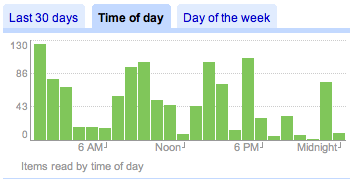
The graph of items read by time of day shows that I read mostly in the morning, when I get up, and at night, before I go to sleep.

Items read by time of day.

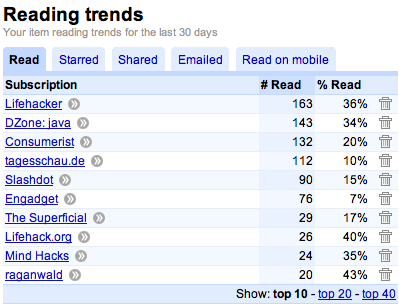
These are the top 10 feeds I read (=click on). Most of them are about “hacking” your life: Small, smart improvements to do things better. “DZone: java” on the other hand is a Java blog and very relevant to my work. I also follow Lambda the Ultimate, but I do that mostly by email so I actually archive every post. That’s why it doesn’t show up.

Top 10 Feeds Read

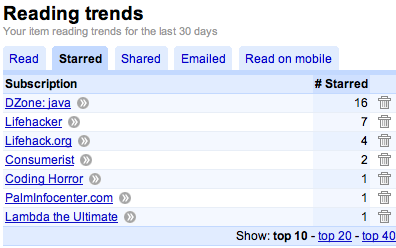
This is a graph of the top 10 feeds with items starred. Starring for me usually means I’ll have to take a closer look again later. Note that again, “DZone: java” is at the top.

Top 10 Feeds Starred

All the images were captured from the “Trends” section of Google Reader.

The idea of feeds is that information that I’m interested in comes to me, and that I can just consume it. It should take the chore of finding that information away. It does. However, trying to keep up and pick out the important items in the feeds has become just as much a chore. Surely, I often find an odd gem that I otherwise wouldn’t have found, such as the BookletCreator, a website that turns a PDF file into another PDF file which you can then print and staple in such a way that it folds nicely like a book.

Nonetheless, I’ll have to remove feeds. I’m overfed. I declare feed bankruptcy.

Share
Posted in Ramblings | Leave a comment

Print This Post Print This Post  

90 Minutes and $2 Wasted on Metro Incompetency

I’ve been riding Houston Metro more frequently lately. It started with taking it to concerts downtown, then picking my mom up at the airport and dropping her off (it took longer, but picking her up by taxi = $130, by shuttle $75, by bus $3!), and it really took off when my bike was broken.

The bus connections are fairly good, but the busses don’t come very frequently (twice an hour tops), and sometimes they don’t come at all. A few times I’ve called Metro to find out when the next bus would come, because the bus I wanted to take was a no-show, and then decided it would be faster to walk.

Light-rail, of course, is amazing. And so is the Q-Card, the proximity card that you can reload using cash and credit cards in most busses and at the light rail stops. It’s probably the only RFID-equipped item I carry (and know of) that I like. My American Express Blue credit card has an RFID device embedded, and I had the that way of paying deactivated, but of course the RFID inside the hard is still happily sending out information.

But with the Q-Card, all you need to do is hold your wallet against a button on the bus or on the light-rail platform, and it’ll deduct the fare from the card and display the remaining balance. You can’t accidentally pay twice, and transfers from one bus to another are automatic. I love it because fidgeting with money always makes me nervous (US currency is still foreign to me, and so is Euro currency actually), and I could never quite figure out when to ask for a transfer ticket.

So, while riding the bus, I found out the other day that students get a 50% discount with the Q-Card. That’s huge. I’ve probably burned about $30 on my Q-Card, and while a dollar for a bus ride isn’t much (at least not compared to the EUR 2.15=$3.25 in Bremen, and I don’t think that allows you to transfer at all!), 50 cents makes it even sweeter.

I called Metro today to find out what I needed to do to change my Q-Card to a Student Q-Card. I actually think that option should have been pointed out to me when I got the Q-Card a few months ago. I was told to just go to a Metro Store with my student ID and some proof that I’m a full time student. I was also told the Metro Store, which is just down the light-rail line, closes at 5:30 PM.

Since it was 5 PM, I printed out some documentation that I was a student, sprinted the quarter mile to the rail station (I actually made it, without being too much out of breath), and got to the Metro Store around 5:20 PM. There was a long line, though, because today was the last day to exchange other types of fare tokens to Q-Cards. So when it was finally my turn, I pulled out my Q-Card, my student ID, and my documentation, only to be told that I needed to go to the Treasury Department on the 2nd floor, which closes at 5 PM.

Think of all the things I could have done instead of take that trip down light-rail lane (and subsequently complain about it here)…

It was generally a bad day: I overslept, I let a friend down, I wasted time with Houston Metro, and the crack at the side of the MacBook reappeared.

Share
Posted in Ramblings | Leave a comment

Print This Post Print This Post  

Still Trouble with Escaping in the Tokenizer

I thought yesterday I finished the escaping part of the new tokenizer, but there are still some problems. If the escape character appears alone, it disappears completely, making it impossible to enter one, or even two or more escape characters. I still need to fix this. I’ve begun to hate escaping.

I got bored with working on the tokenizer, so I added a few easy things that I’ve been wanting to add (or rather: been wanting someone to add) to DrJava for a long time. When auto-completing a word, now you can auto-complete the fully classified path, and it’s also possible to auto-complete all standard Java API classes. It’s still not solved optimally, but it works. I’ll refactor it the other day.

Today I gave a brief introduction into using the YourKit Java Profiler in our COMP 312 class, and today was the first day in about two weeks that I made it home before midnight. I have the strong intention of not going to the office tomorrow. We’ll see if I can keep that up.

Share
Posted in DrJava, Ramblings | Leave a comment

Print This Post Print This Post  

New Tokenizer and DrJava Properties with Attributes

As described in an earlier post, I am looking at all the variables an external process could need. The problem I saw was a large growth of variables that express essentially the same idea, e.g. all the open files, but that are represented differently, e.g. by using ‘:’ as separator instead of ‘ ‘.

I have now solved the problem by using attributes. Each variable can register any number of attributes and set defaults, but the user can override them. To do that, I had to write a new stream tokenizer, as the old one wasn’t easy to use when quote/brace balancing was necessary. The new one, BalancingStreamTokenizer is fairly simple; arguably simpler than the original one. There is no distinction between ordinary characters, word characters, numbers, comments, and quotes. The tokenizer always returns a string.

However, it is possible to register keywords, which are a major replacement over the single-length “ordinary character” concept of Java’s StreamTokenizer. It is furthermore possible to register multi-character quotation symbols where the beginning and the end symbol do not have to match, e.g. /* and */ or ${ and }. Inside quotes, quotation marks are balanced, so a quotation will not cut off at the first matching ending quotation mark, but rather permit correct nesting.

Here are just a few examples of what can be done now:

  • ${drjava.current.file}
  • ${drjava.current.file; dir="/Users/mgricken"}
  • ${drjava.current.file; dir="${user.home}"} — variables can be used again inside attribute values.
  • ${drjava.all.files}
  • ${drjava.all.files; sep=" "}
  • ${drjava.all.files; dir="${drjava.working.dir}"}
  • ${drjava.all.files; dir="${drjava.working.dir}"; sep=" "}
  • ${drjava.current.time.millis}
  • ${drjava.current.time.millis; fmt="full"}
  • ${drjava.current.time.millis; fmt="long"}
  • ${drjava.current.time.millis; fmt="medium"}
  • ${drjava.current.time.millis; fmt="short"}

When the user tries to set an attribute that isn’t valid for a property, an error is emitted. The syntax highlighting works fairly well.

Now I just have to add in all the properties I mentioned earlier…

Share
Posted in DrJava, Ramblings | Leave a comment

Print This Post Print This Post  

StreamTokenizer Does Not Balance Quote Chars

What I’ve always feared was just proved true: Java’s StreamTokenizer does not balance quote characters. If the string is "abc'123"456"789'def", I would want the entire string to be one token, because everything is enclosed in the same pair of " quotes. What StreamTokenizer produces, however, is simply "abc'123". It ends the quoted string at the first matching quote character.

It’s also impossible to define different characters for beginning and ending quotation marks, like { for the beginning and } for the end.

Looks like I have to do quote a bit of work here myself…

Share
Posted in DrJava, Ramblings | Leave a comment

Print This Post Print This Post  

Graduate Recruiting Day, Associates Interview, and DrJava Stuff

Today is graduate recruiting day at the CS department, so we’re supposed to mingle as much as possible with the prospective graduate students. At one point, I started talking to one prospective student, and suddenly I had seven or eight listening to me. I hope I didn’t ruin it for Rice ;-)

That alone would make for a busy day. I also had my second interview with Sid Richardson College’s Associates Committee. I don’t know if I’ve mentioned it before, but I’m applying to be an associate.

I got renewed licenses for the YourKit profiler and showed Corky how to use it. We’re trying to pinpoint the hot spots in the indenting machinery.

Also, as reported before, I’m working on allowing DrJava to spawn external processes, and let the user insert variables like ${drjava.current.file} into the command lines as placeholders.

I’m trying to compile a list of all the variables I should (initially) include. All the DrJava configuration items and the Java system properties are already available. Here is what I have so far:

  • ${drjava.current.file}
  • ${drjava.working.dir}
  • ${drjava.all.files} — this one will have to have options to set the separator between the files and to make the files relative to a certain directory. How I’m going to do that yet, I’m not quite sure.
  • ${drjava.project.files} (see ${drjava.all.files})
  • ${drjava.included.files} (see ${drjava.all.files})
  • ${drjava.excluded.files} (see ${drjava.all.files})
  • ${drjava.word.under.cursor}
  • ${drjava.current.line}
  • ${drjava.current.col}
  • ${drjava.language.level}
  • ${project.current.file}
  • ${project.root.dir}
  • ${project.build.dir}
  • ${project.main.document}
  • ${project.class.path}
  • ${project.bookmarks} — some form of list of “file-line number” pairs, somehow separated. For files, same problem with making them relative to a directory.
  • ${project.compiled.classes} — this one is really the one that needs to be done lazily, and again the problems explained for ${drjava.all.files} apply.
  • ${debugger.breakpoints} — see ${project.bookmarks}
  • ${drjava.version} — some combination of the information in CodeStatus.java and Version.java.
  • ${drjava.revision} — I don’t think this is available right now, but I would like to actually get the revision, not just the build date.

Can anyone think of any additional information that might be useful in external commands or scripts? Please post a comment.

As for the configuration of the separator characters and the directory that paths are relative to, I might have to do something like this: ${drjava.all.files;sep=" ";dir="${project.root.dir}"}. That means that the properties are basically functions, and I’ll have to do interpretation (ok… text processing) recursively. I’m not sure I’m happy about that.

In a few minutes we’re leaving for the recruiting dinner. I don’t know how this day went by so fast, but at least it feels like I’m trying to help out. I think I was the only grad student mingling with the prospectives at the 4 o’clock break.

Share
Posted in DrJava, Graduate School, Ramblings, Uncategorized | Leave a comment

Print This Post Print This Post  

Semi-Weekly Log from 2/18/08 to 2/21/08

Again, another (semi-)weekly log from the DrJava blog. I’m really trying to crank out the basic design and most of the features quickly, and this is my major focus right now, because that way I can hopefully focus on a SIGCSE paper I plan to write (deadline: March 19) and the Java extension that allows subtyping for annotation. But here we go:

Changed keyboard shortcut for Debug mode to MASK + D, instead of just D.

Added DrJavaProperties and PropertyMaps instead of a Map of Properties. These DrJavaProperties can be lazy and delay computationally intensive tasks like that of finding all compiled class files until actually necessary. In the “Preview”, they may display stale values.

Two basic categories existed before, “Java” with the System.getProperties, and “Config” with the values of the DrJava configuration. The “Config” category was previously named “DrJava”, but I thought “Config” was a better name. All the entries in “Config” start with “config.”. The entries in “Java” have the names as specified by Sun.

A new category has been added, “DrJava”, with just a few sample variables. One of them is “drjava.current.time.millis”, which contains the current time in milliseconds since the beginning of the epoche — useless, but a good first test.

“drjava.current.file” contains the currently open document as an absolute path.

“drjava.all.files” contains all open files, separated by File.pathSeparator. “drjava.project.files”, “drjava.included.files” and “drjava.external.files” do the same for project files, external files that are saved with the project, and files that are open but not part of the project.

The same “drjava.\*.files” properties exist as “drjava.\*.files.spaces”, but here, a space is used to separate the files.

Properties can listen to each other to find out when their values have been invalidated. There is a debug mechanism in place that prevents infinite loops.

These are only some very basic sample properties, and we need lots more, and we need to make sure that we invalidate the values of the properties in all the right places, but it’s a good start.

On a Linux system, for example, try opening a project and then run an external process with the command line:

tar cfvz test.tar.gz ${drjava.all.files.spaces}

It will create a tar file with all the source files currently open.

Not bad, eh? Please help me figure out what other properties are needed, and how we can easily make them relative to other directories, etc.

This is a massive commit, with far-reaching changes. Please update your working copy of DrJava to the newest revision and test the changes, the new features, and also the old ones to make sure I haven’t broken anything.

Thanks!

M    src/edu/rice/cs/drjava/config/OptionConstants.java
A    src/edu/rice/cs/drjava/config/DrJavaProperty.java
A    src/edu/rice/cs/drjava/config/JavaSystemProperty.java
A    src/edu/rice/cs/drjava/config/PropertyMaps.java
A    src/edu/rice/cs/drjava/config/ConfigProperty.java
A    src/edu/rice/cs/drjava/config/EagerProperty.java
M    src/edu/rice/cs/drjava/ui/MainFrame.java
M    src/edu/rice/cs/drjava/ui/InsertVariableDialog.java
M    src/edu/rice/cs/drjava/ui/ExecuteExternalDialog.java
M    src/edu/rice/cs/util/JVMProcessCreator.java
M    src/edu/rice/cs/util/StringOps.java
M    src/edu/rice/cs/util/StringOpsTest.java
M    src/edu/rice/cs/util/ProcessCreator.java
Share
Posted in DrJava, Research, xajavac | Leave a comment

Print This Post Print This Post  

Weekly log for 2/11-2/17

We now have an internal password-protected DrJava blog. I think in some cases I will double-post my work on DrJava here on my blog. So, below is my weekly log:

This week I worked on the external process facility. I’m now able to run shell programs and Java programs, and Java properties can be used, and the runtime values are substituted in before the program runs.

At one point I added the ability to set the working directory where the execution starts, but I realized that, in order to keep things as general as possible, users might want to use Java properties and environment variables there too. That meant I couldn’t use DirectorySelectorComponent anymore.

I got to the point where the dialog to set up external shell and Java programs looked pretty nice, including a syntax-highlighted preview of the command line with the runtime values substituted in for variables. There is also a dialog for browsing the variables that can be inserted, and it’s multi-tabbed now, so we can group variables into categories.

After some discussion about what variables should look like (I used %variable% before), I changed my code to use ${variable}. That made it more complex, but it uses the Ant syntax now. I believe %variable% was MS DOS.

I then started working on allowing the user to save the processes and make them accessible from the main menu. Unfortunately, I made a wrong decision here about how to save the data in the OptionsConstants. There was no built-in way to add new keys to be saved at runtime, and I wanted to add keys that looked like external.saved.1.name, external.saved.1.type, etc.

I have now realized that using several VectorOption<String> is better, and I’m now changing the code. I have to make sure that it properly encodes quotes and other symbols, though.

Share
Posted in DrJava | Leave a comment

Print This Post Print This Post  

Early Events Before AWT/Swing Realization?

On Tuesday, Dr. Nguyen asked me to help answer one of his students’ questions. In the first lecture on Java GUIs, a student asked if we shouldn’t do the entire creation of the GUI in the event thread, using SwingUtilities.invokeLater.

Both Dr. Nguyen and I looked through the code and decided that what we were doing was fine, even though Sun’s official stance is that GUI creation should happen in the event thread. However, as far as I knew, events can really only begin to trickle in once the GUI has been realized, by using setVisible(true) or pack(), for example. Since the main thread dies immediately after realization, there cannot be any undesirable interaction due to concurrency.

Yesterday, I sat in Dr. Nguyen’s COMP 212 class and testified this and further explained the notion of realization. As the class moved on, though, I looked through the listeners that one can install on a JFrame, and I noticed three listeners in particular: ComponentListener, PropertyChangeListener, and ContainerListener. I was worried that these listeners might be invoked even before realization, so I modified my statement to the class that what Dr. Nguyen was doing was fine, but that there are some things during GUI initialization that have to be done in the event thread.

Today I took the time to experiment a bit, and I wrote the following program:

import java.awt.*;
import java.awt.event.*;
import javax.swing.*;
import javax.swing.event.*;
import java.beans.*;

public class EarlyEvent {
public static void main(String[] args) {
JFrame f = new Frame1("A JFrame with 2 JButtons");
f.setVisible(true);
}
private static abstract class AFrame extends JFrame {
public AFrame(String title) {
super(title);
addWindowListener(new java.awt.event.WindowAdapter() {
public void windowClosing(java.awt.event.WindowEvent e) {
System.exit(0);
}
});
addComponentListener(new ComponentListener() {
public void componentHidden(ComponentEvent e) {
System.out.println(Thread.currentThread().getName()+
": Invoked when the component has been made invisible.");
}
public void componentMoved(ComponentEvent e) {
System.out.println(Thread.currentThread().getName()+
": Invoked when the component's position changes.");
}
public void componentResized(ComponentEvent e) {
System.out.println(Thread.currentThread().getName()+
": Invoked when the component's size changes.");
}
public void componentShown(ComponentEvent e) {
System.out.println(Thread.currentThread().getName()+
": Invoked when the component has been made visible.");
}
});
addPropertyChangeListener("background", new PropertyChangeListener() {
public void propertyChange(PropertyChangeEvent evt) {
System.out.println(Thread.currentThread().getName()+
": This method gets called when a bound property is changed.");
}
});
getContentPane().addContainerListener(new ContainerListener() {
public void componentAdded(ContainerEvent e) {
System.out.println(Thread.currentThread().getName()+
": Invoked when a component has been added to the container.");
}
public void componentRemoved(ContainerEvent e) {
System.out.println(Thread.currentThread().getName()+
": Invoked when a component has been removed from the container.");
}
});
initialize();
}
protected abstract void initialize();
}
private static class Frame1 extends AFrame {
public Frame1(String title) {
super(title);
}
protected void initialize() {
Container cp = getContentPane();
cp.setLayout(new FlowLayout());
JButton jb1 = new JButton("Button 1");
JButton jb2 = new JButton("Button 2");
cp.add(jb1);
cp.add(jb2);
setSize(300, 300);
setLocation(200, 200);
System.out.println(Thread.currentThread().getName()+": pack or setVisible");
//pack();
setVisible(true);
}
}
}

It is heavily based on the listings given in Dr. Nguyen’s GUI lecture, except all packaged into a single file. Because I was still trying to make it as similar as possible to the listings COMP 212 uses, since this might serve as a demonstration for the class, the listing is longer and a bit more convoluted than it would have to be just to prove the point.

What I’m doing in the AFrame constructor is add the aforementioned listeners before GUI construction actually takes place in the initialize() method. The listeners print out what happened, prefixed by the name of the thread in which the listener method is executed. Finally, right before calling the pack() method, which causes realization, I print the thread name (which I know is the main thread) and "pack or setVisible".

What I feared was that listeners would be invoked before I see "pack or setVisible" being printed, and that the code would be running in the event thread already, disproving my assumption that before realization there would only be the main thread.

However, that does not seem to be the case. The ComponentListener is only executed after realization, and while the PropertyChangeListener and the ContainerListener get executed before realization, the code runs in the main thread. Also, interestingly, the request to reposition the frame gets delayed until after realization. Here is the output from the program:

main: Invoked when a component has been added to the container.
main: This method gets called when a bound property is changed.
main: pack or setVisible
AWT-EventQueue-0: Invoked when the component's size changes.
AWT-EventQueue-0: Invoked when the component's position changes.
AWT-EventQueue-0: Invoked when the component has been made visible.

Everyone should know that writing multithreaded GUI programs is difficult, and that care needs to be taken, so Sun’s advice to serialize access to, and particularly mutation of, the GUI by using SwingUtilities.invokeLater. However, I still have to encounter an example where not doing this does actually cause a problem.

Share
Posted in Graduate School, Research | Leave a comment

Print This Post Print This Post  

Don’t Trust Jewelers

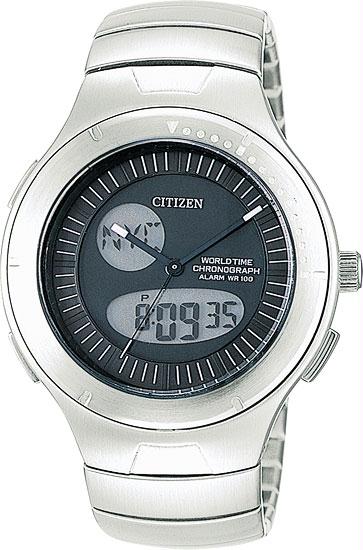
In 2003, I bought a Citizen JU0010-55E Hide-Away watch. I think it’s a pretty neat watch. I definitely need multiple time zones, because my family and the people I know are scattered all over the globe, and functions like a stopwatch, a countdown clock, alarms, and electro-luminescent back lighting are pretty nice. I don’t like digital watches, though: They always seemed cheap and for stupid people. A lot of the things mentioned above, though, are much easier and more conveniently done on a digital watch. In this watch, the digital display takes care of all of the non-essential watch functions, but it can be completely hidden away. I love it!

Citizen JU0010-55E Men’s Hide-Away Watch

Unfortunately, recently I must have banged the watch into something and damaged it. The most visible part was that the crown (the knob in the center right) had fallen off. I managed to recover it, but couldn’t put it back on. The watch wasn’t usable anymore.

A few weeks ago, I took the watch to Box & Box Custom Jewelers in the Rice Village and asked them to repair it. I don’t know how watches work, but I was informed it needed a new stem and crown. I was promised a quote in a few days. I called several times and was told that the spare parts hadn’t arrived yet. Finally, last Friday, February 8, I was able to pick it up. I was in a hurry to get back to the office, so I paid the $92.01 (which included tax and a battery change for another watch; the repair cost for the Citizen watch was $85 before tax). I was a bit shocked at the price, but I figured my watch was repaired and the hassle over. I didn’t notice right away that the button on the lower right didn’t work. It was stuck. It didn’t move at all.

I called Box & Box right away from my office, but 5:36 PM is apparently after their closing time. I left my number twice at the end, to make it easy for them to write it down, and asked for a call-back. I never got one. Today, on February 13, I took the watch back in. But before I did, I wanted to find out if the watch was still available. It is. If I ordered it today, I could have it new on Friday, with a 5-year warranty, for only $109. Considering that I paid $85 plus tax for a repair that didn’t repair the watch (only part of it), I feel robbed.

I talked to the jewelers today, and they confirmed that the button wasn’t working. They even admitted that they noticed it before they let me know that my watch was ready to be picked up (they didn’t call me, I had to repeatedly call them). They also said that they were constantly in a rush while working on my watch. It didn’t strike them as odd that a button didn’t move and apparently didn’t do anything; they figured Citizen might have just put it there for looks. I feel they should have mentioned to me the fact that a button wasn’t working.

They also claimed they gave me a quote, $85, and I told them to go ahead. Honestly, I don’t have any memory of that conversation ever taking place, especially since Box & Box Custom Jewelers never called me. I always called them. In the future, I will purchase CallRec for my phone to unequivocally prove what people tell or don’t tell me. Sure, I’m getting old at my 28 years, but if I had been told that the repairs would be $85, why would I have been shocked about the total of $92.01? I was never given a quote, I just can’t prove it. Had I been given the quote of $85, I would have bought a new watch for $109.

I asked them what they are planning to do to resolve the situation. They said they had a local Citizen expert, and they were going to show the watch to that export. I asked them if that would be free of charge, and they confirmed it. I asked them to put that in writing, at which point the Tony Box, the jeweler, took offense and asked if it wasn’t enough that he had just told me that it would be free of charge. Sorry, pal. Not anymore. In retrospect, I should have insisted on a written quote. I’m not sure, but when he wrote “Will will will attempt to repair function button”, the triple “will” makes me suspect he was mocking me. Also, at first he didn’t write down that it would be free of charge.

If the local Citizen expert cannot do anything, then they are going to come up with a “plan B”, which they couldn’t reveal yet, but which might involve helping me get a new watch at a lower price. The way that sounds to me is that they will try to sell me one of their watches for less than the regular price. I don’t think I have any interest in forking over even more money to this outfit. In fact, I am considering a charge-back on my Visa card: I consider their behavior breach of contract. I wanted the watch repaired; their expert opinion was that the stem and crown had to be replaced. Did I know that? No, I’m not an expert watch repairman. I just told them I wanted it fixed.

Finally, they told me that if the local Citizen contact cannot help, my watch cannot be fixed, because Citizen does not have the spare parts. After only a few years, they consider watches obsolete. I took the liberty of calling the headquarter of Citizen Watch Company of America in Torrance, CA, at 800-321-1023 and talked to a customer service representative named Lisa. She said that most parts for this watch were still in stock, includin the buttons. Box & Box flat out lied to me! It feels good to at least have definitely caught them in one lie.

I really wish I had sent my watch directly to Citizen. There would have been a $15 shipping and handling charge, and at that time, Citizen would have determined if the watch can be repaired and what the repairs would cost. Had I decided not to have the repairs done (for example because of an outrageous $85 claim), Citizen would have shipped the watch back to me free of charge.

Lessen of the day: Don’t trust jewelers. At least not these guys. Stay far away from Box & Box Custom Jewelers in the village. They seem like nice guys, but their professional behavior is severely lacking.

Share
Posted in Ramblings, Uncategorized | Leave a comment

Print This Post Print This Post  

Mutate and Return

I’ve decided to start a new category: The Code Pranger. Maybe it’s a bit redundant, because most of it will be some form of rambling, and The Daily WTF probably does a much better and much more public job at this, but this pranger will be under my control.

To clarify, a pranger is a medieval device for torture and public humiliation, similar to stocks. Someone who had done something shameful was locked up in a pranger, usually by restraining the neck and both hands between two pieces of metal or wood, and exposed to the public. I am not going to expose the writers of bad code here (even though sometimes I might want to; let this be a reminder to myself: don’t!), I’ll just put pieces of code, which I find ugly, on the pranger.

The purpose, of course, is to provide anti-patterns, perhaps create some discussion, and increase the overall quality of code being written. I realize that I will probably won’t achieve the last of those goals. I also realize that I probably won’t even fix the examples of bad code, because I believe in the maxim of “don’t fix what’s not broken”, where broken and ugly aren’t the same thing.

Anyway, here we go. I absolutely hate this piece of code summarized below:

public class ProjectPropertiesFrame extends JFrame {
// ...
private DirectorySelectorComponent _workDirSelector;
// ...
public JPanel _workDirectoryPanel() {
_workDirSelector = new DirectorySelectorComponent(/* ... */);
// ...
return _workDirSelector;
}
private void _setupPanel(JPanel panel) {
// ...
JPanel wdPanel = _workDirectoryPanel();
gridbag.setConstraints(wdPanel, c);
panel.add(wdPanel);
// ...
}
}

The method \_workDirectoryPanel() mutates the _workDirSelector field and returns the new value of the field at the same time. At the call site, the return value is used for further processing.

Why mutate and return? Either mutate the field, let the method be void, and use the field. It’s been mutated, so it’s ready to go. Or don’t touch the field, don’t mutate, return the new value to the caller, and let the caller decide what to do: Mutating the field, for example. If you really want to do both, at least return the old value of the field before it was mutated. That makes at least sense in some situations.

But mutating and returning the value of the field? That’s just a function with an ugly, perverse side effect. I really don’t see the use at all. Is it convenience? No, it can’t be, it would be more convenient just to mutate and not create the local variable wdPanel. Why would anyone write this?

I think mutation should be avoided whenever possible. Of course, in most production programming languages, that’s not possible. So make a void function and be explicit about the mutation you’re doing. There’s a programming style that really dislikes void methods; I sometimes subscribe to it. If a method is void, you can’t chain method calls together. If it returns something, you can. So if, for example, you have a List class and the add(T element) method mutates the internal state of the list, then you could let the method return this:

public class List {
// ...
public List add(T element) {
// ...
return this;
}
}

That way, you can quite succinctly write something like myList.add(1).add(2).add(3);. But that’s a completely different situation.

Can anyone find an explanation why a method should mutate a field and return the new value of the field? I can’t.

Share
Posted in Code Pranger, DrJava, Ramblings | Leave a comment

Print This Post Print This Post