Polyglot Classpath in Habanero Java Compiler

I’m trying to integrate the Habanero Java compiler into DrJava in a way that doesn’t require all the compiler classes to be present in the DrJava jar file. I want it to behave the same as javac, Mint, or NextGen.

In doing so, I noticed that Polyglot wasn’t finding some of the Habanero Java runtime classes, and I suspected that the Polyglot classpath wasn’t set up correctly. I was always getting a [cci lang=”java”]polyglot.util.InternalCompilerError[/cci], [cci lang=”java”]”Cannot find class “hj.lang.Runtime”[/cci].

After looking through the Polyglot, Soot and Habanero Java sources, I inserted a [cci lang=”java”]System.out.println[/cci] call in Polyglot’s [cci lang=”java”]LoadedClassesResolver[/cci], and my suspicion was confirmed: The Polyglot classpath doesn’t have the dynamically loaded jar files on it. When I hardcoded the classpath in [cci lang=”java”]LoadedClassesResolver[/cci] to be the required path, I was able to compile Habanero Java files within DrJava.

When we invoke the Habanero Java compiler from DrJava using [cci lang=”java”]soot.Main.mainEntry[/cci], however, we pass the entire classpath using the -cp option
([cci lang=”java”]testCommand[4][/cci] and [cci lang=”java”]testCommand[4][/cci] in HjCompiler.java, lines 263 and
following
).

I think the Habanero Java developers should just be able to pass that classpath to Polyglot as well. It
looks like the [cci lang=”java”]initExtInfo()[/cci] method in HjToJimple.java would be the
right place to set
[cci lang=”java”]options.classpath[/cci].

I haven’t confirmed this yet, because building Habanero Java is probably more involved than just compiling Polyglot.

Share
Posted in DrJava | 1 Comment

Print This Post Print This Post  

August Braindump

This isn’t really going to be well-formatted, but I want to write down a few things that I have on my mind… This blog is for me anyway, not for you.

I need to rewrite the DrJava JDK descriptors to use the null object pattern instead of the [cci lang=”java”]null[/cci] constant. Checking for [cci lang=”java”]null[/cci] is icky. (Update: This is done now, and it’s so much more beautiful.)

I should try to help one of Prof. Mankoff’s students who has a problem with the Media Computation library. (Update: I emailed back and tried to help as much as I could, but I haven’t heard if it was enough.)

In integrating Habanero Java into DrJava, it seems like Polyglot doesn’t have the right classpath and can’t find [cci lang=”java”]hj.lang.Runtime[/cci].(Update: This is done now, and it’s working.)

It took me forever to find out how the -hj option is defined in Soot, but now I have realized that soot_options.xml defines the options, and the Options.java class is autogenerated. It contains a [cci lang=”java”]hj()[/cci] getter.

Share
Posted in DrJava | 1 Comment

Print This Post Print This Post  

Dumbest Bug Report of the Month

I think this bug report we just received is a promising candidate for Dumbest Bug Report of the Month:

Summary: something is missing?

Initial Comment:
i\’ve just download it. haven\’t start yet

(backslashes present in original)

That’s it. No more detail. What is this guy waiting for? Oh, I know! He’s waiting for my mind reading skills, which actually are missing.

Share
Posted in DrJava, Ramblings | Leave a comment

Print This Post Print This Post  

Another Bugfix for Smart Run

A while ago, I introduced what was supposed to be a “Smart Run” feature, a simpler way of running Java programs, ACM Java Task Force programs, and applets. It sort of worked, but it has been difficult to get it right: The code is concatenated in an ugly manner and interpreted, but since it’s still Java with its type system, I sort of get all the problems but none of the benefits of interpretation.

Now Paul Ezust, Professor of Mathematics and Computer Science at Suffolk University, has notified me of another problem: If the class a user is attempting to run is not marked public then an exception is thrown.

With “Smart Run”, the code to start the program is a lot more complicated. DrJava needs to determine whether a program is an applet, and if it isn’t, it needs to check if it is an ACM Java Task Force program. In the last two situations, the main method is then invoked using reflection (come to think of it, I could probably do this without reflection, too… I should try that).

If the class isn’t public, then Method.invoke will throw an IllegalAccessException unless I call setAccessible(true) first. Now I do that, and I also handle the other exceptions better.

Here’s the concatenated command. Unwieldy, hm? I wish Java had multiline quotes.

String command =
"'{' boolean isProgram = false; boolean isApplet = false; Class c = {0}.class;\n" +
// cannot use Class.forName, doesn't work in Interactions Pane (see bug #1080869)
"while(c != null) '{'\n" +
" if (\"acm.program.Program\".equals(c.getName())) '{' isProgram = true; break; '}'\n" +
" c = c.getSuperclass();\n" +
"'}'\n" +
"if (!isProgram) '{'\n" +
" try '{'\n" +
// if this doesn't throw, {0} is a subclass of Applet
" {0}.class.asSubclass(java.applet.Applet.class);\n" +
" isApplet = true;\n" +
" '}' catch(ClassCastException cce) '{' '}'\n" +
"'}'\n" +
"if (isApplet) '{'\n" +
" edu.rice.cs.plt.swing.SwingUtil.showApplet(java.applet.Applet.class.cast(new {0}({1})), 400, 300);\n" +
"'}'\n" +
"else '{'" +
" java.lang.reflect.Method m = null;\n" +
" try '{'\n" +
" m = {0}.class.getMethod(\"main\", java.lang.String[].class);\n" +
" if (!m.getReturnType().equals(void.class)) throw new java.lang.NoSuchMethodException();\n" +
" '}'\n" +
" catch (java.lang.NoSuchMethodException e) '{'\n" +
" throw new java.lang.NoSuchMethodError(\"main\");\n" +
" '}'\n" +
" String[] args = new String[]'{'{1}'}';\n" +
" if (isProgram) '{'\n" +
" String[] newArgs = new String[args.length+1];\n" +
" newArgs[0] = \"code={0}\";\n" +
" System.arraycopy(args, 0, newArgs, 1, args.length);\n" +
" args = newArgs;\n" +
" '}'\n" +
" try '{'" +
" m.setAccessible(true);\n" +
" m.invoke(null, new Object[] '{' args '}');\n" +
" '}' catch(SecurityException se) '{'\n" +
" System.err.println(\"Error: Please turn off 'Smart Run' or use 'java' command instead of 'run'.\");\n" +
" '}' catch(IllegalAccessException iae) '{'\n" +
" System.err.println(\"Error: Please turn off 'Smart Run' or use 'java' command instead of 'run'.\");\n" +
" '}' catch(java.lang.reflect.InvocationTargetException ite) '{'\n" +
" if (ite.getCause()!=null) throw ite.getCause(); else\n" +
" System.err.println(\"Error: Please turn off 'Smart Run' or use 'java' command instead of 'run'.\");\n" +
"'}' '}' '}'";

I should try to rewrite this as Java code that doesn’t get interpreted in our Interactions Pane, but that actually gets statically compiled.

The bugfix is currently only available in our (more or less) DrJava weekly jar.

Share
Posted in DrJava | Leave a comment

Print This Post Print This Post  

New Mint Release: r15665

I just created a new release of Mint and DrJava with Mint: July 28, 2010 (r15665). It’s been over a year since we made the first version of Mint available! The latest release is, as always, available from the Mint implementation page:

Nothing really changed in the Mint language or in the way Mint is implemented; however, we moved our modified javac compiler into subpackages of the edu.rice.cs.mint.comp package, which means that the compiler is now invoked using the edu.rice.cs.mint.comp.com.sun.tools.javac.Main class.

The package and class names got a bit long, but by not using the same class names as Sun/Oracle, we can use our compiler together with other compilers or the original compiler if we want to, and there won’t be any class name clashes.

(Re-posted from The Java Mint Blog.)

Share
Posted in Mint | Leave a comment

Print This Post Print This Post  

Oracle’s JRE Rebranding

From Slashdot:

“In Java 1.6.0_21, the company field was changed from ‘Sun Microsystems, Inc’ to ‘Oracle.’ Apparently not the best idea, because some applications depend on that field to identify the virtual machine. All Eclipse versions since 3.3 (released 2007) until and including the recent Helios release (2010) have been reported to crash with an OutOfMemoryError due to this change. This is particularly funny since the update is deployed through automatic update and suddenly applications cease to work.”

We probably need to check how DrJava behaves, too.

See also the Eclipse bug report 319514 and the Oracle/Sun bug report 6969236.

Update

Oracle now says that the rebranding will not happen until Java 7 is released:

In consideration to Eclipse and other potentially affected users, Oracle has restored the Windows Company Name property value to “Sun Microsystems”. This value will be changed to “Oracle” in JDK 7.

Update

I actually misunderstood the problem. DrJava would not have been affected at this time because the java.vm.vendor property wasn’t changed. It will change with Java 7, though.

Share
Posted in DrJava | Leave a comment

Print This Post Print This Post  

WTF TX DPS?

WTF… After being on hold with the TX DPS for 19 minutes, they just hung up on me. Thanks, it’s not like dealing with you is a huge waste of time anyway.

I had to renew my TX drivers license again in June because my temporary visitor status expired, even though it really didn’t, because I can legally stay in the US as I’m a student. That was 39 days ago, my temporary license expires in 6 days, and I still haven’t received my new license.

Looks like I’ll have to make a ninth trip to the DPS in less than two years.

Update

Now they’re so busy, they can’t even take my call and put me on hold. It really looks like I have to go to the DPS office again. Vomit.

Update

I received the following email:

Thank you for giving the Department the opportunity to respond to your email inquiry.

Your visitor status has been updated. A request for a new license has been submitted and will be mailed to the address you provided. Allow 2 to 3 weeks for delivery.

I guess I don’t have to go to the office, but I probably still am not allowed to drive with my temporary license once it expires…?

Share
Posted in Ramblings | Leave a comment

Print This Post Print This Post  

GUI Availability Listeners in DrJava

I decided to merge the drjava-guiAvailListener branch into the trunk, even though I said I wouldn’t do this until after the next stable release. Dr. Nguyen and I have used this new version quite a bit already, and we still have a few days before the stable. I’m already confident the new implementation is bug-free.

The GUI availability listeners allow us to tie the state of certain GUI actions, for example the menu item to invoke Javadoc, to the availability of abstract components, for example the compiler. This had become necessary because many of the GUI actions are actually intertwined and mutually exclusive. Running JUnit could invoke the compiler first, and we knew that for a while; but just this spring, we realized that running Javadoc may have to do that too if we are dealing with Language Level source files.

The problem with directly enabling and disabling GUI actions was in some cases, these GUI actions were being re-enabled too early, before the entire action had actually been performed. With these new listeners, actions can specify a set of abstract components that must all be available, and when the status of one of these components changes, the GUI action is enabled or disabled appropriately.

Share
Posted in DrJava | Leave a comment

Print This Post Print This Post  

New Mint Release: r15637

I just created a new release of Mint and DrJava with Mint: July 22, 2010 (r15637). It’s been over a year since we made the first version of Mint available! The latest release is, as always, available from the Mint implementation page:

The DrJava team released a third beta version of DrJava almost two weeks ago, drjava-beta-20100711-r5314.

The only thing that changed on the Mint language side is the implementation of the toString() method for brackets.

There have a been plenty of new features and bugfixes for DrJava, and they have been integrated into DrJava with Mint. In fact, DrJava with Mint includes a few bugfixes that are not yet in the latest beta of DrJava.

(Re-posted from The Java Mint Blog.)

Share
Posted in Mint | Leave a comment

Print This Post Print This Post  

javac Regression and Unit Tests

Joseph D. Darcy posted an informative article on writing regression and unit tests for new Java language features using JCK. This would have been useful for the Mint co-author who was supposed to write tests but ended up doing absolutely nothing.

Share
Posted in Mint, Ramblings | Leave a comment

Print This Post Print This Post  

Javadoc Processing a File It Doesn’t Need To

I’m running the command line Javadoc tool. In the current directory, I have two files, A.java (which is syntactically correct), and a Broken.java (which has a syntax error in it). A.java doesn’t refer to Broken.java.

File A.java:
[cc lang=”java”]import javax.swing.JApplet;

public class A extends JApplet {
}[/cc]

File Broken.java:
[cc lang=”java”]class class Broken[/cc]

When I try to Javadoc just A.java using the command line

javadoc -d doc A.java

I get this output with an error:

$ javadoc -d doc A.java
Loading source file A.java...
Constructing Javadoc information...
Standard Doclet version 1.6.0_21
Building tree for all the packages and classes...
Generating doc\A.html...
Generating doc\package-frame.html...
Generating doc\package-summary.html...
Generating doc\package-tree.html...
Generating doc\constant-values.html...
Generating doc\serialized-form.html...
.\Broken.java:1: expected
class class Broken
^
.\Broken.java:1: reached end of file while parsing
class class Broken
^
Building index for all the packages and classes...
Generating doc\overview-tree.html...
Generating doc\index-all.html...
Generating doc\deprecated-list.html...
Building index for all classes...
Generating doc\allclasses-frame.html...
Generating doc\allclasses-noframe.html...
Generating doc\index.html...
Generating doc\help-doc.html...
Generating doc\stylesheet.css...
2 errors

If I don’t have an “extends” clause for the class A, then Javadoc doesn’t try to process the Broken.java file.

Can somebody please tell me why Javadoc is looking at Broken.java, and how I can prevent it from doing that? How do I tell Javadoc to just process the file I am specifying?

I’m using a Mac with OS X 10.4, Java 5, but this also occurs on Windows with Java 6 Update 21.

I was told to just fix the syntax error, but as IDE developer, that’s obviously not the solution for me. I can’t tell my users to “just fix the syntax error”.

Share
Posted in DrJava | 1 Comment

Print This Post Print This Post  

Problems Loading Pictures with DrJava and the Media Computation Library

This morning, we got a support request for DrJava that mentioned path problems with the Media Computation library from Georgia Tech.

While some of the problems mentioned could not be reproduced or were simply due to not understanding Java syntax, there was one issue that might affect many users of the Media Computation library: Pictures (and problably other resources) aren’t found even though they should be. They fail to load:

String picFile = FileChooser.pickAFile();
> System.out.println(picFile)
/Users/shoshanaholtzblatt/Documents/CMU/Java/intro-prog-java/mediasources/caterpillar.jpg
> Picture.setMediaPath("/Users/shoshanaholtzblatt/Documents/CMU/Java/intro-prog-java/mediasources/");
The media directory is now /Users/shoshanaholtzblatt/Documents/CMU/Java/intro-prog-java/mediasources/
> Picture pictureObj = new Picture("caterpillar.jpg");
Couldn't load the file caterpillar.jpg

I have experimented a bit with the Media Computation library and found
that the first problem has to do with the working directory of the
Interactions Pane. Please make sure that it is the same as the directory
you pass to Picture.setMediaPath(). You can change the Interactions Pane’s
working directory by going to Edit -> Preferences, selecting the
“Interactions Pane” category and entering a path for “Interactions Working
Directory”.

Before I did that, I had the same problem as your student. Once I set the
working directory, I was able to load the picture:

Welcome to DrJava. Working directory is /home/mgricken/Desktop/mediaComp/mediasources
> String picFile = FileChooser.pickAFile();
> picFile
"/home/mgricken/Desktop/mediaComp/mediasources/caterpillar.jpg"
> Picture.setMediaPath("/home/mgricken/Desktop/mediaComp/mediasources")
The media directory is now /home/mgricken/Desktop/mediaComp/mediasources
> Picture pictureObj = new Picture("caterpillar.jpg");
>

Please note that we do not develop the Media Computation library and
therefore may not be in the best position to help you. You may want to
contact the authors at Georgia Tech using the resources on their website. But if there is something we can change in DrJava to make the Media Computation library easier to use, please let us know.

Share
Posted in DrJava | Leave a comment

Print This Post Print This Post  

Menus for Detached Frames on the Mac

I finally implemented something this weekend that had annoyed me for a long time, ever since in July 2008 I introduced the feature to detach DrJava’s Tabbed Panes and the Debugger and put them into separate windows.

These detached frames can have their own menu bar, but we didn’t have a menu bar set. That means that when you select those windows on the Mac, DrJava’s menu bar goes blank. That’s really annoying, because you first have to click on the main frame before you can use the menu. If you’re using the debugger, for example, you cannot just click on the “Debug” menu and select “Clear All Breakpoints”.

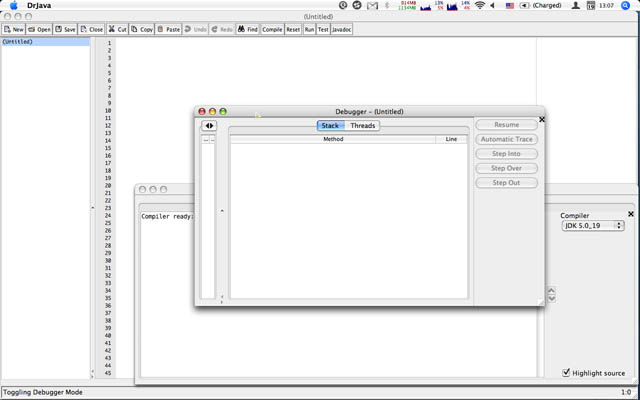
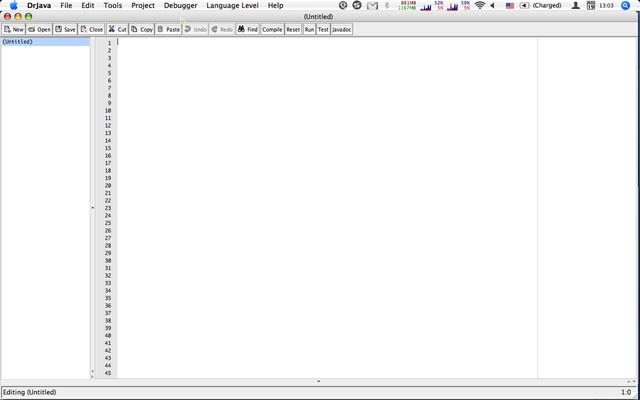
Note how in the first picture, when the detached Debugger window has the focus, there is no DrJava menu bar. The second picture shows the DrJava menu bar, which is only there when the main frame has the focus.

DrJava on Mac, no menu bar

DrJava on Mac: No menu bar when debugger has focus.

DrJava on Mac: menu bar

DrJava on Mac: Menu bar when main frame has focus.

I had noticed this issue before, and I had even experimented with adding the main frame’s menu bar to the detached frames, but that failed, and I never filed a feature request for this until this Friday.

It’s surprisingly difficult to add the same menu bar to multiple frames. Each component can only have one parent, and that means there have to be separate JMenuBar instances, separate JMenu instances, all the way down to separate JMenuItem instances. The only thing that can be shared are the actions the menu items invoke.

Instead of trying to use the same instance or cloning or copying the menu bar, I now create two completely separate structures that only share the actions. Then I have to make sure that they are kept in sync, but there aren’t many things that can change. The most obvious one are the recent files and projects.

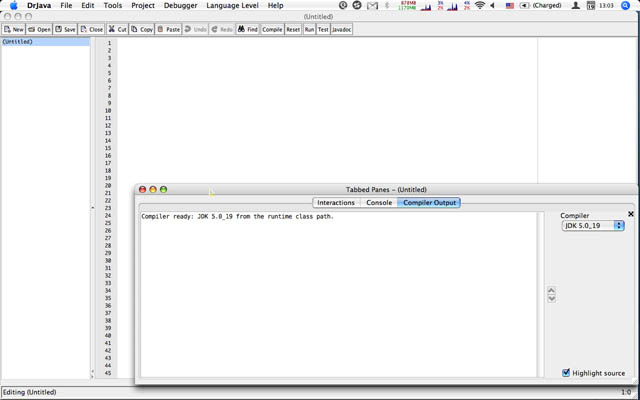
I just noticed that menu items with check boxes aren’t synchronized across frames, so I still need to fix that tomorrow. But when I’m done with that, DrJava will be much more pleasant to use on the Mac. Check out these two new screenshots: Menu bars, as it should be, even when the Debugger or the Tabbed Panes have focus!

DrJava on Mac, menu bar with debugger

DrJava on Mac: Menu bar also when the debugger has focus.

DrJava on Mac, menu bar with tabbed panes

DrJava on Mac: Menu bar also when the tabbed panes have focus.

Does anyone except for me actually detach the tabbed panes and the debugger? I can’t work with them attached anymore…

Update

The bugs I discovered late last night have now been fixed.

Share
Posted in DrJava | Leave a comment

Print This Post Print This Post  

Three Branches and a Trunk

We’re working on three branches of DrJava and on the trunk right now. I don’t think we’ve seen this much parallel development in a while.

In the trunk, for the last three days I’ve been working on a strange bug that Dung found on the Mac:

The menu for the Project does not seem to work right: sometime it just disables itself and does allow the user to select anything, and the run project main class menu item does not seem to work.

One of the ways this was reproducible was:
1. Have project open (with a main class set).
2. Project Properties.
3. Cancel
4. BUG: Project menu items now all disabled.
5. Can be reset by pressing Compile Project button.

This only seems to happen on Mac OS X 10.6, definitely not on my 10.4, and not on Windows or Linux. I finally discovered late this afternoon that a call to JMenuBar.setEnabled seems to be the culprit. This post on the Apple mailing list describes the same symptoms and seems to suggest that the calls maybe appear outside the event thread, and that causes the problems. I have to wait until we can test this on Dung’s OS X 10.6.

On the way, I have fixed a number of smaller bugs that had to do with the project main class and project build directory. Before I realized that JMenuBar.setEnabled seems to be the problem, I also started to rewrite the way we enable menu items, which can get relatively complex: “Clean Build Directory”, for example, may only be enabled if a project is open, a build directory is set, and JUnit isn’t running (which isn’t really an accurate description; it should be any task that ties up that directory for a while: compiling, JUnit, etc.).

I have set up a listener framework for these events. The code greatly simplifies our code, but it is also a fairly major change without external benefits, now that I have diagnosed the problem Dung was having. I don’t want to commit the changes to the trunk until after our next stable release; therefore, the code went into the drjava-guiAvailListener branch.

The folks from the Habanero research group have also begun integrating the Habanero Java compiler into DrJava. That’s in the drjava-hj branch, because we definitely don’t want this in the trunk before the next stable. I haven’t really kept up with how well this has been going. The last thing I heard was that they could compile, but they had problems running programs.

Because of these problems, and because it should really be easier to integrate research compilers into DrJava, I have begun to refactor the entire compiler interface. The idea is that I don’t want to have to modify the main DrJava code to add more search paths for JDKs and compilers anymore. It should really just work by using the custom bundle feature on a jar containing a JDK descriptor and compiler adapter.

I’m using the NextGen compiler as a test of how easy it is to integrate additional compilers. So far I can compile, but I haven’t tried the runtime side of it yet. All of this, again, should definitely not go into the trunk before we release the stable; therefore, this code is in the drjava-compilers branch.

All of this will require major merging, of course. I think the order will probably be drjava-guiAvailListener first, drjava-hj next, and drjava-compilers last, depending on how quickly the Habanero group can get their compiler integrated.

When can this begin? After we have released the next stable. I’m still waiting for a few changes to the language levels. But if they aren’t coming soon, I don’t think we can wait, considering how many DrJava users we have, but how few of them use language levels.

Share
Posted in DrJava | 1 Comment

Print This Post Print This Post  

New Version of DrJava with Mint: drjava-r5246-mint-r15405

The DrJava team released a third beta version of DrJava today, drjava-beta-20100711-r5314.

I therefore created a new release of DrJava with Mint: May 8, 2010 (r15405). The latest release is available from the Mint implementation page:

Nothing has changed on the Mint language side.

(Re-posted from The Java Mint Blog.)

Share
Posted in DrJava, Mint | Leave a comment

Print This Post Print This Post  

New DrJava Beta Release: drjava-beta-20100711-r5314

We have just released our third beta version in preparation for the next stable release: drjava-beta-20100711-r5314. You can download it from SourceForge or from the DrJava homepage.

Available for download at http://drjava.org .

DrJava is a lightweight programming environment for Java designed to
foster test-driven software development. It includes an intelligent
program editor, an interactions pane for evaluating program text, a
source level debugger, and a unit testing tool.

In addition to bug fixes in anticipation of the next stable release,
this beta release includes a number of new features introduced after
the last beta release:

These features include a simplified Java language level facility,
the ability to generate a custom DrJava .jar file that contains
additional libraries, and the ability to abort a “Find All” search
that encounters missing files.

Note: Java 1.4 compatibility has been dropped. To use DrJava, you will
need Java 5 or newer.

New features since the last beta release:

  • There is a new option in Preferences/Interactions Pane
    called “Smart Run (‘java’) Command”. If enabled (default),
    the “Run” button and the “java” command in the Interactions
    Pane detects if the class (a) is an ACM Java Task Force
    program (subclass of acm.program.Program) or (b) an applet.
    If (a), then it runs the program’s main method, but inserts
    “code=MyClass” as argument 0. If (b), it starts the
    applet viewer. Otherwise, the “java” command behaves just
    as before.
  • Right margin line.
  • Improved Save As file naming.
  • Tools->Advanced->New DrJava Instance feature.
  • Appending .jar to file name when generating custom DrJava.

Bug fixes since last beta release:

  • StringIndexOutOfBoundsException During Next Word
  • Exception when double click on External process tab
  • This commit fixes some glitches in the new functional
    LL, effectively subsuming both the Elementary (.dj0)
    and Intermediate (.dj1) language levels.
  • Bugfix for throw null
  • Fixing a memory leak in DefinitionsPane.

New features since the last stable release:

  • The Eclipse Java Compiler is now integrated into DrJava. DrJava
    therefore does not require the JDK anymore to compile
    programs. Note that the JDK is still required to use the debugger
    or to create Javadoc.
  • DrJava supports the OpenJDK and JavaMint (multi-stage programming
    in Java; see http://www.javamint.org/ ) compilers.
  • JUnit 4.7 support.
  • ConcJUnit support (for concurrent unit tests; see
    http://www.concutest.org/ ).
  • Access control for private and package private members now enabled
    by default.
  • DynamicJava (Interpreter) error messages are much better,
    especially those involving method and constructor invocation.
  • Added support in DynamicJava for explicit type arguments in local
    function invocations (x = foo(23)).
  • The Breakpoint, Bookmarks, and Find Results tabbed panes now have
    Previous/Next buttons and associated keyboard shortcuts for simpler
    browsing.
  • The Interactions Pane working directory can now be specified even
    when not using projects.
  • If DrJava cannot start, for example because of bad memory settings
    in the Preferences, DrJava will suggest that you let it reset the
    Preferences.
  • The preferred compiler can now be set, and this setting will be
    restored when DrJava starts the next time.
  • Zoom for Print Preview.
  • New Class wizard.
  • Save Copy ability for Definitions documents, Interactions Pane and
    Console Pane contents.
  • The Java Language Level facility has been simplified. There now is
    only one language level called “Functional Java”, using the file
    extension .dj. It is comparable to the Intermediate level and
    can still compile .dj0 and .dj1 files. .dj2 files are compiled
    using the Full Java compiler. DrJava will suggest that you rename
    .dj0 and .dj1 files to .dj files, and .dj2 files to .java files.
  • DrJava can generate a custom .jar file of itself that includes
    additional files. There is a Tools/Advanced/Generate Custom
    drjava.jar menu item that takes the current DrJava executable file
    and a number of user-specified files to generate a new jar file.

    • The libraries included in the new jar file will then
      automatically be included in the classpath and be usable without
      adding them to a classpath somewhere.
    • There is no functionality to remove the libraries again from the
      modified jar file.
    • Generating a custom DrJava jar file disables the check for
      updated versions. Otherwise a user may download an updated
      version that doesnt have required libraries anymore.
  • When DrJava encounters missing files during a “Find All” search,
    it will ask the user whether to continue or abort the search.
  • Improved “New Java Class” dialog with some auto-completion.
  • Better feedback when Java API data is loaded, which may involve
    some delay if it is retrieved from the internet.

Bug fixes since the last stable release:

  • Fixed some indentation bugs.
  • Fixed some GUI initialization problems that prevented DrJava from
    starting on some systems.
  • Fixed a bug that prevented DrJava from opening on MacOS 10.5 or
    10.6.
  • Fixed compiler error when closing curly brace missing.
  • Fixed NullPointerException in Jar Project dialog.
  • Fixed a bug that prevented users from editing External Processes.
  • Fixed a bug in un-commenting source code.
  • Fixed a bug in displaying the Auto-Import dialog in the
    Interactions Pane.
  • Improved suggestion to increase interactions JVM heap.
  • Improved responsiveness when selecting a compiler.
  • Fixed a bug that prevented users from generating Javadoc of
    Language Level files.
  • DynamicJava (Interpreter) bug fix allows the declaration of
    interfaces.
  • Miscellaneous small DynamicJava bug fixes make it much more robust
    and correct, including better handling of member lookup, inner
    classes, enums, interfaces, raw types, static imports, switch
    statements, casts, and final variables.
  • Bugfix for comparing 0.0 == -0.0 and NaNs.
  • Bugfix in DynamicJava: Supports annotation declarations
  • Bugfix in DynamicJava: Fixes parser bug for enums
  • Bugfix in DynamicJava: Fixes implicit accessibility of interface
    members
  • Bugfix in DynamicJava: Fixes checking of assignments from character
    literals
  • Bugfix in DynamicJava: Improves checking of casts
  • Bugfix in DynamicJava: getClass() is a special method with type
    Class for all classes
  • Bugfix in DynamicJava: Improves error messages for inner class
    references
  • Bugfix in DynamicJava: Preserves location in wildcards
  • Bugfix in DynamicJava: Catches errors that occur during static
    initialization of a class
  • Bugfix in DynamicJava: Short-circuiting during type checking
  • Bugfix in DynamicJava: += for strings
  • Bugfix in DynamicJava: Array initializer is assigned to a non-array
    type
  • Misc improvements to DynamicJava SoureChecker
  • Bugfix that prevented users from watching local variables in the
    Debugger.
  • Smaller Java Language Level fixes.
Share
Posted in DrJava | 1 Comment

Print This Post Print This Post  

Cats That Program

I guess it was only a question of time before someone wrote a programming language in LOLcat dialect: LOLcode.

This listing, for example, prints out the numbers one to ten:

HAI
CAN HAS STDIO?
I HAS A VAR
IM IN YR LOOP
UPZ VAR!!1
VISIBLE VAR
IZ VAR BIGR THAN 10? GTFO. KTHX
KTHX
KTHXBYE

They has a funny…

Share
Posted in Uncategorized | Leave a comment

Print This Post Print This Post  

Rice News: The doctor is out!

The doctor is out!
Rice group celebrates million-download milestone for DrJava

BY MATHIAS RICKEN
Special to Rice News

DrJava isn’t the barista behind the counter at Starbucks. But the doc still serves a pretty potent brew — and more than a million customers can’t be wrong.

DrJava Logo

DrJava is a lightweight, integrated development environment for writing programs in Java, the popular, cross-platform programming language developed in the ’90s by Sun Microsystems. Using Java is the simplest way to write programs that run on all major computer platforms, like Windows, Linux and Mac OS. As a result, Java is now the most commonly used programming language, as measured by the Programming Language Popularity index LangPop.com. For several years, universities and high schools have also been using Java in many of their computer science classes.

Our team at Rice University started building DrJava in 2001, and it has now been downloaded more than a million times.

Mathias Ricken is a Ph.D. candidate in computer science at Rice. (Photo by JEFF FITLOW)

Mathias Ricken is a Ph.D. candidate in computer science at Rice. (Photo by JEFF FITLOW)

The JavaPLT group at Rice continues to develop DrJava as a SourceForge open-source project, primarily to give students an intuitive interface as they learn programming skills. DrJava users can easily evaluate Java code in an “interactions pane” that shows precisely how their creation is working. The environment also includes powerful features for advanced developers.

The development of DrJava began in 2001, led by Robert Cartwright, a Rice professor of computer science. From its initial release the following spring, DrJava source code emphasized the use of Java generics, a method for reducing duplication in code by factoring out certain repeating patterns. Early in the evolution of DrJava, support for Java generics was added to the interactions pane. After the addition of a project facility in 2004 and improved support for large projects beginning in 2006, DrJava experienced a sharp increase in popularity.

DrJava supports several Java compilers, including Oracle/Sun’s JDK, OpenJDK and the Eclipse Java Compiler, as well as such research compilers as NextGen and Java Mint. In 2005, DrJava introduced support for a hierarchy of Java language levels, a pedagogic framework that helps beginners learn Java by partitioning the language into levels of increasing complexity.

More than 60 Rice students have contributed to DrJava over the years through Dr. Cartwright’s class on production programming or as part of independent study projects. DrJava is now being used at institutions across the globe, including Princeton University, the University of Pennsylvania, Cornell University, Georgia Tech, the University of California-San Diego, the University of Washington, Université de Nice Sophia-Antipolis and National University Singapore, as well as Rice.

DrJava has also been used as a teaching tool in books published by Pearson Education and Wiley Higher Education.

DrJava is freely distributed under the BSD License. Download it at http://drjava.org/.

—Mathias Ricken is a Ph.D. candidate in computer science at Rice.

(Reposted from Rice News.)

Share
Posted in DrJava, Pictures | Leave a comment

Print This Post Print This Post  

My Name is Not _______

I’m lucky to receive about three or four emails from recruiters and companies per week, asking me if I want to interview. I’m flattered, but perhaps that is also making me a bit picky.

I understand that I’m not the only candidate out there, and that recruiters can be just as choosy; however, you may at least pretend to make an effort. For example, you may want to learn how to use your mail merge program.

Sr. Architect/Developer Opportunity

Hello _______, I hope all is well.

My name is xxx xxxxxxxx and I’m a technical recruiter here in xxxxxxxx. I wanted to reach out and see if you would be interested in a Sr. Architect/Developer position that I have available with an equities trading firm near downtown xxxxxx.

[…]

My name isn’t _______.

Share
Posted in Ramblings | Leave a comment

Print This Post Print This Post  

A Conversation

Friend: “Do you really want an academic job?”
Mathias: “Yes.”
Friend: “Why? Is that what you’re comfortable with?”
Mathias: “It actually isn’t the most comfortable, but it is the most rewarding.”

\*sigh\*

Share
Posted in Uncategorized | Leave a comment

Print This Post Print This Post