Lecture 1 Review

The first lecture went well, even though I initially had problems with the projectors. I couldn’t get my notebook hooked up, so I used the podium PC. I also did not yet have card access to get into Symonds 1, but I could not set up early anyway because there was a class in the lab. My time is sandwiched between two other classes, so I really can’t start much before 10 AM and need to be out by 11 AM.

We went over the general information. Here I should have mentioned that the students can anonymously complain to Dr. Wong if they have a problem with me.

We did a quick review of IList and LRStruct and the design patterns involved. Then we already started with the lab material, talking about how to set up words. Composite, state and visitor with three cases came up. We will continue that in class.

On Friday, we might talk about the games they did at the end of COMP 201.

After a summer of waiting, I failed to consciously register one of the most anticipated things: the number of students. I think there were six or seven.

Also, I’m terribly disappointed by the clumsy interface of my video camera. I failed to record my first lecture on video.

Share
Posted in Review | Leave a comment

Print This Post Print This Post  

A New School Year

It’s 9 AM now, and a new school year has begun. I don’t think I have been this nervous in a while.

But there’s a reason for that: In just an hour, I will be delivering the first lecture of the first course that I am teaching by myself, COMP 202 – Principles of Object-Oriented Programming II.

I’ve re-worked and re-ordered some of the past lectures, switched out a few assignments, and added a new one, Hangman Refactored. It uses the Janus principle and fits in really well after the Programming for Change lecture and the Temperature Calculator assignment. At least that’s what I think. We’ll see how it goes.

On Saturday, I went to a wonderful workshop that the School of Engineering set up for TAs. I was on their list because this year I get paid by the School of Engineering. The discussion of different learning styles prompted me to ask the students to fill out a Learning Styles Questionnaire.

During the last three or four days, I also improved the external process facility of DrJava a bit. Clearer error messages are now printed to the external process panes, there are ${and}, ${or}, ${not} and ${neq} (not equal) properties, and simple search-and-replace can be done using the ${replace.string;text="...";old="...";new="..."} property.

I then approached the NextGen and xajavac compiler addons for DrJava again. Fortunately, Dan had told me about javac argfiles, which elegantly solve the long-command-line problem. However, I discovered that some problems, like keeping together file names with spaces in them, reappear when printing to text files, even though I had solved them for the command line. I got around that by adding quoting options for file properties.

Now we have two working DrJava Addons (“djapps”) that integrate NextGen and xajavac into DrJava.

Okay now, I’m going to get ready for COMP 202. I hope my Rice ID card will finally let me into the room. Wish me luck.

Share
Posted in COMP202, DrJava, Graduate School | Leave a comment

Print This Post Print This Post  

One DrJava Fix, Lots of COMP 202 Issues

I fixed one issue that had come up again: Competing modal dialogs. For some reason that I’ve already forgotten, we couldn’t use real modal dialogs that come in the form of Dialog or JDialog, so we just used a JFrame and listeners, and stole the focus back whenever someone took it from us. It worked for a while, because DrJava rarely used windows except for the main window.

In the last couple of years, though, we have added more and more windows: The predictive input dialogs to help you search or find Javadoc pages, the error dialog to collect and better display error messages while making them appear less critical, and now even the bottom panes and the debugger can be detached.

I handled most of this by creating a cooperative first-come-first-serve scheme of being modal. Every window that was trying to be modal, asked for modal status, but only one could have it. I considered moving making windows modal that were initially denied modal status, but left it there.

However, there were still other windows that could modally pop up, and those were real modal dialogs out of my control. In his bug report, [ 2040862 ] Modal dialog flicker: Project Properties/Increase Heap, Dan had one of my pseudo-modal dialogs (Project Properties) compete with a real modal dialog (Increase Heap).

Now I check whether the opposite window, the one that stole our focus, is a real modal dialog. If that is the case, we concede modalness. However, we install a listener that will make us modal again when the real modal dialog has been closed.

I have tried to simulate the problem with two windows competing, but I never quite succeeded, so I hope Dan or someone else can reproduce the problem and confirm that the issue has been fixed.

Shifting gears: I have been thinking and working a lot on the COMP 202 lecture notes, and website in general. I am taking over most of what was there from the previous year, but I am making a few changes. For example, I have decided to take more time for a few of the more difficult topics. I have also replaced two unpopular assignments with two assignments of mine, and I have replaced another assignment with one that I am more familiar with. I hope to maintain the level of teaching in general, but I also have to make sure I don’t completely overload myself. Better a little bit less but well done, than more with lots of confusion.

One thing I have to confess here, though: Please, please, no one edit HTML pages with Microsoft Word. Or some other very high-level editors. It pains me. I still edit HTML with emacs, and seeing all the superfluous tags hurts my eyes. Sometimes there is a separate tag around every letter of a word.

b
ack

Just to do:

back

I guess the previous students never looked at the HTML source (why should they have?), so I’m not surprised there were no complaints from them. But honestly, the computers rendering the HTML should have thrown up.

End rant.

Share
Posted in COMP202, DrJava, Ramblings, Uncategorized | Leave a comment

Print This Post Print This Post  

Is It Safe?

For the last couple of days I have been contemplating buying another fire-proof security file. I currently have two Sentry KS-4100 files.

I keep a lot of records: Some are important, like identification documents for three countries, my last will and testament, lease agreements, insurance policies, deeds of ownership, computer backups, and, yes, even tax records. Others hopefully aren’t so important: Receipts for many of the items I have purchased. My credit card has a nice benefit that extends the manufacturer’s warranty by up to a year, and to claim that benefit, I need the receipt. Also, in case of a disaster that destroys my property, my renters insurance will want to examine the receipts so I can be reimbursed for the purchase or replacement costs, not just what the lost items were worth at the time.

Unfortunately, I’m running out of room for these receipts. While looking at buying another KS-4100, I more closely inspected its UL-72 certification. This particular Sentry file is manufactured to keep the interior at or below 350°F (177°C) for a fire that rages at 1550°F (855°C) for half an hour, which is apparently typical for an apartment fire.

As we all know, paper burns at 451°F (233°C) and it singes a bit sooner, at about 405°F (207°C), so keeping the interior of the file at or below 350°F keeps paper safe. Sentry also states that “CDs, DVDs, USB drives and memory sticks” are protected.

CDs and DVDs are mostly made of polycarbonate, with a melting point 513°F (267°C); jewel cases are mostly polystyrene that melts at 464°F (240°C), so CDs, DVDs and their cases are protected. I didn’t check the material of memory sticks and USB drives, although I’m a little worried about my portable hard drives now.

However, I also keep credit cards and ID cards in there, and they are usually made of polyvinyl chloride (PVC) (@I have since been corrected that credit cards are usually produced from polyvinyl chloride acetate, or PVCA, but I haven’t found the melting point of that yet.@), (@Apparently, the properties of PVCA can vary a lot, but one low figure that was provided to me was 257°F (125°C), which is still too low to be protected in the KS-4100 security file; PVCA cards would probably be safe in the expensive Sentry 6720 media file mentioned below.@), and I organize the receipts in nice colorful transparent polypropylene (PP) draw-string envelopes. PVC products, and therefore nearly all ID and credit cards, melt at a mere 176°F (80°F), and my PP envelopes melt at 338°F (170°F), just below the temperature the safe could reach while working as certified.

I’m really experiencing mixed up feelings right now, and I am considering switching to paper envelopes for organization, but the PP envelopes are so much more resilient and practical, and the temperature difference from 338°F to 350°F isn’t that great. That’s perhaps a risk I’m willing to take.

With IDs and credit cards, however, that’s a completely different matter. I’m fairly certain that in an apartment fire, the inside of the safe could easily reach 176°F and melt my passports, my international driver’s licenses and ID cards, and my credit cards (oh shucks, I’ll just get new ones, Washington Mutual willing, but that’s another rant for another hour).

I could get a data-storage security file like the Sentry 6720, which keeps the interior at or below 125°F (52°C). Apparently that’s good enough for floppy disks, and assumeably for hard drives as well, but unless I’m mistaken, it’s still too hot for credit and ID cards! And more importantly, it retails more than ten times the cost of the KS-4100.

How do protect your documents? Am I paranoid? Am I a “filing rat”, and you simply don’t have documents to protect? Please send me your ideas, if you like.

Share
Posted in Graduate School, OOP Book, Ramblings, Uncategorized, xajavac | Leave a comment

Print This Post Print This Post  

Tropical Storm Edouard

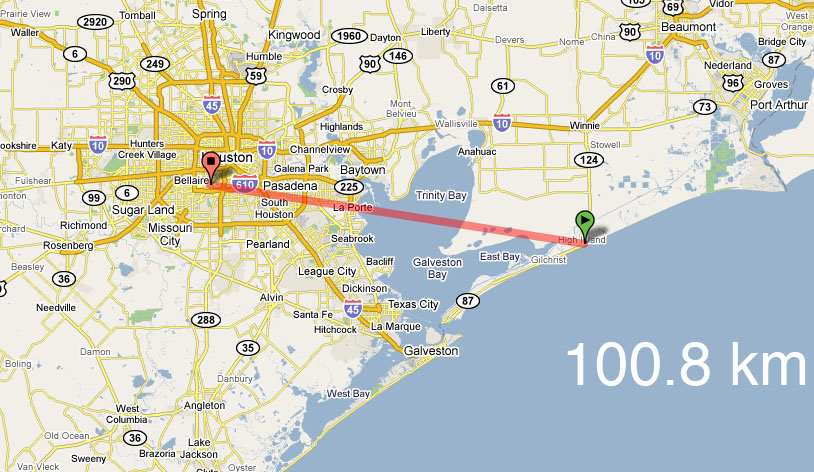
Today, Rice, UTH, and many other places in Houston were closed in preparation of the tropical storm Edouard. This was the first storm since Rita that was expected to hit the Houston area directly, although it never reached the sustained winds speeds of a hurricane.

It remained a tropical storm, not a category 1 hurricane, with sustained wind speeds of about 65 mph. A hurricane has sustained wind speeds of 75 mph or more, and Rita made landfall with winds almost twice as fast, at 115 mph. Edouard also veered to the East and hit the coast near High Island, Texas, not in Galveston.

Tropical Storm Edouard Landfall 2008-08-05

Tropical Storm Edouard Landfall 2008-08-05

Overall, this storm was far less dangerous than predicted. Today was just a rainy day, and in fact not even the worst, even when compared to regular thunderstorms. There was a lot of media attention, and perhaps more caution than necessary, but that’s still a good thing. I got the impression that feelings of preparedness and control permeated the public, I did not get a sense of panic (except from some people on the MyFoxHouston.com chat who lived in Pasadena, feared a storm surge and had never learned to swim). It’s definitely better that people over-prepared for this storm and now have supplies that they didn’t need. But it’s still early in the hurricane season, so this “storm drill” may have been useful.

I haven’t written much in the past few days. I spent most of my time reworking the lecture notes for COMP 202, the course I’ll be teaching next semester.

Share
Posted in Graduate School, Uncategorized | Leave a comment

Print This Post Print This Post  

Update to WordPress 2.6

I just upgraded the blog software to WordPress 2.6. Fortunately, this time the upgrade was much easier than the last time, and I didn’t have to mess with the email and print features separately. Everything seems to be working fine, and I’m keeping my fingers crossed.

Share
Posted in Uncategorized | Leave a comment

Print This Post Print This Post  

Summer Camp using DrJava

With my Google Alert set for “DrJava”, I was notified about another website that mentions DrJava. It’s a blog post about the Alice summer camp. Here’s an excerpt:

The Alice Summer camps concluded last week. Starting from this week, we have the Java, Robotics and Graphics summer camps for High School children. The students who attend this Robotics summer camp are those who attended the Alice summer camp last year.

Well what do I say? I have enjoyed this week a lot. Students are taught Java on a very interactive IDE called Dr.Java. Also they are taught Java concepts using “Pictures”. In the sense, they have to write programs to modify pictures. “For” loop is taught in context of producing a mirror image of a picture, “If” loops are taught in the context of reducing the “red eye” effect in an image. I feel this is the best approach to teach children programming because they are excited working with pictures. So they have both fun and learning. However since it is just one week of Java, it is not much that they can do but definitely a good starting point to encourage them in the field of computer science.

We also got a response to a comment I left:

@Mathias Ricken:

I am very glad that you took the time to drop in a comment. Dr. Java was very user-friendly and easy to use by High School children. We have not had any problems till now. Kudos to the Dr. Java team of developers.

Thanks for the offer to help. I will surely get in touch with you if we need any help in the future.

I’m always happy when instructors choose DrJava, the best little IDE I know.

Share
Posted in DrJava | Leave a comment

Print This Post Print This Post  

Chaotic Week

This past week was a bit chaotic. Fortunately, the problems about the new interpreter that I had bemoaned in the last posting are going away at a fast pace. Dan really dug into his work on DrJava again, so I’m not worried that we’ll still be plagued by embarrassing bugs in the Interactions Pane anymore by the time we make the next release.

There were also three problems with unintended commits to the trunk that should have gone into a branch. I reverted one of them immediately, but against my gut feeling, the consensus about the other commits was that we don’t revert but instead try to fix it. We’re making progress, but I still have an uneasy feeling. In the case of an unintended large commit, the best thing to do, in my opinion, is always a quick revert. Now, five days later, it would of course be a lot of work to backtrack to the point where the unintended commit was made, and then redo all the changes that were intended, but I have this lingering feeling that, while we’re probably running very close to our intended path, we may not actually be on it.

Out of the three problems, at least one of them seems to have gone away, at least when I run it on Windows in a VM on my MacBook. When I get home from the office, I’ll re-run the tests on a real Windows machine.

There was also a very strange problem with dozens of reported RejectedExecutionExceptions. Corky managed to find out that this was a bug known to Sun. I’m still not sure if it’s good to leave our code in a state where these exceptions can occur, even though they are not our fault. Before the unintended commits, these problems did not occur. I am going with the group consensus, though, and will try to not worry too much.

I have also begun to update the documentation for DrJava, in preparation of the new release. I don’t exactly know what other developers should add to the documentation (and it’s unlikely they’ll add anythin — in close to three years, I’m the only one to ever have updated it), but here are the new features I introduced since the last stable, features that have to be documented:

  • Auto-Import in the Interactions Pane
  • Detachable Tabbed Panes
  • Detachable Debug Panel
  • In the “Auto-Complete” dialog, there is now a button to complete the class with the fully qualified class name, e.g. java.lang.Object instead of just Object
  • The External Process facility in all its glory, including the string substitution language I developed for it. This will be a long and major addition to the documentation.
  • The “Follow File” operation and pane
  • The “Check for New Version” dialog
  • The “Send System Information to DrJava Developers” dialog
Share
Posted in DrJava | 1 Comment

Print This Post Print This Post  

Problems with the New Interpreter

The problems with the interpreter that has been included since the last development release are much worse than I thought. Today, I realized that the for problem issue reported in [ 1954403 ] Pre-Increment/Pre-Decrement Throws Exception in For Loop is much worse than I initially thought.

It’s not only pre-increment/pre-Decrement, but also post-increment, post-decrement, assignment, add-and-assign, and subtract-and-assign. THERE IS ABSOLUTELY NO WAY TO WRITE A NORMAL FOR LOOP!

> for(int i=0;i<10;i++) System.out.println(i);
0
> for(int i=0;i<10;i++) System.out.println(i);
0
> for(int i=0;i<10;i+=1) System.out.println(i);
0
> for(int i=0;i<10;i=i+1) System.out.println(i);
0

This issue is so critical, it will kill DrJava. The problem with 1.6.0 Update 4 is bad, and it needs to be taken care of because it inconveniences users, but at least there is a simple work-around.

The problem with the for loop, and many of the other interpreter problems, however, will make most users abandon DrJava. Our user base will run away from DrJava. We need to deal with these problems before we make the next release.

If we can’t fix these bugs, I think we need to roll back to the old interpreter. It doesn’t do generics, but at least it does simple Java statements correctly! We need to know now which of the bugs we can fix within the next month.

It is embarrassing that we released a development version, and we weren’t aware of any of these problems. It’s even more embarrassing that the development release has been out there since April, and we haven’t realized how bad the problems were. What happened to our unit test coverage for DynamicJava? I assumed we had unit tests for it. How did we not notice that something as simple as a for loop does not work?

Why haven’t any of the bugs that have been on the tasks list since January been fixed? It’s almost ridiculous to call this blog posting “Problems with the New Interpreter”. The interpreter isn’t new, it’s half a year old! I’m terribly disappointed by all these problems and how they are not being handled. I have worked too hard on DrJava to see it fail because of sloppy code and lack of action. We have about a month before we should release the next beta, and the developer who created the new interpreter has been AWOL for the last two weeks.

It’s really pissing me off. I can’t release bug fixes since the version with my bug fixes and additional features is so horribly crippled by the buggy new interpreter.

As per Corky’s request at today’s JavaPLT group meeting, here is the list of interpreter bugs. The bugs are in the order of importance, as I perceive it.

I labeled those bugs that absolutely must be fixed before the next release as “CRITICAL”. If one of those bugs cannot be fixed in time, I think we should revert to the old interpreter and put the new interpreter into a branch, so we can merge it later, when the bugs have been taken care of.

The bugs labeled “IMPORTANT” are bad, but perhaps not bad enough to make us revert to the old interpreter, as long as the “CRITICAL” bugs have been fixed.

The bugs in the “WOULD BE NICE” section can be annoying or confusing, but I don’t think many people use them.

CRITICAL:

  1. [ 1954403 ] Pre-Increment/Pre-Decrement Throws Exception in For Loo
    for loops don’t work at all! It’s not only pre-increment and pre-decrement, post-increment and post-decrement, assignment, add-and-assign and subtract-and-assign do not work either! This is horrible.
  2. [ 1914486 ] length field of array types not supported in new interpreter
  3. [ 1914487 ] private constructors in classes are accessible
    Not only private constructors are accessible, private and protected methods and fields are accessible as well!
  4. [ 1986669 ] Case-Insensitivity Problem with Class Members
  5. [ 1992394 ] Interpreter does not support methods with varargs
  6. [ 1151966 ] Interactions pane doesn’t process nulls in varargs correctly

IMPORTANT:

  1. [ 1004730 ] NullPointerException when passing null paramter
  2. [ 995715 ] local methods, return value
  3. [ 1266716 ] array declaration in interface yields error
  4. [ 1585210 ] “Run Document’s Main Method” allows non-void return type

WOULD BE NICE IF FIXED BEFORE NEXT RELEASE:

  1. [ 992535 ] Inner enum declaration fails
  2. [ 994688 ] Incorrect DynamicJava error for inner class instantiation
  3. [ 1080869 ] Class.forName() doesn’t work in interactions pane
  4. [ 1239169 ] Reflection in Interactions
  5. [ 1953827 ] Invalid escape character causes error

Update: I checked the line counts for unit tests, the old interpreter had over over 9000 lines of test code, the new interpreter has only about 4500! The number of tests should increase over time, not decrease. Leveraging the old tests is crucial, especially in a task like replacing the old interpreter with the new interpreter. The old interpreter’s tests would have ensured that the new interpreter can do everything the old one did, and then some.

Update: I’m in the process of reverting the changes made by the developer of the new interpreter, just so we have a stable revision to release in case we need it. Now I’m noticing how much worse our test coverage got with his changes. In addition to cutting the interpreter tests in half, as mentioned above, he also deleted two test files, while he kept other test files but commented out the tests in them so as to not cause suspicion. Sneaky!

Deleted:

src/edu/rice/cs/drjava/model/repl/JavaDebugInterpreterTest.java
src/edu/rice/cs/drjava/model/repl/newjvm/InterpreterJVMTest.java

Tests removed:

src/edu/rice/cs/drjava/model/debug/jpda/DebugTest.java - 9 tests removed
src/edu/rice/cs/drjava/model/debug/jpda/DebugContextTest.java - 8 tests removed
src/edu/rice/cs/drjava/model/GlobalModelOtherTest.java - 2 tests removed
src/edu/rice/cs/drjava/model/repl/JavaInterpreterTest.java - 26 tests removed

The developer has now pledged to fix the bugs in the next couple of weeks, but I have created a branch and will try to revert to the old interpreter nonetheless. Better safe than sorry, for “Wer sich auf andere verlaesst, ist verlassen” (who relies on others ends up left alone).

Share
Posted in DrJava | Leave a comment

Print This Post Print This Post  

Short Review of DrJava

Using Google Alerts, I found a nice, short review of DrJava on a blog called “Return to Java”:

Dr.Java is an interesting little IDE that helps newcomers develop Java code. Although aimed at newcomers, it seems to have lots of advanced features. It could be a useful alternative to the larger IDEs like Eclipse and NetBeans.
I found it useful to create small projects and play around with compiling and easily interacting with Java code, without the hassle of creating a large project in a full featured IDE.

Thank you kindly!

Share
Posted in DrJava | Leave a comment

Print This Post Print This Post  

Dealing with the JDK1.6.0 Update 4 Problem

For a while now, we’ve had a problem with the Java compiler, starting with JDK1.6.0 Update 4. While I’m not the expert on this, it seems like the compiler can no longer use *.exe files on the class path, even if they are just a wrapper around a *.jar file, which is how we create our Windows *.exe file.

Strangely enough, the class loader continues to accept *.exe files, as did the compiler in the past. Whatever Sun did to the Java compiler, now the compiler and class loader have divergent behaviors, and we have therefore considered this a bug on Sun’s part and filed a bug report. The bug report, however, has not been accepted (yet), and therefore isn’t accessible anywhere. We also don’t know if it has been rejected since Sun doesn’t provide notifications for rejected bugs. So, after several months, we have grudgingly accepted that we need to deal with this problem, even though there’s a simple work-around: Just use the *.jar file.

What we plan to do now is to extract a temporary copy of JUnit from our DrJava executable, and put that file instead of the DrJava *.exe file on the class path for compilation. Of course, we only do that if the user is running Windows, the DrJava application is a *.exe file, and the compiler being used is JDK1.6.0 Update 4 or newer.

We still need to exactly figure out when to create that file and when to remove it. Of course, we want to pay the smallest performance penalty possible. There are basically two options

  1. Create the file before every compile, delete the file after every compile.
  2. Create the file at DrJava startup, delete the file during DrJava shutdown.

The first option keeps the temporary directory very clean, but it will probably also be quite time-consuming, particularly on networked drives often found at universities. The second option is much less time-consuming, but it might leave a copy of the extracted file in the temporary directory if DrJava shuts down in an unclean way.

The compromise that we’ll probably attempt is to create temporary file names with a known, unique (or at least rare) naming scheme, e.g. drjava-junit-java6u4-problem-#.jar, where the # stands for a sequential number.

On DrJava startup, we will create a temporary file drjava-junit-java6u4-problem-1.jar, overwriting an already existing file with the same name if one exists. If we cannot overwrite the file because it is locked by another process, we will increase the sequential number until we have found a file that can be overwritten or does not exist.

On DrJava termination, we will attempt to delete all files in the temporary directory that match the pattern drjava-junit-java6u4-problem-#.jar: The file the current instance of DrJava created, and all other files left behind by other instances of Drjava.

This approach combines the low overhead of option 2) with a relatively clean temporary directory, which is a feature of option 1).

We may have to consider that the user could switch from one compiler version to a different one while running DrJava, so we may need to perform the above actions not only on startup, but also when the compiler is changed.

We are planning to have this code in place for an upcoming beta release for testing, and ready to use for the next stable version to be released at the beginning of the next school year.

Share
Posted in DrJava | Leave a comment

Print This Post Print This Post  

New DrJava Feature Requests

Today I submitted four new feature requests for DrJava:

  1. [ 2002071 ] Allow User-Specified Javadoc Links
  2. [ 2002195 ] Next/Previous Match Keys for Current RegionsTreePanel
  3. [ 2002096 ] Export Pane Contents to Clipboard
  4. [ 2002161 ] Project-Persistent Find All Panels

The first one was a feature that I’ve been wanting for a long time, since I just can’t remember the names of any of the classes and methods in the PLT utilities, a library I usually don’t have checked out as source code.

The second feature request is something that I had thought about for a while as well: I often use F3/Shift-F3 to go to the next or previous match of the string currently entered in the “Find/Replace” pane. However, this only works for that word, so I often have to switch back to a second word, then back to the first word! There should be equivalents to the F3/Shift-F3 shortcuts that operate on the matches in the currently selected “Find All” pane, or the “Breakpoints” or “Bookmarks” pane, since they’re all RegionsTreePanel subclasses.

The final two feature requests actually arose from writing the previous blog post (which was an email to the mailing list first): I wanted an easier way to extract the “Find All” results, and after I had sent the email and continued my work on another issue, I realized that I’ll have to run these searches again once the other developers have responded to my email and we have decided on a course of action.

Share
Posted in DrJava | Leave a comment

Print This Post Print This Post  

Keyboard Mnemonics on the Mac

Ok, I have neglected the blog for a while, partly out of necessity as I was on vacation and without internet access, partly out of laziness. Neither of those reasons implies I didn’t do anything, though (yes, I work during my vacation because I enjoy my work), but I’ll fill in the gaps in a later post.

I was just going through some of the // TODO items I had left in the DrJava codebase, and I came across a problem with the “Import Package” checkbox in the “Auto Import Class” dialog in the Interactions Pane (the dialog is displayed if a class name is not recognized because it has not been imported yet).

For this checkbox, I have used Java’s setMnemonic('p'). On Windows, that means you press Alt+P, and the state of the checkbox toggles. On the Mac, however, it toggles AND inserts a Greek lower-case pi character. I searched for other uses of setMnemonic() in DrJava, and we have a bunch of them:

  • A similar checkbox controls whether the Standard Java API should be considered as well for auto-completion in the Definitions Pane (Ctrl-Space or Command-Space). Pressing Alt-J on the Mac, toggles the checkbox and inserts a Greek upper-case delta.
  • All the menus in DrJava’s main windw (File, Edit, Tools, Project, Debug, Language Level and Help) have mnemonics set to respond to Alt-F/E/T/P/D/L/H. The behavior on the Mac is totally erratic:
    • Alt-F displays the File menu, albeit in an awkward place, but also inserts a florin, which is a stylized lower-case f and apparently a currency symbol.
    • Alt-E does not display the Edit menu, but instead inserts an accent acute and waits for a suitable second letter to be entered to create accented letters.
    • Alt-T displays the Tools menu in an awkward place, but also inserts a dagger.
    • Alt-P displays the Project menu in an awkward place and inserts the lower-case pi, as reported above.
    • Alt-D displays the Debug menu in an awkward place and inserts what could be a lower-case delta.
    • Alt-L displays the Language Level menu in an awkward place and inserts a logical not.
    • Alt-H displays the Help menu in an awkward place and inserts what I believe is a diacritic dot, although it does not wait for a second letter, as Alt-E.
  • In a currently unused class, ScrollableListSelectionDialog, there are mnemonics Alt-A and Alt-N for the “Select All” and “Select None” buttons, respectively.
    • Since there is no text input here, Alt-A, which would enter a Swedish/Danish a-circle, actually invokes the button’s action.
    • Alt-N, however does not do anything. Just like Alt-E, if text were entered, it inserts a tilde and then waits for a second suitable letter to which the tilde will belong.

A good reference for the different Alt key combinations is at: Everything2 Special Alt key characters & accents.

As a summary, Java mnemonic on Mac OS are broken, and we need to do something about it. There are several options:

  1. We attempt to block the symbols from being inserted, but at least for Alt-E and Alt-N, possibly for other key combinations as well, the treatment might very well be a hard-wired Mac OS feature. Blocking these symbols would also make DrJava pretty much unusable for users who program in languages that use diacritics: German, French, and the Scandinavian languages, just to name a few.
  2. We ditch mnemonics on the Mac completely. Even though I miss the ability to open menus like a File menu using Alt-F as can be done Windows, I have never seen a Mac application that does that. So not using these mnemonics on Mac OS would probably make DrJava more compliant with Apple’s user interface guidelines.
    There’s one caveat: We have to make sure that every feature that was accessible using a mnemonic is still accessible in some way on the Mac, probably using the mouse. However, I think that already is the case.
  3. We use a different key for mnemonics on the Mac, e.g. Ctrl. This could work in most cases, since keyboard shortcuts like Ctrl-S to save a file on Windows are mapped to Command-S on the Mac. I checked, and the only places where we seem to have hard-coded the Ctrl, even on the Mac, is in the following places:
    • Find/Replace panel: Ctrl-Enter inserts a newline instead of invoking the “Find Next” action; Ctrl-Tab inserts a tab instead of switching focus to the next component
    • Interactions pane: Ctrl-Enter, same as above.
    • Ctrl-Backtick/Ctrl-Shift-Backtick to switch back and forth between recent documents.

    These cannot be replaced since Command-Tab toggles between MacOS applications and Command-Backtick between individual windows. Using Ctrl-Enter even though Command-Enter would work seems more consistent than using Ctrl-Tab to insert a tab, but Command-Enter to insert a newline.
    I don’t know how difficult to implement this option is because setMnemonic() asks either for a character like 'p' or for a VK_xxx constant, but what mask key to use can’t be specified.

Considering these three options (that I can think of — please chime in if you have a different idea), I believe we should choose option 2) and disable mnemonics on the Mac.

It would still be very interesting to figure out how we can use the Mac OS-standard Command-Backtick/Command-Shift-Backtick to switch between documents.

Share
Posted in DrJava | Leave a comment

Print This Post Print This Post  

Streams of Irony

As I’ve mentioned before, I seem to have problems with very long command lines, e.g. when I try to do a javac ${drjava.all.files;sep=" ";rel="${project.root}"}. With really long command lines, it seems like the project is started, and ps also shows the process, but it never does anything, nor produce output.

The fact that it never produced any output was actually good, because it made me notice that in that case, my previous implementation hangs. I was doing the reading in the AWT event thread, and if there was no output from the external process, the event thread would be blocked until output was available. I moved the actual reading from the stream into a separate thread.

When I abort a process, though, I would like to read whatever is available from the process right now, but of course I don’t want to block the event thread. I only want to read if output is available, and Java is nice enough to provide the InputStreamReader.ready() method for this purpose.

The documentation of ready() states:

Returns: True if the next read() is guaranteed not to block for input, false otherwise.

That may be true, but in my case, the call to ready() itself blocks, so finding out whether the next call to read() will block is pointless.

The alternative, InputStream.available() also blocks, even though the documentation states:

Returns: the number of bytes that can be read from this input stream without blocking.

Shouldn’t method which tell you if your program will block or not be written in a way so they themselves do not block? Sigh.

Share
Posted in DrJava, Ramblings | Leave a comment

Print This Post Print This Post  

Double-Click and Command Lines

Today I implemented a feature that allows the user to double-click on the output of an external process, and if the text underneath the cursor happens to be a file name, perhaps followed by a line number, then DrJava will jump to that file and line. This helps tremendously when using external compilers.

There seems to be a problem when I want to do a javac -sourcepath ${project.root} -d ${project.build.dir} ${drjava.all.files;sep=" "} on the codebase of DrJava; in that case, DrJava hangs. The same command line works for smaller projects, and compiling DrJava using ant jar also works, so I believe it is a problem with the length of the command line that gets generated.

Unfortunately, javac does not have a command line switch to take the files to compile from a text file on disk, and piping does not work DrJava’s external process pane.

I also discovered that “Find All” highlights aren’t removed anymore; something was apparently optimized away in the last few weeks. And indeed, when I looked at it, I discovered that in revision 4482, a loop calling removeRegion for every region removed by clearRegions() and removeRegions(OpenDefinitionsDocument) had been removed and replaced by a simple call to clear() of the underlying data structure. This did not notify the listeners anymore that regions were removed, causing the highlights never to be removed.

Another issue fixed that bothered me a lot. After all, “Find All” is one of my most prominent additions.

Share
Posted in DrJava | Leave a comment

Print This Post Print This Post  

JSR 308 Animosity

I’ve come across two blog posts that leave me perplexed: First there was “When Should You Jump? JSR 308. That’s When.”, and now I just found “What Hath Java Wrought”.

I don’t know anything about the authors and I have only read the two posts, but statements like “Every language has a complexity budget. Java blew through it with generics in Java 5.” and “First we got Generics. We all know how that went. While it’s passably better than what was originally there, it’s still not worth a damn.” make me furrow my brow. As for generics, I gladly trade in the more complicated syntax for better static typing. Annotation processors can do the same for non-null values, mutability, problems with equality and identity. They can bring linear types into the language, and make pretty much every kind of program analysis I can think of easier.

I don’t understand why there is such much animosity towards JSR 308. It is much less intrusive than generics were; unless you plan to use raw types, the updated collections libraries virtually forced you to adopt generics to a certain degree. That’s not the case at all with annotations. If you like you can easily ignore the entire idea.

Now, perhaps I’m just not a good programmer, and that’s why I prefer to ride with training wheels like generics, more precise type systems and better warnings, but this kind of humility has never hurt me so far. It does not make sense to be so frugal on the syntax side; the semantic benefits by far outweigh the costs.

I’m definitely not a fan of how generics were implemented using erasure, and I believe there are shortcomings both in the annotations provided with Java 1.5 and JSR-308 (see LAPT-javac, xajavac and blog posts), but I’m a firm believer that programmers have benefited a lot from generics, and that they will benefit in a similar way from annotations.

The beautiful thing about annotations is that dealing with them works on two different difficulty levels: Implementing annotations is not perfectly straight-forward, they use a syntax that is a bit different than the one used for regular Java classes, and that can be a bit confusing. Using annotations that have already been implemented, however, is easy; it’s an absolute piece of cake. This means that the annotations framework, especially with the annotation processors in JSR 308, can be used by more seasoned programmers to provide a lot of value even to programmers who do not know all of the details.

As a programming language researcher, I’m excited about annotations because they allow me to extend and modify the Java language in a relatively safe, convenient and compatible way. The resulting experimental languages may not be the most elegant ones, but they do the trick. Considering the two different levels of difficulty, and the possibility to completely ignore annotations, I have no idea why programmers would dislike annotations so much that they would abandon a language that can still be used exactly the same as without annotations.

Share
Posted in Ramblings, xajavac | 1 Comment

Print This Post Print This Post  

A Summary of COMP 312

Here’s a short summary of this semester’s COMP 312 class: We had the manpower, but not much was done.

Consider the minor projects I had outlined before the class. These are the ones I implemented on my own:

  • 145545, “Find Again” for “Find All” (Feature 1504566)
  • 145868, Allow Auto-Completion with Fully Qualified Class Name
  • 144164, Add Java 6.0 to Options
  • 145518, Make “Run” Switch to Interactions Pane Again

This one was started by other developers, but I finished it:

  • 145554, Fix Javadoc with -private flag

This one was completed by another developer without my involvement:

  • 145546, Fix Line Number Not Available in JUnit

And these are the ones we did not finish:

  • 145550, Turn on “Hour Glass” When Indenting Code (Bug 687674)
  • 145557, Empty java files cause junit test error
  • 124006, Array Entries as Debugger Watches (Feature 1356085)
  • 144162, Default Imports for Interactions Pane

Considering that we had seven developers, with four of them in COMP 312, I had expected to implement every project on this list. Instead, we only finished 6 out of the 10 tasks, and I worked on 5 of them. Only one task was completed without my involvement, and one was partially implemented, but the changes did not cover all aspects of the problem. It is sad that only two minor projects were attacked at all by the COMP 312 developers, and only a single one was completed satisfactorily.

Of the major COMP 312 projects, I had hoped that each pair of developers in COMP 312 would finish two projects, perhaps a total of seven projects. In the end, we completed three projects and made good progress on four others, so it looks like we got close to achieving my goals. However, if you consider that I completed two projects on my own, worked on another one alone, and had to finish the only major project that was started by COMP 312 students, then this part of the summary is as bad as the first part.

These were the projects I worked on without anyone else:

  • 144166, External Tools Facility
  • 145866, Auto-Completion Based on Compiled Class Files
  • 145867, Allow Auto-Completion for Standard Java API Classes

This project was started by other developers, but I finished it:

  • 145543, Automatically Add New Files to Project (Feature 1444433)

Three other developers worked on these three projects and made good progress, but did not complete the task:

  • 70906, Indent Bugs & Parser Bugs, 2007-11-19
  • 145552, Problems With New Interpreter
  • Update the Eclipse Plugin

And these major projects were not approached:

  • 145869, Allow “Open Javadoc” for JUnit 3.8.2
  • 145556, Change Double-Click Selection and Next/Prev Word
  • 145559, Ensuring DrJava’s JUnit Works With Large Projects
  • 145558, Ensure that DrJava Works after Sleep/Hibernate
  • 145553, Pasting While Inside a Comment Should Auto-*
  • 145551, java.class.path does not reflect Extra Classpath (Bug 991311)
  • 145549, Make Non-Default Key Bindings Work in All Text Areas (Bug 676588)
  • 145548, Ensure Compatibility with Windows Vista
  • 145547, Ensure Compatibility with Mac OS 10.5 (Leopard)
  • 145544, Replace All Limited to Selection (Feature 1461858)
  • 145542, Automatic Trace (Feature 1369672)
  • 145541, Imports should persist over breakpoints (Feature 1418853)
  • 144165, “Auto-Import” Dialog for Definitions Pane
  • 124039, “Search All Files” Progress and Abort (Feature 1431014)

Unfortunately, I have no idea what has changed over the last few years and why the last two or three iterations of COMP 312 less successful.

Share
Posted in DrJava, OOP Book, Ramblings | Leave a comment

Print This Post Print This Post  

Connexions Version of “Programming for Change”

Dr. Nguyen had sent me an email with an example of how to include Java applets in a Connexions document. Today I finally updated the Connexions version of our “Programming for Change” nifty assignment that I had started to create last year. The Connexions version now also includes applets, and both the original HTML version and the Connexions version now use an actual image of the star-shaped graph of conversion functions instead of ugly ASCII art.

I had to experiment a little bit since neither the example nor Connexion’s reference described how applets packaged in jar files can be used. It turned out I needed to specify the class name as source of the media, not a file name as described on the reference page of the <media> tag, and then provide the jar file in a <param> tag.

Example applet for the constant solution.

Once those additions were made, I decided the Connexions Version of “Programming for Change” was ready to be published.

In general, Connexions has probably become better. I saw that it now includes a LaTeX importer, although I haven’t tried it. It’s still a slow, cumbersome system, though, that makes a writer jump through an exorbitant number of pointless hoops. I’m going to edit all the lectures for the COMP 202 course that I will teach next semester, and I will make their appearance more consistent, but I’m not sure I also want to port all of them to Connexions. I might end up being forced to do that, even though I don’t see the value of having a Connexions port at all: No one in his right mind would want to maintain the documents.

In other news, I fixed a bug in DrJava that would throw a NullPointerException when using “Step Into” in debug mode and corrected three typos in the QuickStart guide (two found by a user, a third found when I grepped for the misspelled word). I’m glad I didn’t make that mistake, although I’m the only one who has updated the DrJava documentation since it was created almost three years ago.

I also fixed a problem with loading projects and restoring the selection and active document. I don’t know how that got screwed up again, but I know that I fixed it once already, and after that it was working.

I completed the “project auto-refresh” task from COMP 312 that wasn’t finished; now there is a menu item to invoke the feature on demand, and the black list can be edited in the “Project Properties” dialog.

I changed the “Insert Variable” dialog so that it maintains the previously selected variable; I believe this makes the dialog less confusing. Finally, I’ve been in the process of adding a few actions to DrJava that can be invoked from the command line of an external process. The actions are implemented as side effects of the evaluation of the command line: A variable used to denote an action performs the action and then evaluates to the empty string, disappearing from the command line.

So far, the following properties are available:

  • ${action.save.all} — save all source files and the project file
  • ${action.compile.all} — compile all source files and included external files
  • ${action.clean} — clean the build directory
  • ${action.open.file;file="Foo.java";line="100"} — open a file and jump to a certain line, if a line number was specified
  • ${action.auto.refresh} — perform a project auto-refresh

For example, the command line

${action.clean}${action.compile.all}find ${project.build.dir}

cleans the build directory, then compiles all files, and finally runs find on the build directory, resulting in a listing of all class files.

Oh, and I graduated, but I still, still, still don’t have my diploma.

Share
Posted in DrJava, Graduate School, OOP Book, Ramblings | Leave a comment

Print This Post Print This Post  

New External Process Properties

I just finished adding a bunch of new properties for external processes:

  • ${gt;op1="5";op2="7"} — greater than
  • ${lt;op1="5";op2="7"} — less than
  • ${gte;op1="5";op2="7"} — greater than or equal
  • ${lte;op1="5";op2="7"} — less than or equal
  • ${eq;op1="5";op2="7"} — equal
  • ${add;op1="5";op2="7"} — addition
  • ${sub;op1="5";op2="7"} — subtraction
  • ${mul;op1="5";op2="7"} — multiplication
  • ${div;op1="5";op2="7"} — division
  • ${strlen;op="abcde"} — string length
  • ${count;op="abc;def;ghi";sep=";"} — count items in list string

I also moved a lot of the code out of MainFrame.java; that file is already big enough.

PS: I’m tremendously upset that Rice started the graduation fireworks early, and I missed the presidential reception. That’s what I get for working at 10 PM the night before graduation :(

Share
Posted in DrJava | Leave a comment

Print This Post Print This Post  

“Open Java API Javadoc” Uses Compiler’s Version

I just committed a few changes that improve the way “Open Java API Javadoc” works. In the “Preferences” dialog, you can set the Javadoc version to use to “use compiler version”. When this option is selected, DrJava will open the Javadoc page of the same version as the compiler currently selected in the “Compiler Output” tab on the bottom right of the screen.

If JDK 5.0\_13 is used as compiler, putting the cursor on File and selecting “Open Java API Javadoc for Word Under Cursor” will open http://java.sun.com/j2se/1.5.0/docs/api/java/io/File.html. But if JDK 1.4.2 is the compiler that DrJava uses, it will open http://java.sun.com/j2se/1.4.2/docs/api/java/io/File.html.

It’s these small details that help a lot and avoid confusion. Thank you, Dr. Wong, for this suggestion.

Share
Posted in DrJava | Leave a comment

Print This Post Print This Post